Where to buy
Check the latest price, availability and delivery on Amazon, and treat the figure in the title as a ceiling for a whole indoor layer — not a target for one camera. Serious indoor security at this level means the entry points watched, footage stored where a burglar or an outage cannot easily erase it, and detection you can trust at 3 a.m. Every pick below is costed as part of that layer, and each states exactly what its recordings depend on. Confirm the live total for your chosen combination before ordering.
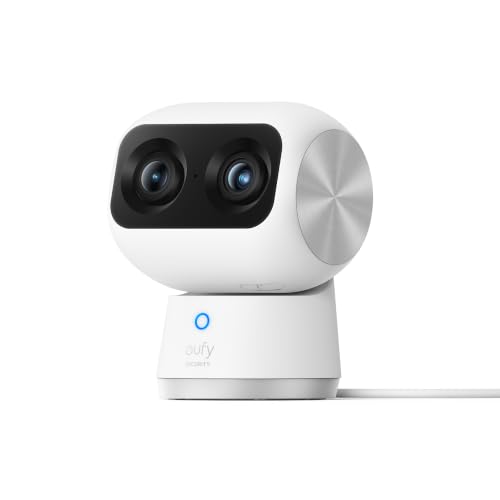
- Best identification camera: eufy Security Indoor Cam S350 — Check on Amazon
- Best recording foundation: eufy HomeBase S380 (HomeBase 3) — Check on Amazon
- Best verified-privacy security pick: Arlo Essential Indoor Camera 2K (2nd Gen) — Check on Amazon
- Best coverage per camera: TP-Link Tapo C225 — Check on Amazon
- Best multi-point building block: eufy Security Indoor Cam E220 — Check on Amazon
- Best smart-alert ecosystem pick: Google Nest Cam (Indoor, Wired, 2nd Gen) — Check on Amazon
Read the full guide ↓
Disclosure: As an Amazon Associate, dailyhomedecorating.com earns from qualifying purchases. Links to Amazon on this page are affiliate links; they cost you nothing extra. Listing details such as price and availability change often, so check the current Amazon listing before you buy.
Choosing the best indoor security camera for home security under $400 is a different exercise from buying a camera to check on the dog. The security lens asks harder questions: will the footage identify a face at the door, will recordings survive an internet outage or a tampered camera, and will the alert that wakes you be a person — not a curtain? This guide spends the ceiling like a security budget, because that is what it is.
And it is a ceiling, not a target — stated plainly because security marketing loves a single expensive hero product. The honest shape of indoor security at this level is layered: cameras at the interior choke points every intruder must cross, storage that does not depend on a subscription staying paid, and detection tuned to people. One flagship camera can be part of that layer; it cannot be the whole layer, because it cannot watch two doors at once.
Subscription honesty matters doubly here. A security camera whose recorded playback stops when a plan lapses has a failure mode built into its business model, and several well-known brands work exactly that way. This guide states, per pick, what keeps recording with no plan, what the plan actually buys, and where footage physically lives — so your security layer rests on facts, not on a trial period.
One scope note, kept factual: these are indoor cameras for the inside layer of home security — doors viewed from within, hallways, main rooms. They complement locks, lighting and any outdoor or monitored system; they do not replace them, and no claim here should be read as a guarantee of safety. Within that honest scope, this budget builds a genuinely strong indoor layer. Baby cameras, with their separate nursery features, are a different category and are not covered here.
A note on evidence and tone: nothing in this guide promises that a camera prevents crime, and any guide that does should be read with suspicion. What cameras provably do is record, alert and identify — capabilities whose value depends entirely on placement, storage and the household’s habits. This guide optimises those three things and leaves the promises to the marketing departments.
The picks that follow are therefore judged as components of a layer, not as isolated gadgets: what each one watches, where its footage lives, what it depends on, and how it behaves on the worst night rather than the best demo. A camera that scores modestly as a product can score highly as a component, and vice versa — the layer is the unit of quality here, and the reviews are written accordingly.
In this guide
Quick picks
| Camera | Best for | Key spec |
|---|---|---|
| eufy Security Indoor Cam S350 | Best identification camera | Dual cameras: 4K wide-angle + 2K telephoto, 8x hybrid zoom, 360-degree pan/tilt, dual-band Wi-Fi 6 |
| eufy HomeBase S380 (HomeBase 3) | Best recording foundation | Central local storage hub for eufy cameras, expandable storage up to 16TB by maker spec, on-device AI processing, no monthly fee |
| Arlo Essential Indoor Camera 2K (2nd Gen) | Best verified-privacy security pick | 2K video (2560 x 1440), 130-degree field of view, automated privacy shield, integrated siren, night vision |
| TP-Link Tapo C225 | Best coverage per camera | 2K QHD (4MP) video, 360-degree pan and 149-degree tilt, starlight colour night vision, Apple HomeKit support |
| eufy Security Indoor Cam E220 | Best multi-point building block | 2K resolution, 360-degree pan and 96-degree tilt, motion tracking, works with HomeBase 3 |
| Google Nest Cam (Indoor, Wired, 2nd Gen) | Best smart-alert ecosystem pick | 1080p HDR video, 135-degree diagonal field of view, person and animal alerts built in, Google Home app |
How we chose
Identification quality led the criteria. A security recording earns its keep when it shows who, not merely that — so zoom capability, resolution at realistic door distances, and night performance were weighted above app polish. Maker specifications are quoted as maker claims, and we favoured cameras whose design — a telephoto second lens, a wide lens placed close — serves identification rather than spec-sheet drama.
Recording resilience came second. What happens when the broadband drops, when the camera is unplugged, when the subscription lapses? Local recording to a card or a home hub keeps an archive independent of the cloud; cloud recording survives a stolen camera but depends on the plan. We included both philosophies, labelled clearly, and marked down any arrangement where basic playback quietly requires payment.
Detection trustworthiness was third. Person detection that runs on the device or hub, rather than waking you for every shadow, determines whether alerts stay enabled — and a muted camera is no security at all. Sirens and spotlights were treated as useful deterrents at the margin, never as substitutes for recording the event properly.
Privacy was the final filter, because a security camera lives in a home. Shields, covers and lenses that rotate away let a household keep security postures for away-hours and privacy for home-hours. Cameras are described exactly as they are on this point — physical control where it exists, software control where it does not — so the trade-off is yours to make with open eyes.
The cameras in detail
eufy Security Indoor Cam S350
The S350 is the identification specialist: a 4K wide view to establish the scene and a 2K telephoto to reach across a large room and resolve a face at the door. In security terms that pairing is the whole argument — wide footage proves the event, zoomed footage names the person — and no other single indoor camera in this guide does both jobs in one body.
It also records locally and detects people on-device, so the security basics never depend on a subscription staying current. Paired with the hub below, its footage joins a central home archive; on a card, it still records through an internet outage, which is precisely when a security camera must not blink.
Choose it for the main living space or the room facing the primary entry, where distance makes identification hard. Skip it as your only measure if the home has two genuine entry points: a second, simpler camera on the other door protects the house better than any single flagship, however sharp.
One operational note for security buyers: the S350’s zoom is most valuable when the camera is placed deliberately at the far end of the room from the door it guards, trading a dramatic wide shot for a telephoto that resolves faces at the threshold. Placement, not specification, unlocks it — walk the route with your phone in hand during setup and check the still frame at the door before calling the installation finished.
Storage and subscriptions, honestly: Local: microSD card or eufy HomeBase 3. No subscription is required for recording, playback or its on-device human and pet detection; an optional eufy cloud plan exists but nothing core is locked behind it.
Privacy: Privacy is handled in the app: you can switch the camera off, schedule it, and set privacy zones. There is no physical shutter, so when privacy matters you are trusting the software state and the status light rather than a cover you can see.
eufy HomeBase S380 (HomeBase 3)
The HomeBase S380 is labelled honestly: it is not a camera, it is the recording foundation a serious eufy layer stands on. Cameras across the house write to one hub, detection is processed there, capacity expands with a drive, and no monthly fee guards the archive. For security purposes, centralised local storage beats a pocketful of memory cards in every way that matters — one archive, one place, inside your home.
It also answers the tamper question better than card-in-camera storage: a camera can be grabbed, but its footage is already on a hub in another room. That is a real, if unglamorous, security property, and it is why this guide spends part of a camera budget on a box with no lens.
Choose it when the plan is two or more eufy cameras, or when local control of footage is the principle the whole setup rests on. Skip it for a single-camera installation — a card inside one camera is simpler — and skip the whole eufy route if your household prefers a cloud ecosystem’s app and accepts its plan.
Security households should also note the hub’s processing role: compatible cameras lean on it for more advanced on-device analysis than a card-only setup offers, which means the hub improves detection quality as well as storage. It is the rare accessory that upgrades cameras you already own — one more reason it belongs in a layer budget rather than being dismissed as an optional extra.
Storage and subscriptions, honestly: This is the storage half of a eufy system rather than a camera: compatible eufy cameras record to the hub inside your home, so footage is not dependent on a cloud subscription and keeps working as a local archive. Add a drive to expand capacity; the hub itself is what removes the per-camera card juggling.
Privacy: A hub does not watch anything itself, but it changes the privacy maths of the cameras paired with it: recordings live on hardware in your home instead of a remote server, which is the arrangement many households prefer for indoor cameras.
Arlo Essential Indoor Camera 2K (2nd Gen)
The Arlo Essential Indoor 2K brings the security feature households actually ask about after the first month: a privacy shield that physically closes when the system is disarmed. Security posture when you are out, verified privacy when you are home — that rhythm is what makes an indoor security camera sustainable in a family house, and Arlo automates it best here.
As a camera it is a solid fixed 2K unit with night vision and an integrated siren, suited to an entry hallway or main room, and it sits naturally in multi-camera Arlo households. Its alerts and recognition are polished — because they are the subscription’s product.
That is the honest limitation, and for a security purchase it must be weighed seriously: after the trial, recording and smart recognition run on Arlo Secure. Choose it if you accept the plan as a permanent part of the system’s cost. Skip it if a lapsed payment silently degrading your security layer is unacceptable — the local-storage picks around it exist for exactly that stance.
For households choosing the Arlo route, the disciplined way to buy it is as a matched set with the plan budgeted annually, in the same conversation as the house insurance — a known, recurring security cost. Framed that way, its shield-equipped cameras are a coherent product. Framed as a cheap camera with a surprise subscription, they are a grievance waiting for its first renewal date.
Storage and subscriptions, honestly: Cloud-first: after the included trial, an Arlo Secure subscription is required to store and review recordings and to use person, package and animal recognition. There is no memory-card slot on the camera, so treat the plan as part of the purchase, not an optional extra.
Privacy: The automated privacy shield is the headline: a physical cover closes over the lens when the camera is disarmed, and you can hear and see it move. It is privacy you can verify, controlled from the app or by schedule.
TP-Link Tapo C225
The Tapo C225 is the coverage worker of a security layer: pan and tilt let one unit sweep a whole main room and turn to the entry, its detection runs on the camera, and its recordings live on a local card — no plan between you and your footage. Two of them, placed at the two choke points of a typical home, form a layer that costs well under this ceiling.
Its privacy mode rotates the lens into the body, which pairs naturally with a security routine: lens out when the house is empty, lens hidden when it is full. Colour night vision helps identification in dim hallways where monochrome footage can wash out the details that matter, like clothing.
Choose it as the repeatable unit of a no-subscription security layer, or as the single camera for a flat with one entry. Skip it if you want a siren and spotlight built into every viewpoint — it is a watcher, not a deterrent device — or if your household is already invested in another ecosystem’s app.
The C225’s starlight colour night vision deserves its security framing: in a dim hallway, colour footage preserves the descriptive details — clothing, bags, build — that monochrome infrared can flatten. Investigators and insurers ask for descriptions, not silhouettes. It is a modest specification with an outsized evidentiary value, and part of why this camera anchors the no-subscription layer so well.
Storage and subscriptions, honestly: Local: microSD card up to 512GB by maker spec, so weeks of event clips can live on the camera itself. Tapo Care cloud storage is optional; person, pet and vehicle detection are handled on-device without it.
Privacy: This is the privacy pick of the group: Privacy Mode physically rotates the lens down into the camera body, so the lens is visibly covered. It is the strongest kind of indoor privacy control because you can confirm it with your eyes.
eufy Security Indoor Cam E220
The E220 is how a security layer gets wide without getting expensive: 2K, pan and tilt with tracking, on-device person and pet detection, and local recording to card or hub. Deployed at the back door’s interior, the garage entry or the hallway junction, it watches the points a flagship in the living room cannot see — and security is, in the end, about the points.
Because detection and recording are local, its alerts do not depend on a cloud round-trip and its archive does not depend on a subscription. It pairs naturally with the HomeBase above, and a layer built from an S350 at the front, an E220 at the back and a hub in the middle is, in our judgement, the strongest honest use of this entire budget.
Its limitation is the absence of privacy hardware; manage it with schedules and placement in shared rooms, and keep it out of bedrooms. Choose it to widen a layer affordably. Skip it where a physical shield is the household’s condition — that requirement points to the Arlo.
Do not overlook the E220’s tracking in a security role: at a hallway junction it follows a moving person across the junction rather than recording three seconds of them crossing a fixed frame. Longer, continuous footage of an intruder’s route is materially more useful than a doorway snapshot, and it is a behaviour money usually buys at higher tiers than this.
Storage and subscriptions, honestly: Local: microSD card or eufy HomeBase 3. On-device human and pet detection runs without a monthly fee, and recordings stay in your home unless you choose eufy’s optional cloud add-on.
Privacy: There is no physical privacy shutter. The app offers an off mode and privacy zones, so the honest position is that privacy here is a software promise, not a mechanical one.
Google Nest Cam (Indoor, Wired, 2nd Gen)
The Nest Cam is the ecosystem security pick: its person and animal alerts are among the most trustworthy in the business, its Google Home routines tie cameras to the household’s presence, and for homes already running Google hardware it is the path of least resistance to a multi-camera indoor layer with familiar-face alerts on the plan.
Its security weakness is structural and stated plainly: no local storage exists. A short rolling window of event history is free; everything beyond it — longer history, familiar faces — is Nest Aware. If the subscription lapses, the layer’s memory largely lapses with it. Google households accept this trade knowingly and get excellent alerts in return; this guide’s job is to make sure the acceptance is knowing.
Choose it if your home is a Google home and alert quality leads your criteria. Skip it if recording independence matters most — a security layer whose archive lives entirely in a rented cloud is a legitimate choice, but it should never be an accidental one.
Google households should weigh one genuine security strength fairly: Nest’s alert ecosystem integrates with presence sensing across the home’s other Google devices, so the layer can arm and disarm itself around the household’s actual comings and goings with less manual routine-keeping. A system that arms itself reliably beats a stronger system left disarmed — the Nest’s convenience is, in that specific sense, a security feature.
Storage and subscriptions, honestly: Cloud only, with no local storage option. Google includes a rolling 3 hours of event video history free; a Nest Aware subscription extends that history and adds familiar-face alerts. Without the plan, anything older than that short free window is gone, so a multi-camera Nest setup should always be costed with the plan included.
Privacy: There is no physical shutter. Google Home offers a home/away routine that can switch the camera with your presence, which is convenient, but the lens is never physically covered.
Comparison table
| Camera | Video | Movement | Local storage | Plan needed for playback |
|---|---|---|---|---|
| eufy Security Indoor Cam S350 | 4K wide + 2K telephoto | Pan and tilt | microSD / HomeBase 3 | No |
| eufy HomeBase S380 (HomeBase 3) | Storage hub, no camera | — | Expandable, up to 16TB maker spec | No |
| Arlo Essential Indoor Camera 2K (2nd Gen) | 2K | Fixed | None on camera | Yes, Arlo Secure after trial |
| TP-Link Tapo C225 | 2K QHD (4MP) | Pan and tilt | microSD up to 512GB | No |
| eufy Security Indoor Cam E220 | 2K | Pan and tilt | microSD / HomeBase 3 | No |
| Google Nest Cam (Indoor, Wired, 2nd Gen) | 1080p HDR | Fixed | None | Free 3-hour history; Nest Aware for more |
How to choose the best indoor security camera for home security under $400
Plan the layer from the doors inward. Every intruder crosses a threshold: front door, back door, garage entry, a ground-floor window route. Place cameras to see faces at those interior choke points — roughly head height, a few metres back — before spending anything on general room views. A camera that watches a sofa is a lifestyle product; a camera that watches a door is security.
Spend on storage like it matters, because it does. Decide whether your archive lives locally — cards, or better, a hub in a separate room from the cameras it serves — or in a cloud you commit to paying for indefinitely. Mixed feelings produce mixed systems; one clear stance, executed properly, is what survives the night something actually happens.
Tune detection for trust. Enable person detection, draw zones over doorways and stairs, and set the away schedule to match the household’s real absences. Review the first week’s alerts and adjust sensitivity once, deliberately. The goal is a system whose 3 a.m. alert you act on because the last fifty were all real.
Build the privacy rhythm at the same time as the security posture. Cameras armed and lenses open when the house is empty; shields closed, lenses rotated away or schedules off when it is full. Households that design both states on day one keep their systems; households that design only the security state quietly unplug cameras by month two.
Finally, rehearse the bad day. Check that you can find and export a clip, that playback works with the internet unplugged if your storage is local, and that everyone who should have app access has it. A security layer is only real if the footage is reachable when it is needed — everything else is decoration.
Document the layer once it works: camera positions, storage locations, which (if any) plan is active and when it renews, and who in the household has app access. Keep the note with the home’s other important documents. Security systems outlive memories of their own setup, and the household that can answer ‘where is Tuesday’s footage?’ in one minute owns a system; the one that cannot owns a shelf of cameras.
Designing the indoor layer: doors, junctions, and the route between
An intruder’s path through a home is predictable: a door, then a junction — hallway, landing, the living room’s far corner — then the rooms with valuables. An indoor layer is simply a camera watching each segment of that path closely enough to identify, not merely detect. Two cameras placed on the path outperform four placed off it, which is why this guide keeps returning to placement over product.
The front entry deserves the identification camera: the sharpest unit, at face height, far enough back to frame a whole person at the door. The junction deserves the tracking or wide camera, the one that follows movement across the home’s crossroads. The second entry — back door, garage door — deserves its own honest viewpoint, because it is the entry an intruder who cases the house will choose precisely because the front is watched.
What the layer does not need is coverage of private rooms. Bedrooms and bathrooms contribute almost nothing to identification — anyone reaching them has already crossed two watched segments — and they cost the household’s consent, which is the layer’s true foundation. A security system the family trusts and leaves armed is worth more than total coverage that gets switched off.
Finally, think about the layer’s own resilience as part of the design. Cameras on different circuits where practical, a hub placed away from the cameras it serves, and at least one recording path that ignores the internet entirely. None of this is exotic; it is the difference between a collection of gadgets and a system that was designed, however simply, to keep working on a bad night.
What your recordings depend on: a plain-language audit
Before any security purchase, a household should be able to answer four questions about its future footage. Where does it live — in the camera, in a hub, or on a company’s servers? What stops it — an outage, a lapse, a theft? Who can view it — only the household, or the provider’s systems as well? And how long does it last before the oldest footage is overwritten or expires? This section is the audit template; each pick’s storage note supplies its answers.
Local answers look like this: footage lives at home, stops only if the hardware is taken or fails, is viewable by whoever holds the app account, and lasts as long as the card or drive takes to fill. The failure mode is physical and visible. Households who choose local storage are choosing to be their own custodians, with everything that implies — including that a hub hidden in a spare room protects the archive better than a card in a grabbed camera.
Cloud answers invert each term: footage lives with the provider, stops when the subscription or the connection does, is processed on the provider’s systems to produce its smart alerts, and lasts exactly as long as the plan’s retention says. The failure modes are commercial and silent — a lapsed card on file can age out a household’s entire history without a sound. None of this makes cloud wrong; it makes it a commitment, to be entered like one.
The hybrid arrangements — local recording with subscription detection, free history windows measured in hours — answer the four questions with a mixture, which is precisely why they confuse. If a pick in this guide uses one, its note spells out the mixture. A security layer built on answers the household cannot recite is a layer built on hope, and hope is not a specification.
Integrating indoor cameras with the rest of home security
Indoor cameras sit in the middle of a home’s security story: locks and doors resist entry, lighting and outdoor visibility discourage it, and the indoor layer’s job begins if those fail — detect, identify, preserve. Judged in that role, the indoor layer should be bought after the deadbolts are sound and the exterior lighting works, and this guide’s budget discipline helps: a layer built for a fraction of the ceiling leaves money for the unglamorous hardware that prevents the event the cameras would otherwise record beautifully.
Doorbells and indoor cameras pair naturally: the doorbell sees the approach, the indoor camera sees the entry, and together they bracket the moment that matters. Households already running a doorbell ecosystem should weigh that pairing honestly — a shared app and, where relevant, a shared plan can make the ‘wrong’ ecosystem’s indoor camera the right purchase for that specific house. This guide’s storage warnings still apply; they are simply priced into a decision that has other compensations.
Voice assistants and routines are the layer’s connective tissue rather than its substance: arming cameras as the household leaves, announcing a person at the back door, showing the hallway camera on a kitchen display. These conveniences genuinely raise the chance the system is armed when it matters — the most common real-world failure of home security is not weak hardware but a system nobody switched on.
What indoor cameras should not be asked to do is substitute for monitored response. They notify the household; they do not summon help, and their sirens are deterrents, not alarms in the monitored sense. Households whose risk assessment calls for professional monitoring should buy that service for what it is and let cameras do the seeing. Clarity about each layer’s job is what turns a pile of devices into a security posture.
The indoor layer’s final integration is with the household itself: partners who both hold the app, older children who understand the privacy rhythm, a cleaner or carer who knows the schedule. A system whose rules are understood by everyone it touches keeps working for years; one that surprises people gets quietly disabled, and disabled cameras are the only truly useless ones.
Deterrence, detection, evidence: what each part of the layer is for
Security writing blurs three different jobs, and a household spending real money deserves them separated. Deterrence is discouraging the attempt — visible cameras, a siren’s existence, the impression of a watched house. It works on opportunists and is worthless against the determined, and it is the weakest of the three jobs: nice to have, never to be relied on, and certainly never to be the reason a camera was bought.
Detection is knowing, promptly, that something is happening: the person alert at the back door while the event is still unfolding. Detection is where camera quality quietly lives — on-device processing, sensible zones, alerts a household trusts enough to keep enabled. A layer with excellent detection and modest everything else will outperform a flagship system whose alerts were muted in March.
Evidence is the recording that remains afterwards: identifiable, timestamped, exportable, and stored somewhere the event itself could not destroy. Evidence is the job this guide weights most heavily, because it is the one that cannot be improvised after the fact. When you choose between a more dramatic camera and a more dependable archive, choose the archive — deterrence fades, detection is a moment, but evidence is the layer’s permanent product.
A closing note on proportion
Home security spending has a way of expanding to fill the anxiety available, and a generous ceiling can feed that expansion if a household lets it. The discipline this guide has tried to model is proportion: the indoor layer sized to the doors that exist, the archive secured against the failures that are plausible, the privacy of the household defended with the same seriousness as its property. A layer built to that proportion can be maintained for years without resentment, and maintained systems are the only ones that work.
Revisit the layer when the house changes — a new door, a new routine, a new member of the household — and not merely when a newer camera launches. Security is a property of the arrangement, not of the product cycle. Keep the arrangement honest, and the cameras in this guide will do the rest quietly, which is the highest praise a security device can earn.
Common mistakes
One expensive camera instead of a layer
A flagship watching the living room cannot see the back door. Security fails at the unwatched point, not at the watched one. Divide the budget across the entry points first, then upgrade the most important viewpoint if money remains.
Letting a subscription trial become the security plan
If recorded playback depends on a plan, a lapsed card or a cancelled trial quietly hollows out the system. Either commit to the plan as a permanent cost, in writing, or build on local storage whose recording owes nothing to a billing cycle.
Mounting for the widest view instead of the clearest face
Dramatic ceiling-corner footage identifies nobody. Security cameras belong at face height near the points people must pass. Test the view by walking the route yourself and checking whether you could name the person in the clip.
Leaving default alerts untuned
Untuned cameras alert on shadows, pets and heating vents until the household mutes them — and a muted security system is a false sense of one. Person detection, zones and schedules are not optional extras; they are what keep the system switched on.
Keeping footage only inside the camera being filmed
A card inside a stolen camera takes its evidence with it. A hub in another room, or a cloud plan you have committed to, keeps the archive when the camera cannot. Choose at least one arrangement where the footage outlives the device.
Final recommendation
The strongest indoor layer this ceiling buys is unglamorous and specific: an S350 watching the main entry space for identification, an E220 at the second point, and a HomeBase keeping both archives locally — no subscription between you and your footage, and money still unspent. That combination is this guide’s direct answer for a security-first household.
Adapt it to your stance rather than copying it blindly: the Arlo route suits households that want automated privacy shields and accept its plan as a running cost; the Nest route suits committed Google homes that prize alert quality; the Tapo route builds the widest no-subscription coverage cheapest. The wrong answers are the same everywhere — one hero camera, an accidental subscription, and footage that lives only inside the camera it incriminates.
One final practical word: after installation, stand outside your own front door for a moment and think like the person the layer exists for. Which door looks watched, which route looks recorded, where would you hesitate? Then come inside and check the footage of your own walk-through at face height. That small act of hostile self-inspection finds more weaknesses in ten minutes than a month of reading specifications, and it costs nothing but honesty.
Start with the eufy Security Indoor Cam S350 if you want one decision and no second-guessing. If its one real limitation is the thing you care about most, the eufy HomeBase S380 (HomeBase 3) is the alternative we would buy instead.
FAQ
Can indoor cameras really improve home security?
Within their honest scope, yes: they record identifiable footage at entry points, alert you to a person while an event is unfolding, and deter opportunistically. They are one layer alongside locks, lighting and outdoor measures — not a monitored alarm and not a guarantee — and this guide treats them as exactly that.
Is local or cloud storage safer for security footage?
They fail differently. Local storage cannot be switched off by a lapsed subscription and survives internet outages, but can be physically taken — which is why a hub in a separate room helps. Cloud storage survives a stolen camera but depends on the plan staying paid. Many security-first households choose local with a hub for that reason.
How many cameras does an indoor security layer need?
One per genuine entry point, plus the main living space if it is a through-route — typically two to three for a house, one to two for a flat. This ceiling covers that layer in any ecosystem in this guide, with storage included, which is the correct way to count it.
What happens to recordings if the internet goes down?
Local-recording cameras — the eufy and Tapo picks — keep recording to card or hub and sync nothing because there is nothing to sync; you view the footage when you are home or back online. Cloud-only cameras generally cannot save new recordings during an outage, which is a real consideration for a security purchase.
Do I need a subscription for a security camera to work?
Only in some ecosystems. Ring, Arlo and Blink tie recorded playback to their plans, and Nest’s useful history is mostly its plan’s. The eufy and Tapo systems in this guide record and play back fully with no plan at all — for a security layer, that independence is a feature, not a saving.
Should security cameras go in bedrooms?
Generally no. The security value of a bedroom camera is low — intruders are recorded at doors and choke points first — and the privacy cost to the household is high. If a specific room must be covered, choose a model with a physical shield or rotating lens and agree its schedule with everyone who sleeps there.
Should indoor cameras be visible or hidden?
Visible, for two reasons. A camera an intruder notices may deter the opportunist, and a camera the household can see is a camera whose privacy state everyone can verify. Concealed indoor cameras create legal and trust problems with guests, cleaners and family that far outweigh any marginal recording advantage.
Do indoor cameras need to be on show for insurance or evidence purposes?
Requirements vary by insurer and jurisdiction, and this guide makes no legal claims. Practically, visible cameras with intact, exportable footage and correct timestamps are the useful kind — set the time zone properly at installation, and verify you can export a clip before you ever need to.
How often should a security layer be reviewed?
Once a year is a sane rhythm: walk the route, check each camera’s view and recording, confirm storage health and any plan’s renewal terms, and re-run the bad-day rehearsal of finding and exporting a clip. Homes change — furniture moves, doors get rehung — and an annual hour keeps the layer matched to the house it guards.
Should cameras record continuously or only on motion for security?
Motion-based recording preserves storage and makes review practical, and modern person detection makes it reliable for most homes. Continuous recording suits a specific high-risk viewpoint and consumes cards and drives quickly. Most households in this guide’s position should run event recording everywhere and reserve continuous mode, if used at all, for the single most important door.
Are two-way talk and sirens useful for security, or gimmicks?
Mostly secondary, occasionally decisive. A voice from a camera has ended real incidents — opportunists who believe the house is occupied behave differently — but it depends on someone hearing the alert in time. Treat talk and sirens as a small bonus on top of recording and detection, never as a reason to choose one camera over another.


