Where to buy
Check the latest price, availability and delivery on Amazon, and read the ceiling in this guide’s title the right way: it is a ceiling, not a target. Apartments rarely need even half of it — a strong two-camera rental setup, or one camera plus proper local storage, covers most flats with money to spare. What matters is that every pick here installs without drilling, moves out with you, and keeps working without a subscription you did not choose. Confirm the live total for the exact combination you want before ordering.
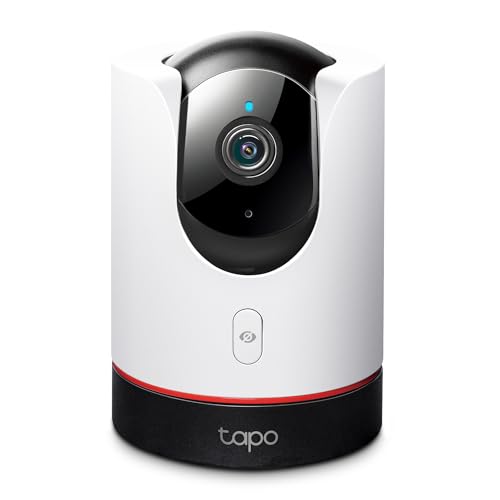
- Best overall for renters: TP-Link Tapo C225 — Check on Amazon
- Best physical privacy cover: Ring Indoor Cam (2nd Gen) — Check on Amazon
- Best no-subscription all-rounder: eufy Security Indoor Cam E220 — Check on Amazon
- Best budget second camera: Blink Mini 2 — Check on Amazon
- Best tracking on a budget: Wyze Cam Pan v3 — Check on Amazon
- Best for smart rentals: Aqara Camera Hub G3 — Check on Amazon
Read the full guide ↓
Disclosure: As an Amazon Associate, dailyhomedecorating.com earns from qualifying purchases. Links to Amazon on this page are affiliate links; they cost you nothing extra. Listing details such as price and availability change often, so check the current Amazon listing before you buy.
Finding the best indoor security camera for apartments under $400 starts with a liberating fact: an apartment almost never needs to spend anywhere near that ceiling. The figure is headroom, not a target. What renters actually need is a camera — usually one, sometimes two — that watches the front door and the main living space, installs without a single screw hole, and leaves with them on moving day. Everything in this guide is chosen against those rental realities.
Apartments change the priorities. You cannot drill into walls you do not own, run cables through cavities, or mount anything permanent, so shelf-and-bookcase placement, plug-in power and pan-and-tilt coverage do the work that fixed installations do in houses. Space is tighter, which helps: one well-placed pan-and-tilt camera can honestly cover an open-plan living area and the entry hallway behind it.
Renting also sharpens the privacy question. The camera watches your home, but it also watches visiting friends, a partner, a flatmate’s evenings. Picks with real hardware privacy — a lens that rotates away, a cover you swivel by hand — rank highly here, because ‘trust the app’ is a harder sell to everyone else who lives in or visits the flat.
And the subscription question matters more on a renter’s budget, not less. A generous hardware ceiling makes it tempting to buy into an ecosystem whose plan then bills you every month of the tenancy. This guide states plainly, for every pick, what stops working without a plan — so the ongoing cost is a decision you make now, not a surprise during setup. Note this is a guide to general apartment security cameras, not baby cameras, which are a separate category with different features.
Everything below is tested against the same renter’s checklist: no drilling, no deposit risk, no landlord conversation required, nothing that cannot be in a moving box in five minutes. If a camera could not pass that checklist, it is not in this guide — however good it might be in a house the buyer owns.
Apartments also forgive experimentation in a way houses do not: a camera that turns out wrong for the living room can try the hallway, the kitchen doorway or the home-office corner in the same afternoon, because nothing is mounted and nothing is wired into the building. Use that freedom. The first placement is a draft, and in a small floor plan the second draft is usually the one that stays for the whole tenancy.
In this guide
Quick picks
| Camera | Best for | Key spec |
|---|---|---|
| TP-Link Tapo C225 | Best overall for renters | 2K QHD (4MP) video, 360-degree pan and 149-degree tilt, starlight colour night vision, Apple HomeKit support |
| Ring Indoor Cam (2nd Gen) | Best physical privacy cover | 1080p HD video, colour night vision, two-way talk, manual audio and video privacy cover |
| eufy Security Indoor Cam E220 | Best no-subscription all-rounder | 2K resolution, 360-degree pan and 96-degree tilt, motion tracking, works with HomeBase 3 |
| Blink Mini 2 | Best budget second camera | 1080p HD video, colour night view, built-in spotlight, plug-in power, works with Alexa |
| Wyze Cam Pan v3 | Best tracking on a budget | 1080p HD, 360-degree pan and 180-degree tilt, automatic motion tracking, IP65 weather resistance |
| Aqara Camera Hub G3 | Best for smart rentals | 2K (2304 x 1296) video, 340-degree pan and 45-degree tilt, built-in Zigbee 3.0 hub, infrared remote control, HomeKit Secure Video |
How we chose
Rental rules came first. Every pick must work sitting on a shelf, bookcase or window-adjacent surface with its included stand — no drilling, no permanent mounts, nothing that risks a deposit. Plug-in cameras were preferred over battery models for indoor apartment use, because a camera that needs recharging is a camera that is flat on the one evening it matters.
Coverage per camera came second. In a typical one- or two-bedroom flat, a pan-and-tilt camera that sweeps the living space and turns to the door earns its place over a fixed camera that stares at one corner. We favoured models whose movement and field of view let one unit do an honest job of a whole open-plan area.
We then applied the subscription test with a renter’s eye: what still works if you never pay? Local recording to a memory card, on-device person detection and playback in the app all count heavily. Cloud-only cameras are included only where they bring something specific — a genuinely good privacy cover, or the easiest multi-camera path — and their plan requirement is stated in plain terms.
Finally, portability. These are purchases meant to survive a move: small, light, quick to re-pair on a new network, and useful in the next flat too. Maker specifications are quoted as maker claims, and nothing here requires modifying the property — if a camera’s best feature needs a screw, it did not make this list.
The cameras in detail
TP-Link Tapo C225
The Tapo C225 is the renter’s sweet spot: it sits on a shelf, sweeps the room with full pan and tilt, records to its own memory card and asks for no subscription to do any of that. For a one-camera apartment — living room covered, door in frame when it turns — it is difficult to argue with, and it costs a small fraction of this guide’s ceiling.
Its standout feature for shared flats is Privacy Mode: the lens physically rotates down into the body. Flatmates and guests do not have to interpret an app status or a tiny light; the camera is visibly asleep. When you come home to a flat you share, that visible gesture settles the ‘is it watching?’ question instantly.
Choose it as the single camera for a studio or one-bedroom, or as the first of two in a larger flat. Skip it only if your building’s Wi-Fi is unreliable at the camera’s spot and you cannot move the router or the shelf — like every camera here, it lives or dies by its connection.
A renter-specific strength worth underlining: the C225’s colour night vision works at the short distances apartments involve, so the hallway at midnight is recorded in usable detail rather than grainy silhouettes. And because everything records on the camera’s own card, a building-wide internet outage — not rare in large blocks — does not blind your front door for the evening.
Storage and subscriptions, honestly: Local: microSD card up to 512GB by maker spec, so weeks of event clips can live on the camera itself. Tapo Care cloud storage is optional; person, pet and vehicle detection are handled on-device without it.
Privacy: This is the privacy pick of the group: Privacy Mode physically rotates the lens down into the camera body, so the lens is visibly covered. It is the strongest kind of indoor privacy control because you can confirm it with your eyes.
Ring Indoor Cam (2nd Gen)
The Ring Indoor Cam’s party trick is disarmingly simple: a cover you swivel over the lens with a finger, which also cuts the microphone. In a rental — especially a shared one — that manual, visible, no-app-needed privacy is worth real money, and it is why this camera ranks despite its catch.
The catch is storage, and renters should hear it clearly: there is no memory card and no local recording at all. Without a Ring Protect subscription you get live view and motion alerts, but no recorded video to look back at. The camera is genuinely pleasant to live with, and the Alexa ecosystem suits smart rentals, but the plan is part of the rent, effectively — a small monthly line item for as long as you use it.
Choose it if the physical cover matters most and you accept the subscription knowingly, perhaps because you already pay for Ring at a door. Skip it if avoiding monthly fees is the point of your setup; the Tapo and eufy picks in this guide record locally and ask for nothing monthly.
Renters already paying for a Ring doorbell plan should do one piece of arithmetic before dismissing this camera: a single existing plan typically covers the household’s Ring devices together, which can make the Indoor Cam’s real added running cost zero rather than a second subscription. The guide’s warning stands for new Ring households; for existing ones, check your current plan’s terms on the live listing and decide with the true number.
Storage and subscriptions, honestly: Cloud only, and this is the honest catch: there is no microSD slot and no local recording. Without a Ring Protect subscription you get live view and motion alerts but you cannot watch recorded video back; the subscription is what unlocks video history and rich notifications. Budget for the plan as part of the real cost of any multi-camera Ring setup.
Privacy: The manual privacy cover is excellent: swivel it over the lens and it physically blocks the camera and switches off the microphone. It is simple, visible and needs no app, though you do have to remember to open it again before you leave.
eufy Security Indoor Cam E220
The E220 is the dependable middle of this guide: 2K video, pan and tilt that tracks movement across the room, and local recording to a memory card with person and pet detection handled on the camera itself. For a renter who wants the door watched, the cat’s afternoon documented and no monthly bill for either, it is the straightforward answer.
It also gives an apartment a growth path that costs nothing to start: run it on a card now, and if a future home wants several eufy cameras, a HomeBase can centralise their storage later. Nothing about the first purchase is wasted, which suits renters whose next place is unknown.
Its limitation is privacy hardware — there is none. Off means an app setting, not a covered lens. Choose it if you live alone or your household is comfortable with software privacy and scheduling. Skip it for a shared flat where a visible cover is the condition of everyone relaxing; that is the Tapo or the Ring above.
In practice the E220’s motion tracking earns its keep in the classic rental layout — entry door opening into the living space — because the camera follows a person from the door across the room instead of losing them at the frame’s edge. For a single-camera flat, that following behaviour is the closest thing to having a second camera watching the other side.
Storage and subscriptions, honestly: Local: microSD card or eufy HomeBase 3. On-device human and pet detection runs without a monthly fee, and recordings stay in your home unless you choose eufy’s optional cloud add-on.
Privacy: There is no physical privacy shutter. The app offers an off mode and privacy zones, so the honest position is that privacy here is a software promise, not a mechanical one.
Blink Mini 2
The Blink Mini 2 is the cheap second viewpoint: the camera you add for the hallway, the home-office corner or the view of the door from the other side, once the main room is covered. It is tiny, plug-in, Alexa-friendly and priced so that adding it barely dents the ceiling — which is exactly what a second camera should be.
Be honest about its storage model before you buy two. Clips and person detection live behind the Blink Subscription Plan; local storage exists only via a separate Sync Module accessory. A renter running one Mini 2 on the plan has a simple life; a renter expecting free local recording will be disappointed, and the guide would rather you knew now.
Choose it as an affordable add-on camera inside an Alexa household that accepts the plan or the Sync Module route. Skip it as your only camera if subscription-free recording is a requirement — it is a supporting player here, and priced like one.
Placement is where the Mini 2 quietly shines in rentals: it is small enough to sit on a picture ledge or the top of a fridge without dominating the room, and its plug-in lead is long enough for real shelves rather than only socket-adjacent ones. A second viewpoint that guests never notice is, in a small flat, a genuinely valuable property.
Storage and subscriptions, honestly: Cloud-first: recorded clips and person detection sit behind the Blink Subscription Plan. Local storage is possible only through a separate Blink Sync Module with USB or card storage, which is an extra purchase; without either, you have live view and motion alerts but no saved video.
Privacy: There is no privacy shutter or lens cover. The app lets you arm and disarm the camera and set privacy zones, so privacy is a settings choice rather than a physical one.
Wyze Cam Pan v3
The Wyze Cam Pan v3 tracks movement the way a more expensive camera should: it physically turns to follow a person or pet across the room, which in an open-plan flat means one camera genuinely follows the action from kitchen to sofa. Its weather resistance is wasted indoors, but harmless; its price is the point, leaving most of the ceiling unspent.
Its privacy mode points the lens down into the base — a visible, physical gesture flatmates can verify at a glance. Recording to a memory card works without paying anything, which keeps the running cost at zero for basic use.
The split to understand is detection: person detection and cloud event video are Cam Plus subscription features, so without the plan your alerts are motion alerts with thumbnails, backed by your card footage. Choose it if tracking coverage on a budget is the priority. Skip it if smart person alerts without a plan are non-negotiable — the Tapo and eufy cameras detect people on-device for free.
One apartment-specific caution: the Pan v3’s tracking motor makes a faint mechanical sound as it follows movement. In a living room nobody notices; in a studio flat where the camera shares your sleeping space, light sleepers may prefer its privacy mode at night — which, conveniently, is the setting this guide recommends for studios anyway.
Storage and subscriptions, honestly: Local: microSD card recording works without a plan. Be clear-eyed about the split, though: Wyze’s Cam Plus subscription is what unlocks person detection and full cloud event recording; without it you get motion alerts with still-image thumbnails and your card footage.
Privacy: Privacy Mode points the lens down into the base and stops recording, a physical gesture you can verify at a glance, though the microphone state follows the app setting rather than a hardware switch.
Aqara Camera Hub G3
The Aqara G3 suits the renter who is quietly building a smart home: camera, Zigbee hub and infrared remote blaster in one shelf-friendly unit. In a flat where you cannot rewire anything, a hub that talks to battery sensors — a door contact on the rental door, a motion sensor in the hall — is how an apartment gets a real security setup without touching the property.
It records locally to a memory card in its own app with no subscription, recognises faces and gestures by maker description, and can rotate its lens to a privacy position — including by a wave, which houseguests find considerably less creepy than a glowing fixed lens. Apple households can also route it through HomeKit Secure Video, though that path needs an iCloud plan.
Choose it if your flat is becoming a smart home and one box doing three jobs appeals. Skip it if you want the dead-simplest camera app and nothing else; the G3’s talents come with a tinkering flavour that the Tapo deliberately avoids.
For renters counting sockets, the G3’s triple role is a practical gift: one plug and one shelf corner replace a camera, a hub and an infrared blaster that would otherwise compete for the flat’s limited surfaces. In a studio, where every device is visible all the time, that consolidation is worth as much as any specification on its list.
Storage and subscriptions, honestly: Local: microSD card recording (up to 128GB by maker spec) works in the Aqara app without a subscription. If you route it through Apple HomeKit Secure Video, recordings live in iCloud and that route does require an iCloud storage plan; Aqara’s own optional cloud exists too, but the card keeps the camera useful with no plan at all.
Privacy: The lens assembly can be rotated to a privacy position from the app, and the G3 also accepts gesture control, so a wave can send it to sleep. It is not a sliding mechanical cover, but the lens visibly turns away, which is more reassurance than a software-only off switch.
Comparison table
| Camera | Video | Movement | Local storage | Plan needed for playback |
|---|---|---|---|---|
| TP-Link Tapo C225 | 2K QHD (4MP) | Pan and tilt | microSD up to 512GB | No |
| Ring Indoor Cam (2nd Gen) | 1080p | Fixed | None | Yes, Ring Protect |
| eufy Security Indoor Cam E220 | 2K | Pan and tilt | microSD / HomeBase 3 | No |
| Blink Mini 2 | 1080p | Fixed | Via separate Sync Module | Yes, Blink plan for clips |
| Wyze Cam Pan v3 | 1080p | Pan and tilt | microSD | Only for smart detection / cloud |
| Aqara Camera Hub G3 | 2K (1296p) | Pan and tilt | microSD up to 128GB | No in Aqara app; iCloud plan for HomeKit video |
How to choose the best indoor security camera for apartments under $400
Start at the front door — in most apartments it is the only door, and the camera that watches its inside face plus the living space covers the flat’s real risk. In a studio or one-bedroom, one pan-and-tilt camera on a shelf opposite the door usually does the whole job. In a two-bedroom, add a second viewpoint for the hallway rather than upgrading the first camera.
Place for faces, not for drama. A camera at roughly chest-to-head height on a bookcase, a few metres from the door, records identifiable faces; a camera in a ceiling corner records the tops of heads. Keep it within good range of the router — apartment walls and a neighbour-heavy Wi-Fi environment punish marginal connections — and near a socket, because plug-in cameras cannot be recharged back to life after a flat battery week.
Respect the lease in the small print of your setup: adhesive pads that peel cleanly, stands on furniture, cable clips rather than staples. Everything in this guide works that way. If you are in a shared flat, agree the camera’s hours and privacy routine with flatmates before it goes live, and prefer a model whose privacy state everyone can see.
Choose your storage stance deliberately. Local-card cameras keep footage in the flat and cost nothing monthly; cloud cameras trade a subscription for polished apps and footage that survives a stolen camera. For a renter, the local route usually wins on cost and simplicity — but whichever you choose, choose it now, on this page’s information, not during setup with the camera already in your hand.
Spend the change well. Because a good apartment setup lands far under the ceiling, the leftover budget is best spent on the unglamorous extras: a larger memory card, a second camera for the hallway, or a small shelf that puts the camera at the right height. Resist upgrading the main camera past the point your rooms can use — in a small flat, extra resolution buys almost nothing.
One final renter’s trick: photograph your setup once it works — shelf position, angle, cable run — and keep the picture with your lease paperwork. On moving day it tells you exactly how to rebuild the same coverage in the next flat in five minutes, and it quietly documents that the installation was furniture-based and damage-free, should any deposit conversation ever need the evidence.
One more placement reality deserves a sentence, because apartments are full of it: rented shelves are rarely where you would put them. If the only bookcase faces the wrong wall, a camera with pan and tilt forgives the furniture — it simply turns. That forgiveness is a large part of why this guide favours moving cameras for rentals: the flat decides the furniture, the furniture decides the shelf, and the camera, politely, adapts to both.
The renter’s setup playbook: door, living space, and nothing drilled
Walk the flat and find the one shelf that sees the most: ideally a bookcase or cabinet in the main living space, positioned so the camera’s sweep takes in the room and, when it turns, the inside face of the front door. In most rentals that single viewpoint is the whole system. If the door opens into a hallway the living-room camera cannot see, the hallway gets the camera instead, and the living space is covered by its outward view.
Power decides more placements than sightlines do. Every camera in this guide is plug-in, so map the sockets before falling in love with a viewpoint: a perfect angle with no socket within cable reach is not a viewpoint. Cable runs along skirting with removable clips keep landlords calm and deposits intact, and a small cable cover makes the run look intentional rather than improvised.
Height is the third decision, and renters get it wrong in the forgiving direction: too high feels safer but films the tops of heads. Chest-to-head height on furniture is both the best identification angle and the least permanent installation imaginable — the camera simply stands there. When you move, it lifts off the shelf and the flat is exactly as you found it.
Finally, run the flatmate protocol before the first alert ever fires: show everyone the app, the privacy mode and the schedule, and agree which hours the camera watches. A five-minute conversation at setup prevents the slow resentment that ends with a tea towel over the lens — the most common cause of death for apartment cameras is social, not technical.
Subscriptions on a renter’s budget: the tenancy maths
A subscription looks trivial monthly and behaves differently across a tenancy. A plan that runs for a two-year lease is a real purchase hiding in small print, and renters — who move, change households and renegotiate budgets more often than owners — feel that accumulation most. This is why this guide keeps returning to the question: the camera price is paid once, but the plan is rent by another name.
The local-storage picks in this guide exist to make that line optional. A Tapo, eufy, Wyze or Aqara camera recording to its own card costs its purchase price and nothing else, for the whole tenancy and into the next flat. For a renter whose deposit, bills and moving costs already compete, a zero-running-cost camera is not a compromise — it is the financially literate choice.
There are two fair exceptions. If you already pay a brand’s plan for a doorbell, adding its indoor camera may add no new monthly cost at all, and the ecosystem convenience is real. And if a cloud camera’s app is the only one a non-technical partner will actually use, a used camera beats a perfect one sitting muted. Both exceptions are decisions; the mistake is only ever the accidental subscription discovered at setup.
So do the tenancy maths once, on paper, before ordering: camera, card, plan across your expected stay. The totals regularly surprise people — a ‘cheap’ cloud camera plus two years of plan can pass a ‘premium’ local camera that asked for nothing. Renters above all should buy the whole cost, not the headline.
Apartment layouts, matched to cameras: studio, one-bed, two-bed, shared
The studio is the purest case: one room that is bedroom, living room and office, with a door and usually a kitchenette. One pan-and-tilt camera covers it entirely, and the deciding feature is not coverage but privacy — you sleep in this camera’s room. Choose a model whose lens visibly closes or rotates away, run it on an away-and-night schedule, and let the local-storage picks spare you a subscription on top of studio rent.
The one-bedroom flat separates sleeping from living, which simplifies everything: the camera belongs in the living space facing the entry route, the bedroom stays camera-free, and one unit remains the whole system. This is the layout where the guide’s top pick does its cleanest work, and where money left unspent under the ceiling is most obviously the correct outcome.
The two-bedroom flat usually adds a hallway between the door and the rooms, and the hallway becomes the camera’s home: it sees the entry, the route to every room, and nobody’s private space. If the living room also needs its own view — a pet’s territory, a valuables cabinet — that is the one justified second camera, bought as a matched partner to the first so the flat runs one app and one storage model.
The shared flat is a social layout before it is a floor plan. The camera belongs in genuinely shared space, its existence and schedule agreed in the group chat before it is unboxed, and its privacy mode demonstrated to everyone once. Technically it is the easiest setup in this guide; diplomatically it is the hardest, and the households that treat the diplomacy as part of the installation keep their cameras — and their flatmates — longest.
Across all four layouts the pattern repeats: fewer cameras than the marketing suggests, placed on the route everyone passes, running at zero monthly cost unless a plan was chosen with open eyes. An apartment’s constraints — no drilling, small spaces, shared walls, shared rooms — turn out to be a good design brief, and the setups that respect it are the ones still running at the next lease renewal.
Guests, partners and the social life of an apartment camera
An apartment camera’s hardest job is not technical at all: it has to survive the flat’s social life. Friends on the sofa, a partner who did not choose it, a date, a cleaner, a landlord’s inspection visit — each is a moment where a badly introduced camera becomes the story of the evening. The picks in this guide were ranked with those moments in mind, which is why visible privacy states keep beating raw specifications here.
The workable etiquette is simple and worth stating as a household rule: the camera watches an empty flat and sleeps in a full one. Say it once, demonstrate the privacy mode once, and the camera becomes as unremarkable as the router. Households that skip the conversation tend to have it later, at higher volume, usually while a guest is pointing at the lens.
For partners moving in or flatmates changing, revisit the arrangement rather than inheriting it silently: show the new person the app, the schedule and the off switch, and offer the same control you have. A camera everyone can switch off is, paradoxically, the camera nobody switches off — consent is the most reliable uptime strategy an apartment camera can have.
A closing note for renters
The deepest advantage an apartment buyer has is reversibility: every decision in this guide can be undone in minutes, carried to the next flat, and rebuilt better with experience. Lean into that. Start with the single camera your layout actually needs, live with it through a full month of post, guests and late nights, and let evidence — not a bundle’s discount clock — decide whether a second viewpoint ever joins it.
Renters are sold systems designed for houses they do not live in, at prices framed for budgets they did not set. This guide’s ceiling is the clearest example: a figure a good apartment setup should mostly decline to spend. Decline it cheerfully, keep the deposit safe, keep the monthly cost at zero, and let the camera on the bookcase do its quiet, sufficient work.
Common mistakes
Drilling first, reading the lease later
A mounted camera that costs you a deposit deduction was an expensive camera. Every pick in this guide works from a shelf or stand; if a setup idea needs screws, redesign it around furniture before you touch a drill.
Buying a whole-house system for a one-bedroom flat
Multi-camera bundles marketed for houses overwhelm an apartment: too many viewpoints, too many alerts, and a subscription scaled to the bundle. One or two cameras, placed well, watch a flat properly. The ceiling is permission, not an instruction to spend.
Forgetting the flatmates and guests
A camera your flatmate did not agree to will be unplugged, covered or resented — usually all three. Discuss it first, use schedules and hardware privacy, and keep cameras out of bedrooms and bathrooms entirely. Consent is a security feature: an accepted camera stays on.
Signing up for a plan by accident
Several cameras here only reveal their subscription wall during setup. Renters on tight monthly budgets feel that most. Read the storage section before ordering, and if a plan is required for playback, count it as part of the camera’s price for the whole tenancy.
Placing the camera where the Wi-Fi is weakest
The perfect viewpoint with a flaky connection produces frozen live views and missing clips. Test the signal at the shelf before committing, and prefer a spot a room closer to the router over a marginally better angle at the edge of coverage.
Final recommendation
For most apartments, the answer is refreshingly modest: one Tapo C225 on a shelf, recording locally, lens rotating away when you are home — a setup that costs a fraction of this ceiling and does everything a rental honestly needs. Add the eufy E220 as a second viewpoint for larger flats, and the whole system still leaves money unspent.
Choose differently only for a specific reason: the Ring if a hand-swivelled privacy cover matters more than avoiding its subscription, the Aqara if the flat is growing into a smart home, the Wyze if tracking coverage on the tightest budget is the goal. What no apartment needs is the full ceiling spent — and a guide that pretended otherwise would not be worth trusting.
One final practical word: set the camera up on a weekday evening, not moving day, and give it a full week of ordinary flat life — post arriving, friends visiting, a late night, an early start — before judging it or adding to it. Apartments reveal their camera needs slowly, through routine rather than through floor plans, and a renter who lets the routine speak first almost always ends up with the smallest, cheapest, most sufficient system on this page.
Start with the TP-Link Tapo C225 if you want one decision and no second-guessing. If its one real limitation is the thing you care about most, the eufy Security Indoor Cam E220 is the alternative we would buy instead.
FAQ
Can I install these cameras without drilling or losing my deposit?
Yes — every pick in this guide is designed to sit on a shelf, bookcase or stand with plug-in power. No screws, no permanent mounts. Use removable adhesive cable clips if you tidy the power lead, and the whole setup leaves with you on moving day.
How many cameras does an apartment actually need?
One pan-and-tilt camera covers most studios and one-bedrooms when it can see the living space and turn toward the door. Two-bedroom flats usually justify a second camera for the hallway or entry. More than that is rarely useful in rental-sized spaces.
Do any of these work without a monthly subscription?
Yes. The Tapo C225, eufy E220, Wyze Cam Pan v3 and Aqara G3 all record to local memory cards without a plan, though Wyze keeps its person detection behind its subscription. Ring and Blink tie recorded playback to their plans, which this guide states openly for each.
Is it okay to have a security camera in a shared flat?
Only with everyone’s agreement. Discuss placement and schedules with flatmates first, keep cameras to shared spaces like the living room and entry, never bedrooms or bathrooms, and favour models with visible hardware privacy so anyone can confirm the camera is asleep.
Will these cameras work on my building’s Wi-Fi?
They need a standard home Wi-Fi network you control the password for; most run on the common 2.4 GHz band, and a few support 5 GHz or Wi-Fi 6 as noted per pick. Captive-portal building networks that require a web login usually do not work with cameras — your own router or hotspot solves it.
What happens to my cameras when I move out?
You unplug them and take them — that is the point of shelf-based plug-in cameras. Re-pairing on a new network takes a few minutes per camera, memory cards keep their footage, and the same setup works in the next flat, which is why this guide favours portable picks over anything installed.
Can my landlord object to an indoor security camera?
Indoor cameras that sit on furniture and record your own home are generally a tenant’s own business, unlike anything mounted to walls or pointed at shared areas like corridors and neighbours’ doors. Rules vary by lease and location, so check your agreement — and never aim a camera through a window at shared spaces.
Will a camera use much of my apartment’s internet?
Live viewing and cloud uploads are the hungry moments; local-recording cameras mostly sip. A camera recording to its own card places little ongoing load on a typical rental connection, while cloud cameras upload every event clip. If your building’s broadband is slow or capped, that difference is one more argument for the local picks in this guide.
Can I take my camera setup to a house later?
Yes — nothing in this guide is apartment-specific hardware. Shelf cameras, cards and apps all transfer to a house unchanged, and the same units become the first layer of a larger system, with a hub or extra cameras added only if the new floor plan genuinely asks for them.
Can I point an indoor camera out of my window at my parking spot or the street?
This guide does not recommend it: window glass defeats night vision with reflections, and recording shared or public areas raises lease and legal questions that vary by place. Indoor cameras are for the inside of your home; a parking spot is a different product category and a different conversation with your landlord.
My flat is rented furnished. Does that change anything?
Only for the better: furnished flats offer more shelves and surfaces at useful heights, which is all these cameras ask for. Keep cameras off the landlord’s furniture edges where a knock could drop them, prefer sturdy mid-shelf spots, and the furnished flat becomes the easiest installation of all.


