Where to buy
Check the latest price, availability and delivery on Amazon, and treat the figure in this guide’s title as a ceiling, not a target. No single indoor camera needs to cost anywhere near that ceiling; the sensible way to spend at this level is a small system — two to four cameras, or one flagship camera plus proper local storage — with every part still under $400 in total. Prices move constantly and multi-camera bundles change what you pay, so confirm the live listing total for the exact combination you plan to buy before you order.
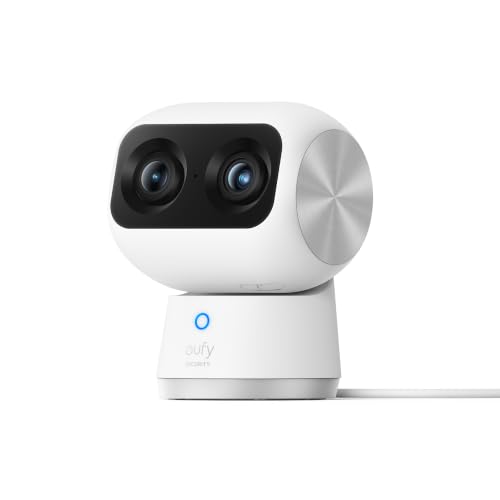
- Best flagship single camera: eufy Security Indoor Cam S350 — Check on Amazon
- Best verified privacy: Arlo Essential Indoor Camera 2K (2nd Gen) — Check on Amazon
- Best smart-home hub camera: Aqara Camera Hub G3 — Check on Amazon
- Best value pan-and-tilt: TP-Link Tapo C225 — Check on Amazon
- Best local-storage foundation: eufy HomeBase S380 (HomeBase 3) — Check on Amazon
- Best multi-room building block: eufy Security Indoor Cam E220 — Check on Amazon
Read the full guide ↓
Disclosure: As an Amazon Associate, dailyhomedecorating.com earns from qualifying purchases. Links to Amazon on this page are affiliate links; they cost you nothing extra. Listing details such as price and availability change often, so check the current Amazon listing before you buy.
Shopping for the best indoor security camera under $400 puts you in an unusual position: the budget is far larger than any single indoor camera honestly requires. That is the first thing to understand about this tier. The ceiling is not a target. A household that spends the whole amount on one camera has usually bought resolution it cannot use, while a household that treats the ceiling as a system budget — covering the rooms that matter, storing footage properly and avoiding a subscription it resents — ends up with something genuinely better.
So this guide is organised around systems and flagships rather than a single hero product. At this level the realistic shapes of a good purchase are: one flagship dual-lens camera for a large open-plan space, two or three good pan-and-tilt cameras covering separate rooms, or a camera plus a local storage hub so recordings live in your home instead of a rented cloud. Every pick below can anchor one of those shapes, and the combinations still land under the ceiling.
Two honest themes run through everything that follows. The first is subscriptions: brands differ enormously in what stops working when you refuse to pay monthly, and at this budget there is no excuse for buying into a plan you did not choose deliberately. The second is indoor privacy. A camera in a living room or hallway is pointed at your own life, so a physical shutter, a lens that visibly turns away, or storage that never leaves the house is worth more than another increment of resolution.
One boundary is worth drawing before the picks. This guide covers general indoor security cameras for watching rooms, doors and pets. It is not a guide to baby cameras, which are a separate product group with their own monitors and nursery features, and it is not about outdoor or whole-property surveillance systems. If your real question is a nursery, shop that category separately; if it is the inside of your home, read on.
What follows is deliberately practical. Each pick is presented as a role in a system — flagship, building block, privacy specialist, storage foundation — because at this ceiling the roles are what you are actually buying. Read the roles first and the model names second, and the right configuration for your home tends to assemble itself.
Prices and bundles in this category shift constantly, so treat every configuration discussed here as a shape rather than a shopping list with a fixed total: the same roles, filled by the same models, may cost meaningfully less during a promotion. What does not change with the sales calendar is the logic — coverage first, storage independence second, privacy hardware third — and a system bought by that logic stays right at any price.
In this guide
Quick picks
| Camera | Best for | Key spec |
|---|---|---|
| eufy Security Indoor Cam S350 | Best flagship single camera | Dual cameras: 4K wide-angle + 2K telephoto, 8x hybrid zoom, 360-degree pan/tilt, dual-band Wi-Fi 6 |
| Arlo Essential Indoor Camera 2K (2nd Gen) | Best verified privacy | 2K video (2560 x 1440), 130-degree field of view, automated privacy shield, integrated siren, night vision |
| Aqara Camera Hub G3 | Best smart-home hub camera | 2K (2304 x 1296) video, 340-degree pan and 45-degree tilt, built-in Zigbee 3.0 hub, infrared remote control, HomeKit Secure Video |
| TP-Link Tapo C225 | Best value pan-and-tilt | 2K QHD (4MP) video, 360-degree pan and 149-degree tilt, starlight colour night vision, Apple HomeKit support |
| eufy HomeBase S380 (HomeBase 3) | Best local-storage foundation | Central local storage hub for eufy cameras, expandable storage up to 16TB by maker spec, on-device AI processing, no monthly fee |
| eufy Security Indoor Cam E220 | Best multi-room building block | 2K resolution, 360-degree pan and 96-degree tilt, motion tracking, works with HomeBase 3 |
How we chose
We chose for this tier the way the money actually gets spent. Each pick had to do one of three jobs well: serve as a flagship single camera whose extra cost buys something visible, serve as a repeatable building block you can buy two or three of without the total escaping the ceiling, or remove a recurring cost — a hub that replaces a subscription, for example. Products that were merely expensive versions of ordinary cameras did not qualify.
Storage honesty was a hard filter. For every pick we state plainly where recordings live, what a memory card or hub can and cannot do, and exactly which features are locked behind each brand’s subscription. A camera that cannot play back recorded video without a plan is not necessarily a bad camera, but at this price level you should choose that arrangement knowingly, never discover it during setup.
Privacy hardware mattered more here than in cheaper guides, because these cameras are bought for main living spaces rather than a single hallway. Physical covers, automated shields and lenses that rotate into the body all scored; cameras whose only privacy control is a software toggle are described as exactly that, so you can weigh the trade-off yourself.
Finally, we weighted identification quality over headline resolution. A dual-lens camera that can zoom into a face at the far end of a room, or a camera with reliable on-device person detection that does not cry wolf at every shadow, protects a home better than a big pixel count attached to weak detection. Specs quoted are maker specifications, and where a figure is a maker’s claim we treat it as such.
The cameras in detail
eufy Security Indoor Cam S350
The S350 is what a flagship indoor camera looks like when the money goes somewhere visible: two lenses in one body, a wide 4K view of the whole room and a 2K telephoto that can zoom toward a door or a face without the picture dissolving. In a large open-plan living space, that second lens is the difference between footage that shows someone was there and footage that shows who it was.
As the single-camera way to spend at this tier, it suits a household with one big space to cover — a combined kitchen, dining and living area — rather than several small rooms. Its pan and tilt mean one unit sweeps the whole footprint, and dual-band Wi-Fi 6 keeps the high-resolution stream steadier than older single-band cameras manage.
Choose it if identification at distance is your priority and your space is genuinely large. Skip it if your home is several small rooms: two mid-range cameras in two rooms will always beat one brilliant camera that cannot see through walls, and they leave budget for storage as well.
Day to day, the S350’s dual-band Wi-Fi 6 is an underrated part of the flagship case: high-resolution streams from cheaper cameras stutter on congested home networks, and a security-adjacent purchase that buffers during the exact moment you opened the app undermines itself. In a house full of streaming, calls and other cameras, the steadier connection is a real, if unglamorous, part of what the premium buys.
Storage and subscriptions, honestly: Local: microSD card or eufy HomeBase 3. No subscription is required for recording, playback or its on-device human and pet detection; an optional eufy cloud plan exists but nothing core is locked behind it.
Privacy: Privacy is handled in the app: you can switch the camera off, schedule it, and set privacy zones. There is no physical shutter, so when privacy matters you are trusting the software state and the status light rather than a cover you can see.
Arlo Essential Indoor Camera 2K (2nd Gen)
The Arlo Essential Indoor Camera 2K earns its place on one feature no specification table captures: when you disarm it, a physical shield closes over the lens. In a main living room or a bedroom-adjacent hallway, that mechanical click is the difference between trusting an app’s status screen and simply knowing the camera cannot see.
The camera itself is a competent fixed 2K unit with a wide field of view, night vision and a built-in siren, and as a system building block it suits households already comfortable in the Arlo app. Two or three units cover the rooms that matter while staying inside the ceiling, and the shield makes each one easier to live with than a permanently exposed lens.
The honest limitation is the business model: this is a cloud camera, and once the trial ends the subscription is what your recordings and smart recognition run on. Choose it if verified privacy matters most and you accept the plan as part of the price. Skip it if avoiding monthly fees is a firm rule — the eufy and Tapo picks below exist precisely for you.
Consider the Arlo as a two- or three-camera matched set rather than a single: the shield behaviour is most valuable when every indoor camera in the house shares it, so coming home disarms the whole set into verified privacy at once. Mixed setups — one shielded camera, two exposed ones — deliver only half the psychological benefit the Arlo route exists to provide.
Storage and subscriptions, honestly: Cloud-first: after the included trial, an Arlo Secure subscription is required to store and review recordings and to use person, package and animal recognition. There is no memory-card slot on the camera, so treat the plan as part of the purchase, not an optional extra.
Privacy: The automated privacy shield is the headline: a physical cover closes over the lens when the camera is disarmed, and you can hear and see it move. It is privacy you can verify, controlled from the app or by schedule.
Aqara Camera Hub G3
The Aqara Camera Hub G3 is the pick for a home that is becoming a smart home, because it is two products sharing one plug: a 2K pan-and-tilt camera and a Zigbee hub that can run sensors and automations, with an infrared blaster that can wake up older appliances. Bought as part of a system at this tier, it can be the room camera and the nerve centre at the same time.
Its recognition features are unusually ambitious for the class — face and gesture recognition by maker description — and it plays with more ecosystems than most: Alexa, Google Assistant and Apple HomeKit, including HomeKit Secure Video for households in the Apple world. The lens rotates to a privacy position, and a gesture can send it to sleep, which guests tend to find charming rather than alarming.
Choose it if you want the camera purchase to pull double duty as smart-home infrastructure. Skip it if you want the simplest possible single-app experience: the G3 rewards tinkerers, its pan and tilt controls live in Aqara’s app rather than inside HomeKit, and a household that wants none of the hub features is paying for capability it will never open.
The G3’s infrared blaster deserves a sentence of its own in a system context: it can switch on an older air conditioner or television as part of an automation, which means the camera budget quietly buys a slice of whole-home control. Households pricing a hub anyway should count that overlap before buying separate smart-home hardware the G3 already replaces.
Storage and subscriptions, honestly: Local: microSD card recording (up to 128GB by maker spec) works in the Aqara app without a subscription. If you route it through Apple HomeKit Secure Video, recordings live in iCloud and that route does require an iCloud storage plan; Aqara’s own optional cloud exists too, but the card keeps the camera useful with no plan at all.
Privacy: The lens assembly can be rotated to a privacy position from the app, and the G3 also accepts gesture control, so a wave can send it to sleep. It is not a sliding mechanical cover, but the lens visibly turns away, which is more reassurance than a software-only off switch.
TP-Link Tapo C225
The Tapo C225 is the value anchor of this tier, and its presence is a useful reality check: a camera with 2K QHD video, full pan and tilt, colour night vision and on-device detection costs a fraction of the ceiling, which means a three-camera whole-home setup built on it still leaves money unspent. Spending less than the budget, when the coverage is better, is the correct outcome.
Its privacy mode is the best in this guide alongside the Arlo’s shield: the lens physically rotates down into the body, visibly covered, no app interpretation required. For living rooms and bedrooms, that gesture — camera asleep, lens hidden — is what makes an indoor camera acceptable to everyone in the house.
Choose it as the building block for multi-room coverage, or as a single camera when you want flagship manners without flagship pricing. Skip it only if you are committed to another ecosystem’s app and subscriptions already; as a standalone local-storage camera, it asks for no plan and gives up very little.
A practical note for system builders: because the C225 keeps detection and recording on the camera, adding a second or third unit does not multiply any bill — the running cost of a three-camera Tapo layer is the electricity and nothing else. That flat cost curve is precisely what makes it the sensible default building block at this tier.
Storage and subscriptions, honestly: Local: microSD card up to 512GB by maker spec, so weeks of event clips can live on the camera itself. Tapo Care cloud storage is optional; person, pet and vehicle detection are handled on-device without it.
Privacy: This is the privacy pick of the group: Privacy Mode physically rotates the lens down into the camera body, so the lens is visibly covered. It is the strongest kind of indoor privacy control because you can confirm it with your eyes.
eufy HomeBase S380 (HomeBase 3)
The HomeBase S380 is not a camera, and it is labelled as such here because at this budget the smartest single purchase for a eufy household may be storage rather than another lens. Paired with eufy indoor cameras, it centralises recording on a hub inside your home with expandable capacity, so footage from several rooms gathers in one local archive instead of scattering across memory cards.
It also changes the subscription conversation permanently: detection processing happens on the hub, recordings stay on your hardware, and there is no monthly fee for the arrangement. For a household planning two or more eufy cameras — now or over the next year — buying the hub once is cheaper and tidier than paying any brand’s cloud plan indefinitely.
Choose it if you are building a eufy system of two-plus cameras, or if local control of footage is your deciding principle. Skip it for a single camera in a single room: a memory card inside one E220 or S350 does the same job more simply, and the hub only earns its shelf space when several cameras feed it.
Budget the hub honestly as part of a system total: hub plus two cameras is the configuration where it pays for itself against any cloud plan’s first year, and hub plus three cameras is where the comparison stops being close. Buyers planning exactly one camera should reread the skip guidance above — this pick’s value is strictly a multi-camera value.
Storage and subscriptions, honestly: This is the storage half of a eufy system rather than a camera: compatible eufy cameras record to the hub inside your home, so footage is not dependent on a cloud subscription and keeps working as a local archive. Add a drive to expand capacity; the hub itself is what removes the per-camera card juggling.
Privacy: A hub does not watch anything itself, but it changes the privacy maths of the cameras paired with it: recordings live on hardware in your home instead of a remote server, which is the arrangement many households prefer for indoor cameras.
eufy Security Indoor Cam E220
The E220 is the workhorse building block of the eufy system: 2K video, full pan and tilt with motion tracking, and local recording to a card or to a HomeBase. Three of them — living room, hallway, back door interior — form the classic under-ceiling system, each watching its own room properly instead of one flagship straining to cover a floor plan it cannot see.
Because detection runs on the device, the alerts you rely on do not depend on a subscription, and because the cameras record locally, a broadband outage does not blind the house. It is also the natural partner for the HomeBase above: start with cards, centralise later, and nothing you bought first is wasted.
Its honest limitation is privacy hardware: there is no shutter, so in the most private rooms you are relying on the app’s off mode and scheduling. Choose it for coverage-per-room value inside a no-subscription system. Skip it for a bedroom if a physical cover is non-negotiable for your household — that is the Arlo or the Tapo’s job.
The E220 also earns a mention as the gift-able, expandable unit: households often start with one at the front interior and add the second at the back months later, and because both record locally from day one, the system never changes character as it grows. Consistency of storage and alerts across rooms is a quiet virtue that mixed-brand setups never quite achieve.
Storage and subscriptions, honestly: Local: microSD card or eufy HomeBase 3. On-device human and pet detection runs without a monthly fee, and recordings stay in your home unless you choose eufy’s optional cloud add-on.
Privacy: There is no physical privacy shutter. The app offers an off mode and privacy zones, so the honest position is that privacy here is a software promise, not a mechanical one.
Comparison table
| Camera | Video | Movement | Local storage | Plan needed for playback |
|---|---|---|---|---|
| eufy Security Indoor Cam S350 | 4K wide + 2K telephoto | Pan and tilt | microSD / HomeBase 3 | No |
| Arlo Essential Indoor Camera 2K (2nd Gen) | 2K | Fixed | None on camera | Yes, Arlo Secure after trial |
| Aqara Camera Hub G3 | 2K (1296p) | Pan and tilt | microSD up to 128GB | No in Aqara app; iCloud plan for HomeKit video |
| TP-Link Tapo C225 | 2K QHD (4MP) | Pan and tilt | microSD up to 512GB | No |
| eufy HomeBase S380 (HomeBase 3) | Storage hub, no camera | — | Expandable, up to 16TB maker spec | No |
| eufy Security Indoor Cam E220 | 2K | Pan and tilt | microSD / HomeBase 3 | No |
How to choose the best indoor security camera under $400
Start with a floor plan, not a shopping list. Walk your home and mark the interior points that actually matter: the front door’s inside face, the back door, the hallway every route crosses, and any room with valuables or a pet’s main territory. Most homes need two to four indoor cameras; the ceiling in this guide comfortably covers that, and any money left over is better spent on storage than on a fifth camera watching a wall.
Decide your storage philosophy before choosing a brand, because it is the decision you live with longest. Local storage — memory cards or a hub like the HomeBase — means no monthly fee and footage that stays home, but the archive is only as safe as the hardware it sits on. Cloud storage survives a stolen camera and offers polished apps, but playback itself is usually the paid feature. Neither is wrong; drifting into one by accident is.
Match the camera type to the room shape. Pan-and-tilt cameras earn their keep in one large or L-shaped space where a fixed lens leaves corners blind. Small square rooms are usually covered better by one wide fixed camera, and several small rooms are always better served by several modest cameras than by one expensive one. Resolution should follow distance: the further the camera sits from the door it watches, the more a zoom or higher resolution genuinely helps.
Plan privacy room by room. Bedrooms and bathrooms-adjacent spaces deserve hardware privacy — a shield, a cover or a lens that rotates away — while a hallway camera can reasonably live on schedules and app controls. Agree the arrangement with everyone in the house before the cameras go up; an indoor system the family resents will be unplugged within a month, and an unplugged camera protects nothing.
Finally, budget the whole system honestly: cameras, memory cards or a hub, any subscription you have chosen on purpose, and the small things — longer cables, a shelf mount, a spare card. Then check the combined total against the ceiling on the live listings, because bundle pricing shifts. If the total leaves money spare, that is success, not a reason to upgrade a camera that already does its job.
One last discipline for this tier: write the system down. A single note — which cameras, where the footage lives, what (if anything) is subscribed to and why — saves the household from re-litigating every decision when a camera is added or replaced. Generous budgets create systems; systems deserve one paragraph of documentation, kept wherever the household keeps its manuals.
What a sensible system at this ceiling actually looks like
It helps to see the arithmetic of restraint. One flagship configuration — a single dual-lens camera for a big open-plan space, a large memory card, nothing else — uses roughly half the ceiling and covers that space better than any alternative at any price. The money left over is not a failure to spend; it is the correct answer for a one-room problem.
The two-room configuration is the most common good outcome: a strong pan-and-tilt camera in the main living space, a second unit watching the back or side entry, both recording locally. That layer watches more of a real house than any single product can, and it still leaves headroom — which matters, because the household that keeps headroom can replace a failed unit or add a third viewpoint without a new budget conversation.
The three-camera-plus-hub configuration is the enthusiast’s version: three local-recording cameras feeding one central archive. It is the most capable arrangement in this guide and the closest the ceiling comes to being fully used — and even here, the honest total usually leaves something unspent, because indoor cameras have simply become inexpensive relative to a budget framed for whole systems.
Notice what none of these configurations contains: a subscription chosen by default. Where a household deliberately prefers a cloud ecosystem — for its app, its alerts, its doorbell already on the wall — the plan becomes a known, budgeted line. The configurations above merely prove it is a preference, not a necessity, and preferences are exactly what a generous ceiling should buy.
Local storage, cloud storage, and the middle paths
Local storage in its simplest form is a memory card inside each camera. It is cheap, private and independent of any company’s servers, and its weaknesses are equally simple: the archive is distributed across devices, and a card leaves with a stolen camera. For one or two cameras in a home that mostly wants event clips, it remains the default recommendation of this guide.
The hub model fixes the distribution problem: cameras write to one box, in one place, with room to grow. It keeps every local advantage — no fee, no dependence on broadband, footage physically at home — while adding a single archive to browse and back up. Its weakness is concentration: the hub is one device, in one room, and households who care should place it somewhere unobtrusive rather than beside the cameras it serves.
Cloud storage inverts every term: the archive survives fire and theft, the apps are polished, and the price is permanent. It also introduces the dependency this guide keeps flagging — playback as a paid feature — which is tolerable when chosen and corrosive when discovered. Households with a doorbell already on a plan often find adding cameras to it rational; households starting fresh should price the plan across years, not months, before calling it cheap.
The middle paths deserve mention because marketing blurs them. Some brands record locally but reserve smart detection for subscribers; some include a token free history window measured in hours. Neither is dishonest, but both mean the sentence ‘it records without a subscription’ needs its second half. Every pick in this guide carries that second half in its storage note, in plain language, for exactly this reason.
Ecosystems at this level: picking the house your cameras live in
Every pick in this guide belongs to a household of products, and at system scale the household matters as much as the camera. eufy’s house is built around local storage and hub processing; Tapo’s around inexpensive cameras that keep their intelligence on-device; Wyze’s around very low hardware prices with an optional smart layer; Aqara’s around a hub that runs a wider smart home. Ring, Nest and Arlo run cloud houses, where the app experience is the product and the plan is the rent.
The practical consequence is that a second camera is never just a second camera: it inherits the first one’s storage model, app and alert style. Households that choose the first unit for the house it brings with it rarely regret their systems; households that choose on a single specification often end up running two apps and two subscriptions by the time the third room is covered.
Switching houses later is possible but never free: recordings do not migrate, learned routines do not transfer, and at least one camera usually becomes the odd one out in the wrong app. That is not an argument for anxiety — every house in this guide is respectable — but it is an argument for spending ten minutes on the ecosystem question now, at the start, when it costs nothing.
If your home already has a house — a doorbell, a voice assistant you actually use, a hub on the shelf — let that weigh honestly in the decision. Compatibility with what exists beats theoretical superiority in a vacuum. If your home has none, the local-storage houses are the neutral starting point this guide defaults to, because they ask the least of the future: no plan to maintain, no archive held elsewhere, nothing to cancel if tastes change.
Whichever house you choose, choose it once, for all the indoor cameras, and let the system’s consistency do the quiet work: one alert style to learn, one archive to search, one storage answer to give when a partner asks where the footage is. That consistency, more than any camera in this guide, is what a generous ceiling actually buys.
Reading the comparison table like a system builder
The comparison table in this guide is short on the numbers marketing loves and long on the two columns that decide ownership: local storage and whether playback needs a plan. Read those two columns first for any camera you shortlist, here or anywhere. A camera whose row reads ‘local: yes, plan: no’ can be bought on its picture quality alone; a camera whose row reads ‘local: none, plan: yes’ must be bought as a service, with the service priced in.
Movement is the third column that matters, and it is a floor-plan question rather than a quality ranking. Pan and tilt is not better than fixed; it is better for rooms with corners, worse for nothing, and unnecessary in a square room a wide lens already covers. Match the movement column to your largest room’s shape and the table becomes a configuration tool instead of a beauty contest.
Resolution, the column most guides lead with, is deliberately placed where it belongs: as context. At indoor distances, the difference between the resolutions in this table is smaller than the difference placement makes. A well-placed mid-resolution camera out-records a flagship in a ceiling corner every single night, which is why this guide spends its words on placement, storage and privacy ahead of pixels.
A closing note on value at this tier
There is a temptation, with a ceiling this generous, to equate spending with diligence — as if the household that used the whole budget had somehow secured the home more thoroughly. The configurations in this guide disprove it nightly: coverage, storage independence and privacy hardware are what protect a home, and all three are bought well before the ceiling is reached. The disciplined buyer at this tier is not the one who spends most, but the one who can explain, room by room, what each part of the system is for.
If you take one sentence from this guide, take this one: buy the system your floor plan describes, store its footage somewhere a subscription cannot switch off, and give every camera a privacy state your household can see. Do those three things with any combination of the picks above and the purchase will still look correct in five years — which is more than can be said for most flagship-chasing at any price.
Common mistakes
Spending the whole ceiling on one camera
The most common error at this tier is treating a generous budget as a single-product budget. One flagship cannot see into two rooms, and its extra resolution is wasted on a small space. Sketch the floor plan first and let coverage — not a hero product — decide how the money divides.
Discovering the subscription after setup
Several respected brands make recorded playback a paid feature. Finding that out with the camera already mounted feels like a trap, and it is avoidable: read the storage section of any camera you shortlist and decide whether its plan is a price you accept or a reason to choose a local-storage brand instead.
Ignoring indoor privacy until someone objects
A camera pointed at a sofa is pointed at your family’s evenings. Households that skip the privacy conversation end up with cameras unplugged or angled at ceilings. Choose hardware privacy for sensitive rooms and agree schedules for the rest, before installation day.
Mixing brands across rooms
Two cameras in two apps means two sets of alerts, two storage systems and two subscriptions to reason about. Unless a specific room truly needs a specific feature, one ecosystem across the house is simpler to run, cheaper to store and far more likely to still be switched on in a year.
Mounting high and far, then blaming the camera
Faces are identified at face height, within a sensible distance. A camera tucked into a ceiling corner twenty feet from the door produces dramatic wide shots and useless identification. Place cameras to see faces at doors and choke points, then use wide views for context, not the other way round.
Final recommendation
At this ceiling, the best purchase is a system decision, not a camera decision. For one large living space, the flagship route below is genuinely excellent. For most homes, two or three good cameras with local storage will watch more of the house, cost less than the ceiling and ask for nothing monthly — and that restraint is the correct use of a generous budget.
If your household leans toward Apple or a growing smart home, the Aqara’s hub talents make it the interesting alternative; if verified privacy is the family’s condition, the Arlo’s shield or the Tapo’s rotating lens should lead. The only wrong answers at this tier are paying a subscription you never chose, or spending flagship money to watch a room a modest camera covers perfectly.
One final practical word: whatever configuration you choose, buy it as one order where you can, keep the receipts and the pairing codes together, and spend the first evening with the system doing the walk test this guide described — door to hallway to main room, phone in hand, checking faces rather than admiring the wide view. A system commissioned properly on day one rarely needs attention again, and that quiet reliability, not any single camera, is the real product a generous ceiling should buy.
Start with the eufy Security Indoor Cam S350 if you want one decision and no second-guessing. If its one real limitation is the thing you care about most, the TP-Link Tapo C225 is the alternative we would buy instead.
FAQ
Is any single indoor camera really worth this whole budget?
For most homes, no — and this guide is built on that honesty. The ceiling makes sense as a system budget: several cameras, or a flagship plus proper local storage. One dual-lens flagship can justify a premium in a very large open-plan space, but even then it should leave money for storage.
How many indoor cameras can this budget realistically cover?
Typically two to four good cameras, depending on the brand’s storage model. Local-storage cameras stretch furthest because there is no per-camera plan; cloud brands should be costed with their subscription included, which is part of the real price of the system.
Do I need a subscription for any of these cameras?
Some, yes — and the guide says which, per camera. Ring, Arlo and Blink tie recorded playback to their plans; Nest includes only a short free history window. eufy, Tapo and Wyze record to local cards without a plan, though Wyze reserves its smart detection for subscribers.
Is local or cloud storage better for indoor cameras?
Local storage keeps footage in your home and removes monthly fees, but the archive can be lost if the camera or hub is taken. Cloud storage survives theft and is easier to browse, at a recurring cost and with footage held by the provider. Many households choose local for bedrooms-adjacent spaces and accept cloud for a front-door camera.
What privacy features should an indoor camera have?
Ideally something physical: a shield, a swivelling cover, or a lens that rotates into the body. After that, look for scheduling, privacy zones and a clear status light. Software-only off switches work, but they ask everyone in the house to trust an app screen.
Can these cameras replace a full home security system?
They cover the inside view honestly — doors, hallways, living spaces — but they are not a monitored alarm system and do not watch the outside of the property. Treat them as the indoor layer of home security, complementary to locks, lighting and, if you want it, a separate outdoor setup.
Should I wait for a sale or bundle before buying at this level?
Bundles and seasonal pricing move constantly on indoor cameras, and multi-camera packs from the brands in this guide appear regularly. If your need is not urgent, checking the live listings over a few weeks is reasonable — but buy the configuration your floor plan needs, not the configuration a promotion happens to assemble.
Can I mix brands if I find deals on different cameras?
You can, and many households do — but know the cost: separate apps, separate alert styles and separate storage answers per camera. If a specific room truly needs a specific brand’s feature, mixing is rational. As a default strategy for a whole system, one brand is simpler to live with and cheaper to store.
How long do memory cards and hubs keep footage?
It depends on capacity, resolution and how much motion your home generates, so any exact figure would be invented — this guide will not invent one. Event-based recording on a large card or an expandable hub typically covers weeks of household life; continuous recording fills the same space far faster. Check the maker’s stated card limits per pick and size generously.
Are refurbished or previous-generation cameras a smart way to use this budget?
They can stretch a system further, particularly previous generations of the local-storage brands, whose recording model does not change with age. Check that the model still receives firmware updates and that its app remains supported — a camera abandoned by its maker is a poor security purchase at any discount.
What is the single most important specification for an indoor camera?
There is not one, which is the honest answer this guide is built on. Forced to choose, we would take dependable person detection over any resolution figure, because alerts you trust determine whether the system stays switched on — and a switched-on modest camera outperforms a muted flagship every night of the year.


