Where to buy
Shopping for the best baby security camera under $500? Check the latest price, availability and delivery options on Amazon before you buy — prices and stock in this category move often, and orders are placed on Amazon. One honest note before the list: the under $500 figure in this guide is a ceiling, not a target. No single baby camera below needs the whole amount, so treat the headroom as your budget for a second camera, an add-on, a memory card or a funded subscription year, and check the current price of each pick on Amazon rather than assuming the most expensive option is the right one.
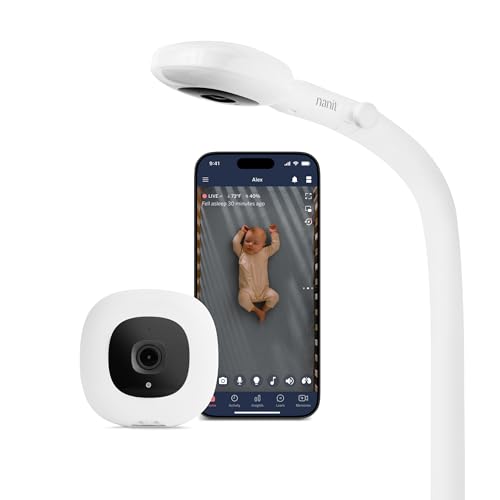
- Best flagship overall: Nanit Pro Smart Baby Monitor — Camera & Floor Stand — Check on Amazon
- CuboAi Smart Baby Monitor 3 — Floor Stand Set — Check on Amazon
- eufy Baby Monitor E21 — 4K Camera with 5-Inch Display — Check on Amazon
- Infant Optics DXR-8 PRO — Check on Amazon
- Owlet Cam 2 (Gen 2) — Check on Amazon
- Lollipop Baby Monitor (Cotton Candy) — Check on Amazon
Read the full guide ↓
Disclosure: As an Amazon Associate, dailyhomedecorating.com earns from qualifying purchases. Links to Amazon on this page are affiliate links; they cost you nothing extra. Listing details such as price and availability change often, so check the current Amazon listing before you buy.
Shopping for the best baby security camera under $500 starts with a fact most roundups bury: that budget is a ceiling, not a target. No single baby camera on the US market genuinely needs the whole amount. The flagship systems in this guide — the ones with overhead crib views, sleep analytics and AI alerts — sit comfortably below it, and the honest way to use a budget this size is to buy one excellent camera and then spend what is left on the things that actually improve daily life: a second camera for the playroom or a second child, a spare parent display, a memory card where the system uses one, or the first year of a subscription you have decided, with open eyes, is worth paying for. Every pick below is presented in that spirit, with its real ongoing costs named.
That honesty matters doubly in this category because a baby camera is not a security camera in the usual sense, and it is not a medical device either. It is a video and audio monitor with smart alerts. When a maker describes breathing-motion monitoring, covered-face detection or sleep tracking, those are manufacturer-described software features built on a camera feed — useful prompts to go and look, never guarantees, and never a substitute for safe-sleep practice: baby on their back, in a bare crib, in your room for the early months, with you checking in person. We have written every pick in this guide with that line held firmly, and we flag subscription walls, cloud dependence and storage limits wherever they hide, because at this price the difference between systems is rarely the camera — it is what the camera still charges you for after you have paid for it.
The pool below splits into three honest groups. The flagships — Nanit Pro on its floor stand and the CuboAi Smart Baby Monitor 3 — sell data and proactive alerts on top of excellent overhead pictures, and both involve plan decisions. The eufy E21 is the flagship that refuses the subscription model entirely, pairing a 4K camera with a real parent screen and local recording. Then come the value picks — the Infant Optics DXR-8 PRO, the Owlet Cam 2 and the Lollipop — which cost a fraction of the ceiling and earn their place as second cameras, travel cameras and offline backups. Read the guide with your household’s shape in mind: one crib or two rooms, your phone or a dedicated screen, data-hungry or deliberately simple. The right answer at this budget is a combination, not a single box.
In this guide
Quick picks
| Pick | Best for | Key spec |
|---|---|---|
| Nanit Pro Smart Baby Monitor — Camera & Floor Stand | Best flagship overall | 1080p Wi-Fi, floor stand, app, temp and humidity |
| CuboAi Smart Baby Monitor 3 — Floor Stand Set | Best proactive alerts | 2.5K QHD Wi-Fi, floor stand, maker AI alerts, humidity sensor |
| eufy Baby Monitor E21 — 4K Camera with 5-Inch Display | Best no-subscription flagship | 4K camera, 5-inch display, hybrid Wi-Fi/no-Wi-Fi, pan-tilt, local recording |
| Infant Optics DXR-8 PRO | Best offline second system | 720p, 5-inch display, no Wi-Fi, interchangeable lenses, pairs up to 4 cameras |
| Owlet Cam 2 (Gen 2) | Best value second camera | 1080p Wi-Fi app camera, 130-degree view, temp and humidity, cry notifications |
| Lollipop Baby Monitor (Cotton Candy) | Most flexible mounting | 1080p Wi-Fi, flexible wrap mount, crying detection, lullabies |
How we chose
We built this list for a ceiling budget, so the first criterion was flagship legitimacy: a pick had to offer something a mid-priced camera cannot — an overhead crib view with analytics, genuinely proactive alerts, class-leading resolution with a dedicated screen, or a second-system role no flagship can fill. Cameras that were merely expensive versions of ordinary Wi-Fi cameras did not make the cut, and any model whose US listing or maker specifications we could not verify was left out rather than guessed at.
Second, we priced the whole ownership, not the box. For each pick we checked what runs free, what sits behind a subscription, how long included trials and playback windows last, and whether recordings live on a local card, on the maker’s cloud, or nowhere at all. A camera whose sleep diary renews annually costs more over three years than a pricier camera with no plan, and this guide says so wherever that is true. Storage is part of the same test: local recording you control, cloud history someone else controls, or live-only viewing are three different products wearing similar plastic.
Third, we weighed the viewing model. App-only systems (Nanit, CuboAi, Owlet, Lollipop) put the nursery on the phone you already carry and let you check in from anywhere, at the cost of total dependence on Wi-Fi and the maker’s servers. Dedicated-screen systems (eufy E21, Infant Optics) keep working through internet outages and hand a babysitter a screen with no account attached. Neither is universally better; the criterion was that each pick be excellent at its own model rather than mediocre at both.
Finally, safety and honesty checks. Every pick was reviewed for cord-management reality — where the cable goes, whether guards or routing channels are included, and whether the mount tempts an unsafe install — because a camera cord within reach of a crib is a genuine hazard that marketing photos routinely ignore. And every health-adjacent claim in this guide is framed as what it is: a maker-described detection or estimate. No camera here is a medical device, none monitors vital signs, and none should ever be the reason a parent skips looking into the crib themselves.
The picks in detail
Nanit Pro Smart Baby Monitor — Camera & Floor Stand
Key spec: 1080p Wi-Fi camera, ASTM-certified floor stand included, app viewing, two-way audio, temperature and humidity sensing, split-screen for a second camera.
The Nanit Pro with the floor stand is the flagship configuration this tier is built around, and it exists to solve the one problem the wall-mount version creates: not every nursery wall can or should be drilled. The stand is a tall, weighted ASTM-certified frame that positions the 1080p camera directly above the crib for the true overhead view Nanit’s software is designed around, then the feed runs over Wi-Fi to the Nanit app with two-way audio, background audio, a built-in nightlight and white-noise sounds, and live temperature and humidity readouts. There is no dedicated parent screen in the box — your phone or tablet is the monitor — and the app supports a split-screen view if you add a second Nanit camera later, which is exactly where a budget this size starts to make sense.
The money conversation with Nanit is never just the hardware. Live video, sound, motion and cry notifications, two-way talk and the maker’s breathing-motion monitoring (which works with Nanit’s Breathing Wear garments, sold separately) run without a paid plan. Sleep analytics, saved video history and clips, milestone tracking and the deeper smart alerts sit behind the Nanit Insights subscription, billed annually; a trial of the entry plan is included with a new camera and renews automatically unless you cancel. So the honest way to price this pick is hardware plus at least a year of the plan if the sleep diary is why you are buying it. Nanit also states plainly that the camera is not a medical device: breathing-motion monitoring is a maker-described awareness feature, not a health or life-safety guarantee, and it never replaces safe-sleep practice or checking on your baby in person.
Living with the floor stand version is mostly about placement discipline. The stand’s base must sit where it cannot be tipped or pulled toward the crib, and the power cord has to be routed down the stand and completely out of the crib and out of reach — a loose cable anywhere near a crib is a genuine strangulation hazard, and Nanit’s own mounting guidance treats cord management as part of the installation, not an afterthought. The overhead angle is not optional decoration, either: the sleep and breathing-motion features are calibrated for that top-down view, so a Nanit parked at an angle on a dresser will not deliver the analytics the price promises. Video is cloud-assisted through the app rather than stored on a local card, so your Wi-Fi quality and your comfort with a cloud account are part of the purchase.
- True overhead crib view with no drilling, thanks to the included floor stand
- Deepest sleep-tracking ecosystem here when paired with an Insights plan
- Split-screen support makes a second camera a clean upgrade path
- Background audio, nightlight and white noise built in
Honest limitation: The features most buyers want most — sleep analytics and video history — need the paid Insights plan after the trial ends.
Choose the floor-stand Nanit if you want the full data-driven flagship and a no-drill install, and you accept an annual plan as part of the real cost. Skip it if you refuse subscriptions, if a stand behind the crib does not fit your room, or if you want a screen that is not your phone.
CuboAi Smart Baby Monitor 3 — Floor Stand Set
Key spec: 2.5K QHD Wi-Fi camera, floor stand included, covered-face and rollover alerts (maker AI), cry detection, humidity sensor, multi-day playback.
The CuboAi Smart Baby Monitor 3 is the challenger built around one idea: proactive alerts. Its 2.5K QHD camera watches the crib and, per the maker, uses AI detection to flag a covered face or a rollover onto the stomach, to distinguish a true cry from background noise, and to warn you if your baby enters a danger zone you draw in the app once they start standing and roaming. This floor-stand set puts the camera on a tall stand behind the crib for the overhead angle those alerts are designed around, with no drilling and nothing attached to the crib itself. Two-way audio, lullabies, night vision with no visible red glow, a room humidity sensor and multi-day video playback round out a nursery package that is deliberately the least clinical-looking device in this guide.
The honest framing for those headline alerts matters more at this price than anywhere else: they are manufacturer-described detection features, not medical monitoring. A covered-face alert is a prompt to go and look — it is not a guarantee of detection in every bedding arrangement, lighting condition or network state, and CuboAi does not sell this camera as a medical device. Treat the AI as an extra set of eyes that sometimes blinks, keep the crib bare following safe-sleep guidance, and never let an app notification substitute for your own checks. On ownership cost, CuboAi has historically kept its core alerts and a rolling multi-day playback window usable without a mandatory paid tier, with an optional premium plan adding longer history and extras; published reviews note advanced features can move behind that plan after an included first period, so check the current plan page before you buy, because app packaging in this category changes often. Video runs through CuboAi’s cloud app — there is no local memory-card recording and no dedicated parent unit.
Setup is genuinely renter- and grandparent-friendly: assemble the stand, place it so its base cannot be pulled into the crib, route the cable down the stand and away from small hands, and keep the whole assembly far enough back that a standing toddler cannot grab the camera or the cord. The floor stand also makes the CuboAi easy to move between rooms or take to a caregiver’s house, though the overhead alerts are calibrated for the stand’s crib view and will not perform the same way aimed across a playroom. Picture quality from the QHD sensor is a real step up from 1080p when you pinch-zoom on a phone screen, which is how most parents actually check whether eyes are open or closed — and at this budget, that sharpness is one of the few upgrades you can genuinely see.
- Covered-face and rollover alerts are the headline act (maker AI claims)
- Floor stand included — overhead view with no drilling
- 2.5K QHD picture is visibly sharper when zooming on a phone
- Multi-day playback has historically been included without a mandatory plan (verify current terms)
Honest limitation: No local storage and no parent screen: if your Wi-Fi or CuboAi’s cloud stumbles, so does your monitor.
Choose the CuboAi 3 if proactive crib alerts matter more to you than sleep diaries, and you want the overhead view without touching a wall. Skip it if you want recordings kept inside your home, or a screen that works when the internet does not.
eufy Baby Monitor E21 — 4K Camera with 5-Inch Display
Key spec: 4K UHD camera, 5-inch 720p parent display, hybrid Wi-Fi and no-Wi-Fi modes, pan-tilt, 8x zoom, local recording, built-in camera battery.
The eufy E21 is the pick for parents who want flagship picture quality without handing the nursery to a subscription. The camera shoots 4K UHD and pans and tilts under remote control with up to 8x zoom, while the box includes a proper 5-inch parent display — so the monitor keeps working on its own screen even if you never connect it to Wi-Fi at all. That hybrid design is the E21’s signature: run it as a closed local system on the included display, or link it to the eufy app for phone viewing and round-the-clock recording in the app when you want remote access. Active noise reduction keeps nursery sound from turning into a hiss of white noise on the parent unit, and the camera itself carries a built-in battery, so it can ride out a short outage or work for naps in a room with an awkward outlet. eufy also sells an add-on camera for this system, and the display can show two rooms on a split screen — the cleanest two-room path in this guide.
On the money question, the E21 is refreshingly plain: the maker states that all of its features are free to use with no monthly fee, and recording is handled locally rather than sold back to you as a cloud plan. That changes the real cost of ownership across two or three years of use more than any single feature on this page, and it is why this pick anchors the value end of a tier where rivals keep charging rent on their own hardware. The trade-offs are equally plain. The parent display is 720p, so the 4K detail is best appreciated in the app feed and in zoomed views rather than on the handheld screen, and families who want sleep analytics, cry diaries or milestone tracking will find none of that here — eufy sells you an excellent camera and screen, not a data service. eufy is also explicit that this is a video and audio monitor: it does not measure breathing, heart rate or oxygen, and nothing it shows should be treated as a health reading.
In daily use the E21 behaves like the grown-up security-camera brand it comes from: motion and sound alerts, two-way talk, temperature awareness and straightforward pan-tilt controls. The camera needs a stable perch or mount with its power cable dressed safely away from the crib — the battery is a bridge for outages and travel, not a way to leave a camera loose within reach, and a camera within grabbing range of a standing baby will eventually be grabbed. For twins or a nursery-plus-playroom setup, the add-on camera route means the second room costs a camera, not a second full system, which is precisely how a generous budget should be spent. If your shortlist question is which of these will still be fully yours in three years with no monthly bill, the E21 is the answer in this tier.
- Best-in-guide camera resolution with pan, tilt and 8x zoom
- Included 5-inch display works with Wi-Fi switched off entirely
- No subscription needed for core monitoring or local recording
- Add-on camera and split-screen viewing for a second room
Honest limitation: No sleep analytics or smart diary features, and the parent screen is 720p despite the 4K sensor.
Choose the E21 if you want premium hardware, a real parent screen and zero ongoing fees, and you do not care about sleep data. Skip it if nightly sleep reports are the whole point of spending at this tier.
Infant Optics DXR-8 PRO
Key spec: 720p camera with dedicated 5-inch display, no Wi-Fi, Active Noise Reduction, pan-tilt-zoom, interchangeable lenses, pairs up to four cameras.
The DXR-8 PRO is the veteran of this roundup and, in a guide about a very generous budget, its role is specific: it is the offline half of a two-system strategy. There is no Wi-Fi, no app, no account and no subscription — the camera talks directly to its dedicated 5-inch parent display over a closed second-generation FHSS wireless link, and that is the entire system. Resolution is 720p, which sounds modest next to 4K badges, but the PRO’s party trick is Active Noise Reduction, which filters the hiss, hum and static that make most audio monitors fatiguing to listen to all night. Interchangeable lenses — a standard lens in the box, with optical zoom and wide-angle lenses available from the maker — let you tune the view to a small nursery or a wide toddler room, the camera pans, tilts and zooms from the parent unit, and one display can pair with up to four cameras.
Why does a 720p offline monitor belong in an under-$500 guide at all? Because at this budget the smart move is often two monitors, not one: a connected flagship for your phone, plus this as the always-works screen for the nightstand, the babysitter and the grandparents’ house. It removes every recurring complaint about smart cameras — nothing to reach through the home network, nothing that stops when the internet drops, no plan quietly renewing, no firmware update changing the app the week the baby arrives — and a screen that is always a screen, never a phone you also need for everything else. The honest limitations are the mirror image of those strengths: you cannot check in from work or the driveway, there are no cry-detection smarts, no sleep data, no recordings to review, and the picture will not reward pinch-zooming the way the eufy or CuboAi will. Range is also a physical fact: thick walls and distance between nursery and parent unit matter in a way they do not for Wi-Fi systems.
Setup is the simplest here: place the camera where it sees the crib, keep it and its cord well out of reach — the same cord discipline applies, out of the crib, secured, at least a full arm’s length plus growing margin from small hands — pair nothing, create no account, and you are monitoring in minutes. Battery life on the parent unit, the second-camera pairing for siblings, and the lens options are the three things to verify on the listing for your household’s layout. Bought alone it leaves much of this budget unspent, and that is fine: the leftover buys the add-on camera, the wide-angle lens and years of zero running costs. As the second monitor in a house that already owns a smart camera, it has no real rival in this guide.
- Completely offline: no Wi-Fi, no app, no account, no subscription, ever
- Active Noise Reduction makes overnight audio far less fatiguing
- One display pairs with up to four cameras for multi-room coverage
- Interchangeable lenses adapt it from crib close-up to whole-room view
Honest limitation: 720p picture, no remote viewing, no recordings and no smart alerts of any kind.
Choose the DXR-8 PRO if privacy, simplicity and zero running costs outrank apps and analytics — especially as the dedicated-screen half of a two-system home. Skip it as your only monitor if you need to see the nursery from outside the home or want any form of sleep tracking.
Owlet Cam 2 (Gen 2)
Key spec: 1080p Wi-Fi camera, 4x zoom, 130-degree wide-angle view, two-way talk, sound/motion/cry notifications, temperature and humidity sensor, cable guards included.
The Owlet Cam 2 is the compact, good-looking Wi-Fi camera in this tier — a small 1080p unit with a 130-degree wide-angle lens, 4x digital zoom, night vision, two-way talk and sound, motion and cry notifications through the Owlet Dream app, with temperature and humidity sensing built in. In a guide about a generous ceiling, its role is the second-camera and travel role: it is the camera you add for the playroom, the grandparents’ house or the bassinet by your bed while the flagship covers the nursery, or the single camera for families who would rather bank most of this budget than spend it. It is the camera-only member of a family whose famous sibling is a wearable sock, sold separately and not part of this pick; judged purely as a camera, its appeal is a clean picture, a tidy magnetic-base design that sits neatly on a shelf or wall mount, and an app built for exhausted one-handed use at 3 a.m. The box includes cable guards — a small, telling detail, because the maker expects the cord to be covered and routed away from the crib as part of a safe install.
Cost honesty for the Owlet: live viewing and basic alerts in the Dream app are the free foundation, and the maker offers an optional paid tier (Owlet360) that extends how long event video clips are stored — a short window of clip storage is included, longer history is the upgrade. Check the current app plan page before you buy and confirm which features are free today, because packaging in this category shifts. Also be clear-eyed about what a camera can and cannot tell you: cry and motion notifications are convenience alerts, and any breathing or wellness language around the wider Owlet ecosystem refers to separate wearable products with their own instructions and limitations — the Cam 2 on its own is a video monitor, not a health device, and nothing it shows replaces safe-sleep practice or your own checks. Video is encrypted in transit per the maker, and there is no parent screen and no local memory-card slot, so the Cam 2 is a cloud-app monitor through and through.
Living with the Cam 2 is easy in the ways that matter nightly: background audio options, quick talk-back, and a picture that holds up well in a dark room. Its weaknesses are the category’s usual ones — total dependence on your Wi-Fi and phone, no offline fallback screen for a sitter who does not have the app, and no sleep analytics depth to rival the Nanit if data is your thing. Mount it or place it with the cable routed down, covered by the included guards, and away from the crib, never draped where a standing child can reach it. As a first smart camera for parents who want the nursery on their phones and nothing more complicated — or as the affordable second eye in a two-camera home — it earns its place here on simplicity.
- Clean 1080p picture with a genuinely useful wide-angle lens
- Temperature and humidity sensing plus cry notifications in one tidy unit
- Cable guards included in the box for a safer install
- Small, neat design that disappears on a shelf
Honest limitation: App-only viewing: no parent screen, no local recording, and longer clip history sits in the optional paid tier.
Choose the Cam 2 if you want a straightforward phone-based monitor, or an affordable second camera alongside a flagship. Skip it if you want recordings stored at home or a screen a babysitter can use without your phone.
Lollipop Baby Monitor (Cotton Candy)
Key spec: 1080p Wi-Fi camera, flexible wrap-around mount, true crying detection (maker), two-way audio, infrared night vision, in-app plan extras.
The Lollipop is the design object of the group: a 1080p Wi-Fi camera on a flexible, bendable stem that wraps around a shelf edge, a floor lamp or a stand, or stands on a surface with its tail as a tripod. That mount is not a gimmick — it solves the most common nursery problem, which is that the perfect camera position is rarely where a shelf happens to be. The maker’s headline software feature is true crying detection, designed to distinguish an actual cry from a barking dog or a door slam before it pings your phone, alongside two-way audio, infrared night vision, lullabies and white-noise playback, and event clips in the app. There is no parent unit; like the Nanit and Owlet, your phone is the screen. In this tier it plays the flexible-second-camera role: the one that travels, covers the playroom, and goes where the fixed mounts cannot.
Two honesty notes belong with the Lollipop. First, the app sells an optional paid plan that unlocks extras such as the maker’s breathing-monitoring and sleep-tracking features — maker-described, camera-based estimates, not medical measurements, and no substitute for safe sleep or in-person checks; the camera’s core live view and crying detection are the free foundation, but confirm the current plan split on the maker’s page before purchase, because the line between free and paid has moved before. Second, the wrap mount tempts people to attach the camera directly to the crib rail with its cable nearby — resist sloppy versions of this. The camera body may grip a rail or shelf, but the power cable must still be routed away from the crib interior and out of reach, and once your baby can stand and grab, a rail-mounted camera is within range of determined hands; move it further back and re-check the view. Cloud dependence applies here too: no local card recording, so the app and your Wi-Fi are the whole system.
Where the Lollipop shines is flexibility across the first two years: crib-side now, playroom shelf later, wrapped around a travel crib at a relative’s house in between. Its picture and night vision are solid rather than class-leading, and data people will find its sleep features thinner than Nanit’s. But as the one camera in this guide that can perch almost anywhere without a stand, a shelf or a drill, it solves real rooms that defeat fixed-mount rivals — which is why it closes out this pool. Bought as a second camera beside a flagship, it turns the leftover budget into coverage of the room the flagship cannot see, and that is a better use of the money than a marginally fancier single camera.
- Flexible stem mounts almost anywhere — no shelf, stand or drilling needed
- True crying detection aims to cut false alerts (maker feature)
- Doubles as a travel and playroom camera as your child grows
- Lullabies and white noise built in
Honest limitation: Best extras sit in a paid in-app plan, and there is no local recording or parent screen.
Choose the Lollipop if your rooms defeat fixed mounts and you need the mount itself to be the solution — especially as a flexible second camera. Skip it if you want deep sleep analytics or an offline fallback screen.
Side-by-side comparison
| Pick | Viewing | Storage | Subscription | Best for |
|---|---|---|---|---|
| Nanit Pro Smart Baby Monitor — Camera & Floor Stand | Phone/tablet app | Cloud app history (plan tiers) | Insights plan unlocks sleep analytics and video history after the included trial | Best flagship overall |
| CuboAi Smart Baby Monitor 3 — Floor Stand Set | Phone/tablet app | Cloud app, multi-day playback | Core alerts and multi-day playback included; optional premium tier for extended history | Best proactive alerts |
| eufy Baby Monitor E21 — 4K Camera with 5-Inch Display | 5-inch display + app | Local recording | No subscription — all features included, local recording | Best no-subscription flagship |
| Infant Optics DXR-8 PRO | 5-inch dedicated display | None — live only | No subscription, no account, no recording — live view only | Best offline second system |
| Owlet Cam 2 (Gen 2) | Phone app | App event clips (short window included) | Optional paid tier extends clip storage; live view and alerts included | Best value second camera |
| Lollipop Baby Monitor (Cotton Candy) | Phone app | App event clips | Optional in-app plan unlocks breathing/sleep extras; live view and cry detection included | Most flexible mounting |
How to choose the best baby security camera under $500 for your home
Start by deciding what the money is for. If nightly sleep summaries, milestone clips and a data diary genuinely appeal to you — and you accept an annual plan as part of the price — the Nanit Pro is the deepest version of that idea, and its floor stand removes the drilling objection. If you would rather be alerted than informed, the CuboAi 3’s covered-face and rollover alerts (maker-described, always verify in person) point the other way. If both pitches leave you cold, the eufy E21 converts the same budget into hardware alone: the sharpest camera here, a real screen, local recording and no plan, ever. None of these is the wrong answer; buying one while wanting another’s strengths is the only real mistake.
Next, audit your home’s constraints before falling for features. App-only cameras need strong Wi-Fi in the nursery itself, not just in the hallway — test the signal at the crib with the door closed. Overhead systems need somewhere for a stand or a wall you may drill; renters should note both flagships here offer floor-stand sets for exactly that reason. Dedicated-screen systems need the nursery within radio range of wherever the screen will live, and thick masonry walls shorten every maker’s optimistic range figure. Measure your actual rooms against the system type first, and the feature list second.
Then decide your storage and privacy posture explicitly, because the picks split cleanly. Local recording (eufy) keeps footage in your home and under your control, at the cost of losing it if the camera is taken or fails. Cloud history (Nanit, CuboAi, Owlet, Lollipop) survives the camera and enables the smart features, at the cost of an account, a subscription for the deeper history, and trust in the maker’s security. Live-only (Infant Optics) records nothing at all, which some families consider the most private option of all. There is no neutral choice here — only the one you can explain to yourself at 3 a.m.
Last, plan the install as a safety task, not a gadget task. Wherever the camera goes, its cord must be routed completely out of the crib and out of reach — down a stand, inside a cable guard, flat against a wall — with slack removed, and the arrangement re-checked the day your baby first pulls to standing, because reach grows faster than habits. Place stands so they cannot be tipped toward the crib, keep cameras themselves beyond grabbing distance, and remember that every alert these systems send is a prompt for your own eyes. A monitor that helps you look sooner is doing its whole job; one that promises to watch so you do not have to is promising something no camera in this guide can deliver.
Where the rest of the budget should actually go
Because no single camera here needs the whole ceiling, the most useful section of this guide may be this one: how experienced parents actually deploy the leftover money. The highest-value purchase is a second camera. A nursery camera watches sleep; a second camera watches the playroom, the toddler’s bedroom after the move out of the crib, or the bassinet in your room during the newborn weeks. Systems differ sharply here — the eufy E21 adds a camera to the same display with split-screen viewing, the Nanit app splits its screen between two Nanit cameras, and the Infant Optics display pairs with up to four of its cameras — so if two rooms are in your future, choose the flagship whose expansion path you like, because mixing brands means living in two apps.
The second-best use of the surplus is the viewing screen. App-only flagships assume your phone is always free, charged and allowed to be a monitor all night; many parents discover at 2 a.m. that it is none of those things. A budget this size comfortably covers a dedicated-screen system like the DXR-8 PRO alongside an app flagship, giving you a nightstand screen that always works and a phone feed for the garden and the office. Grandparents and babysitters benefit most: handing over a screen needs no password, no app install and no access to your accounts.
Third, fund the boring consumables and commitments deliberately. If you choose a subscription flagship, pre-funding the first year or two of its plan turns a surprise renewal into a known cost. If you choose a local-recording system, buy the largest memory card the maker supports on day one, because the week you need footage is the wrong week to discover the card filled up. Add the wide-angle lens for an Infant Optics, the extra Breathing Wear sizes for a Nanit, a spare charging cable for the parent unit that will inevitably vanish — small purchases, each of which removes a specific future frustration. What the surplus should not buy is a second flagship from a rival ecosystem: two analytics platforms means two subscriptions, two apps and two alert philosophies arguing on your phone all night.
Common mistakes
Treating the ceiling as a target. Spending the full amount on one camera because the budget allows it leaves the playroom unwatched and the subscription unfunded. Decide the combination first — flagship plus second camera, or flagship plus dedicated screen — and let the total follow.
Ignoring the subscription until the trial ends. On plan-based systems the trial expires quietly and renews automatically. Before buying, write down what runs free, what the plan unlocks, and what it costs per year — then decide whether the diary is worth it, in advance, on purpose.
Believing alert language literally. Covered-face, rollover and breathing-motion features are maker-described detection on a video feed. They can miss, they can false-alarm, and none of them makes a camera a medical device. The crib stays bare and the checks stay yours.
Routing the cord for the photo, not the child. A cable draped down the crib rail or hanging within reach is a strangulation hazard, whatever the product pictures show. Route it away, guard it, remove the slack, and re-check it at every new stage of mobility.
Buying two rival ecosystems. Two flagships from different brands means two apps, two plans and two alert styles. Expand inside one system — its second cameras are designed for exactly that — or pair one smart system with one deliberately dumb offline screen.
Testing Wi-Fi from the doorway. Nursery signal with the door closed, at night, with the microwave running, is the real specification. Check it where the camera will actually live before the return window starts.
Final recommendation
Our recommendation for most families shopping at this level is the Nanit Pro on its floor stand, bought with eyes open about the Insights plan: it is the most complete nursery system here, with the overhead view, the deepest sleep software and a no-drill install, and the budget comfortably covers the camera plus a funded first stretch of the plan it needs to shine. Add the Owlet Cam 2 later as the playroom camera and you have spent the ceiling the way it deserves to be spent — on coverage, not on a single box.
If the subscription model itself is the objection, the answer is the eufy E21, full stop: the sharpest camera in this guide, a real parent screen, local recording, an add-on camera path for a second room, and a maker who states plainly that everything is free to use. Pair it with nothing, or with the DXR-8 PRO as a travel and grandparents’-house unit, and the three-year cost of the whole setup is the hardware alone. And if proactive alerts are what you are actually shopping for, the CuboAi 3 is the one built around them — just hold its maker-described detection to the standard it deserves: a helpful prompt to go and look, every single time.
Check the Nanit Pro Smart Baby Monitor — Camera & Floor Stand on Amazon · Check the CuboAi Smart Baby Monitor 3 — Floor Stand Set on Amazon · Check the eufy Baby Monitor E21 — 4K Camera with 5-Inch Display on Amazon
Frequently asked questions
Is any single baby camera really worth spending the full amount on?
In our assessment, no single camera needs the entire ceiling. The flagships in this guide sit well below it, and the better use of a generous budget is a combination: one flagship, plus a second camera, a dedicated screen or a funded subscription year. Treat the figure as headroom, not as a price to aim at.
What does a subscription actually unlock on the flagship cameras?
On the Nanit Pro, the Insights plan unlocks sleep analytics, saved video history and clips, milestone tracking and deeper smart alerts; live viewing, two-way talk and basic notifications run without it. The CuboAi 3 has historically included its core alerts and multi-day playback without a mandatory plan, with an optional premium tier for longer history. The eufy E21 and Infant Optics DXR-8 PRO have no subscription at all. Always check the current plan page before buying, as packaging changes.
Can these cameras monitor my baby’s breathing or health?
No. None of the cameras in this guide is a medical device and none measures vital signs. Nanit’s breathing-motion monitoring and similar features are maker-described estimates based on video of a special garment or the crib scene. They are prompts to check on your baby, not health readings, and they never replace safe-sleep practice or in-person checks.
Wi-Fi app camera or dedicated parent unit — which is better at this price?
They solve different problems. App cameras (Nanit, CuboAi, Owlet, Lollipop) let you check in from anywhere and carry the smart features, but depend entirely on your Wi-Fi and the maker’s cloud. Dedicated-screen systems (eufy E21, Infant Optics) work through internet outages and need no account, but cannot be viewed from outside the home. The eufy splits the difference with both. Many families at this budget run one of each.
Where do recordings live on these systems?
It varies by pick: the eufy E21 records locally, Nanit and CuboAi keep history in their cloud apps (with plan tiers affecting how much), Owlet stores short event clips in its app with longer storage in its optional paid tier, the Lollipop keeps event clips in its app, and the Infant Optics records nothing at all — live view only. Choose the model whose storage matches your privacy comfort.
How should the camera cord be handled safely?
Route it completely out of the crib and out of your child’s reach — down the back of a stand, inside cable guards where provided, or flat and secured against the wall — with no slack loops anywhere near the crib. Keep the camera itself beyond grabbing distance, place stands so they cannot tip toward the crib, and re-check the whole arrangement when your baby starts pulling up to stand.


