Where to buy
Shopping for the best baby security camera for small homes under $200? Check the latest price, availability and delivery on Amazon. Orders are placed on Amazon. We may earn a commission from qualifying purchases. Every set below is a complete purchase with no subscription required; check price on Amazon before you buy, because listing prices change often.
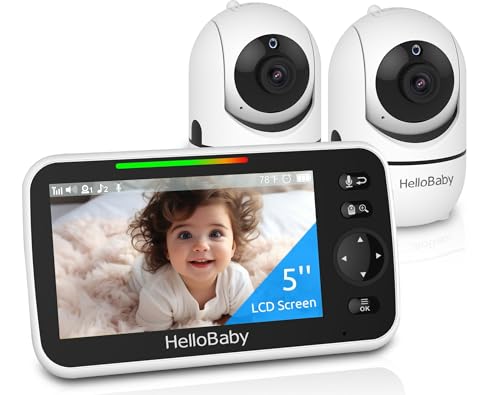
- Best first look: HelloBaby HB6550-2 Baby Monitor with 2 Cameras — Check on Amazon
- eufy SpaceView Baby Monitor E110 — Check on Amazon
- Infant Optics DXR-8 PRO Video Baby Monitor — Check on Amazon
- VTech VM350-2 Baby Monitor with 2 Cameras — Check on Amazon
- Motorola VM50G-2 Baby Monitor with 2 Cameras — Check on Amazon
- Babysense HDS2 5-Inch HD Split-Screen Baby Monitor with 2 Cameras — Check on Amazon
Step-up above this budget, covered prose-only in this guide: the Nanit Pro Wi-Fi app camera (premium tier, paid subscription for its insights features) — discussed honestly in its own section below, with no link, so its full cost is visible.
Read the full guide ↓
Disclosure: As an Amazon Associate, dailyhomedecorating.com earns from qualifying purchases. Links to Amazon on this page are affiliate links; they cost you nothing extra. Listing details such as price and availability change often, so check the current Amazon listing before you buy.
Choosing the best baby security camera for small homes under $200 is a different exercise from shopping for a big house, and the difference is not range — in a compact home every room is close. The difference is proportion. Shelf space is scarce, the nursery is often a corner or the smaller bedroom, the parent unit will be carried into every room including the kitchen, and a system sized for a sprawling floor plan brings bulk a small home feels daily. The six sets here are chosen for compact living: efficient footprints, wide lenses that let one camera do two cameras’ work, and two-camera sets whose second camera earns its shelf by watching the living-area play zone your child actually lives in.
Small homes also forgive nothing about placement. There is rarely a spare dresser for the camera, rarely a hidden route for its cord, and the crib is close to everything — which makes the standing rules of this guide more important, not less: camera and cord at least three feet from the crib and fixed out of reach, and a clear head about what a monitor is — a convenience for an awake caregiver nearby, never a substitute for one, however few steps away the next room is.
Three honest framings before the picks, small-home edition. First, architecture: every linked pick is a non-Wi-Fi set with its own parent-unit screen — no router demands, no app accounts — and the one famous Wi-Fi name, the Nanit Pro, sits above this budget, covered prose-only below with its subscription for extra features stated plainly. Second, storage: these sets are live-only; nothing is saved to a cloud or a card, so there is nothing to pay monthly and nothing to review later. Third, claims: sleep or breathing-motion tracking language from any maker is that maker’s claim, not a medical measurement, and a camera never replaces an awake adult in the home — a point that matters in small homes too, where it is tempting to treat a nearby camera as a nearby person.
One rule applies to every camera in this guide and matters more than any feature: keep the camera and its power cord at least three feet from the crib, fixed so a child who can stand and reach cannot touch either. Cords within reach of a crib are a strangulation hazard. And no monitor — at any price — replaces an awake caregiver in the home, safe-sleep practice, or checking your child in person.
In this guide
Quick Picks
In a hurry? This table matches each set to the household it serves best in this guide.
| Buyer type | Pick | Why it stands out | Link |
|---|---|---|---|
| Best two-camera value | HelloBaby HB6550-2 Baby Monitor with 2 Cameras | 5-inch screen, 2 cameras, pan-tilt-zoom, VOX mode, night vision, two-way talk, room temperature display, no Wi-Fi | Check on Amazon |
| Best wide view | eufy SpaceView Baby Monitor E110 | 720p HD, 5-inch display, no Wi-Fi, 110-degree wide-angle lens included, pan and tilt, lullaby player, sound alert | Check on Amazon |
| Best overall | Infant Optics DXR-8 PRO Video Baby Monitor | 720p HD, 5-inch display, no Wi-Fi FHSS link, Active Noise Reduction, pan-tilt-zoom, interchangeable lens system | Check on Amazon |
| Best established-brand two-camera set | VTech VM350-2 Baby Monitor with 2 Cameras | 5-inch screen, 2 cameras, night vision, two-way talk, lullabies, sound-activated screen, secure FHSS transmission, no Wi-Fi | Check on Amazon |
| Best remote camera movement | Motorola VM50G-2 Baby Monitor with 2 Cameras | 5-inch screen, 2 cameras, remote pan tilt and zoom, room temperature sensor, two-way audio, lullabies, night vision, no Wi-Fi | Check on Amazon |
| Best split screen | Babysense HDS2 5-Inch HD Split-Screen Baby Monitor with 2 Cameras | 5-inch HD split-screen display, 2 cameras, night light on camera, 4x zoom, two-way audio, expandable to 4 cameras, no Wi-Fi | Check on Amazon |
How These Picks Were Chosen
We chose for footprint and flexibility. Single wide-view cameras that cover a sleep corner and its room ranked highly, because in a small home one well-placed camera often replaces two; two-camera sets had to justify their second camera with a real second zone, usually the living-area play space. Parent units were judged as carried objects — battery behaviour in VOX mode, sound-activated screens that stay dark and quiet until needed — because in compact homes the unit is never parked in one place.
Architecture stayed consistent with this guide’s tier logic: non-Wi-Fi parent-unit sets only in the linked list, no subscriptions, no cloud, no recording — with the familiar Wi-Fi step-up covered prose-only above budget. Maker range claims matter least in this lens (distance is not a small home’s problem) and were discounted accordingly; wall penetration was tested reasoning instead — check your own unit during the return window. No reader scores or review tallies were used as evidence.
We did not hands-on test these monitors. Picks were compared on manufacturer specifications and listing evidence — connection type, screen size, camera movement, included cameras, storage and subscription terms — verified against the sources recorded with this article, and every figure a maker quotes about its own product (range, battery life, tracking features) is presented in this guide as a maker claim, not as a measured fact.
Two verification passes deserve explicit mention, because baby cameras attract more marketing fog than most nursery products. The first is the money pass: for every candidate we confirmed whether the purchase is complete in the box or merely the entry fee — whether an app is required, whether features sit behind a subscription, whether the wide lens or the second camera is included or sold separately, and whether any storage exists at all. Candidates whose real first-year cost quietly exceeded this guide’s budget were either excluded or, in the one prominent case, demoted to a clearly labelled prose-only step-up with no purchase link. The second is the claims pass: any language about sleep tracking, breathing motion, safety or security was rewritten to say exactly what the maker says and nothing more. A monitor that reports a room temperature is reporting a sensor reading; a system that describes breathing-motion tracking is describing its own algorithm, not certifying an outcome. Where a claim could not be tied to the maker’s own published specification, it did not enter this guide. That discipline costs some exciting adjectives. It is also the reason you can trust the boring sentences — the ones about cords, subscriptions and storage — completely.
The 6 Best Baby Security Cameras for This Guide
HelloBaby HB6550-2 Baby Monitor with 2 Cameras
Who it suits: Parents who need two rooms covered — siblings, a nursery plus a play space, or a crib plus a toddler bed — and who value a parent unit that lasts through the night without living on its charger.
The HB6550-2 bundles two pan-tilt-zoom cameras with one 5-inch parent unit. The maker rates the parent unit battery for up to 30 hours in its power-saving VOX mode, which wakes the screen when sound is detected; continuous video streaming uses far more power, as it does on every monitor, so read that figure as a maker claim about light-duty overnight use rather than a promise of a day and a half of full video. VOX, two-way talk, automatic night vision, a room-temperature readout and a set of lullabies cover the everyday checklist, and the cameras take turns or are selected from the parent unit rather than shown simultaneously — if true side-by-side viewing matters, the Babysense split-screen pick below is the honest alternative.
This is another fully non-Wi-Fi design: no app, no account, no cloud storage, no subscription and no recording. The feed exists only on the parent unit, inside the home, over the maker’s quoted range of up to 1,000 feet in open space — a maker claim that real walls will reduce substantially. What you give up in phone access you gain back in predictability: the system behaves the same during an internet outage as it does on a normal evening, and there is no password or cloud service to manage.
Two cameras double the placement discipline. Each camera is mains-powered, each cord must be fixed at least three feet from any crib or bed a child can reach from, and each camera needs a stable mount or shelf that a standing toddler cannot pull down. Set both cameras up before the baby arrives if you can; threading cords safely behind furniture is much easier without a newborn’s schedule running the house.
Small homes make the HB6550-2’s two cameras useful in a way big homes do not need: the distances are short, so one parent unit covers the whole home easily, and the second camera watches the living-room play corner that is also the dining room and the office. The maker-rated battery matters here too — in a small home the parent unit travels to every room with you, rarely sitting on its charger.
- Two pan-tilt-zoom cameras in one box for siblings or two rooms
- Maker-rated long parent-unit battery in VOX power-saving mode
- Temperature display, two-way talk and lullabies cover the daily checklist
Honest limitation: The two cameras are viewed by switching or scanning, not side by side, and the long battery figure is a maker claim for VOX mode, not continuous video.
Choose it if two rooms must be covered on a budget and overnight battery life matters more than split-screen viewing. Skip it if simultaneous side-by-side viewing is the point — choose the Babysense instead.
eufy SpaceView Baby Monitor E110
Who it suits: Parents whose nursery is wide, shared or awkwardly shaped, and who want the whole room in frame from day one without buying an extra lens.
The SpaceView E110 earns its place on a single generous decision: the wide-angle lens is in the box. Where the Infant Optics design sells width as an accessory, eufy includes a 110-degree wide-angle lens alongside the standard view, so a camera placed in a corner can take in the crib, the changing table and the door in one frame. The camera pans and tilts from the parent unit, the 5-inch display shows a 720p picture, and a built-in lullaby player plus a sound alert round out a spec that is deliberately focused on the nursery rather than the phone in your pocket.
Like most of this guide, the SpaceView is a non-Wi-Fi system. There is no eufy app account for this model, no cloud plan and no subscription; the camera links directly to its parent unit. That also means no remote viewing from outside the home and no saved video — the recording question simply does not arise, because the system is live-only. Families who want phone access should look honestly at the hybrid and Wi-Fi designs discussed in the how-to-choose section, including their subscription and privacy trade-offs, rather than expecting this set to grow an app later. It will not.
Battery and range figures for this class are maker claims measured in open conditions; walls, floors and neighbouring networks shorten real range in every home, so treat headline numbers as a best case and test the link from the rooms you actually use during the return window. Placement safety is the same rule as every mains-powered camera here: mount or set the camera so neither it nor its power cord can be reached from the crib — at least three feet away, cord fixed to the wall — because a pulled cord is a strangulation hazard, not a tidiness issue.
In a small home, one camera must often do the work of two, and the SpaceView’s included wide lens is built for exactly that economy. A single corner camera frames the crib and the room it sits in; there is no second camera to find a shelf for, no extra cord to route in a space where every cord is visible. When square footage is the scarcest resource in the purchase, width beats quantity.
- Wide-angle lens included in the box — whole-room framing without accessories
- 5-inch 720p display with pan and tilt from the parent unit
- No Wi-Fi, no account and no subscription to manage
Honest limitation: Live view only: no recording, no phone access, and the wide view is a lens swap rather than a second camera, so two rooms need a second camera unit.
Choose it if your room is wide or shared and a corner camera must see all of it from the first night. Skip it if you need two rooms covered, or any form of recording or phone check-in.
Infant Optics DXR-8 PRO Video Baby Monitor
Who it suits: Parents who want the most adaptable non-Wi-Fi picture in this price tier — one camera that can be reframed with lenses as the nursery changes, on a private radio link that never touches the home network.
The DXR-8 PRO is built around two ideas that still separate it from cheaper monitors. The first is its interchangeable lens system. The standard lens handles a normal crib view; a wide-angle lens and a zoom lens are available separately from the maker, so the same camera can cover a whole toddler room later or tighten in on a small crib now, without replacing the monitor. The second is Active Noise Reduction, the maker’s patented filtering that cuts the background hiss, fan hum and white-noise-machine wash that make overnight listening so tiring on basic monitors. The maker presents both as its own technology, and the practical effect parents describe is simple: a cleaner picture framing and cleaner sound on a 5-inch, 720p display.
Connection honesty matters with this pick. There is no Wi-Fi, no app and no cloud account. The camera talks only to its dedicated parent unit over a secured FHSS radio link, so there is no subscription, no cloud storage and also no recording at all — this is a live-view and live-listen monitor, and if saving clips matters to you, a different architecture is the honest answer. The trade is privacy and simplicity: nothing leaves the house, nothing depends on your router, and the monitor keeps working when the internet does not.
Safety placement is part of owning any camera, and this one is no exception. The camera is mains-powered, so its cord must be routed completely out of reach — camera and cord at least three feet from the crib, cord secured along the wall, never draped over the crib rail. A monitor camera is a watching aid for a caregiver who is awake and nearby in the home; it does not watch the baby for you and it never replaces direct supervision or safe-sleep practice.
The DXR-8 PRO suits small homes that will not stay small-home nurseries forever: the lens system means the same camera frames a tight crib corner now and a whole bedroom after a move. Its compact camera body and single-camera simplicity respect tight shelf space, and the private radio link ignores the home’s layout entirely — range is a non-issue when no room is far away.
- Interchangeable lenses adapt one camera from crib close-up to whole-room view
- Active Noise Reduction cleans up overnight listening (maker technology)
- No Wi-Fi, no app, no subscription — a private link to its parent unit only
Honest limitation: It sits at the top of this budget tier — check the current price on Amazon before you buy — the extra lenses are separate purchases, and there is no recording of any kind.
Choose it if your nursery will change — crib, then toddler bed, then playroom — and you want one camera system that reframes instead of being replaced. Skip it if you need saved video, phone viewing, or a second room covered from the same box.
VTech VM350-2 Baby Monitor with 2 Cameras
Who it suits: Parents who prefer a long-established nursery brand with straightforward controls, covering two rooms without apps, accounts or monthly anything.
VTech’s VM350-2 pairs two cameras with a 5-inch parent-unit screen, automatic night vision, two-way talk and a set of lullabies, on a secure FHSS radio link the maker describes as private and hack-resistant in the ordinary sense that it never joins your network at all. The cameras are viewed one at a time from the parent unit — this is not a split-screen set — and a sound-activated mode wakes the screen when a room gets loud, which stretches battery life overnight. The maker’s range figure for this class is quoted for open space; in a real home, expect the link to be a whole-home tool in most layouts and a same-floor tool in dense construction, and verify yours during the return period.
The storage and subscription answer here is the simplest in the guide: there is none of either. No cloud, no memory card, no app, no recording, no plan. The VM350-2 is a live window into two rooms and nothing more, which is either exactly right or clearly wrong for your family — and knowing which is the real buying decision. Parents who travel for work and want phone check-ins should not buy this set hoping to add access later; they should buy a Wi-Fi or hybrid design from the start.
Brand familiarity does not change the physical rules. Both cameras are mains-powered: place each at least three feet from the crib or bed it watches, fix cords to the wall out of reach, and never run a cord across or inside the crib. A camera that can be grabbed will eventually be grabbed by a standing child, so mount high, route behind furniture, and revisit the setup at every mobility milestone.
The VM350-2’s two compact cameras fit small homes without dominating them, and its sound-activated screen is a small-space kindness: in a home where the nursery is never far from the living room, you do not need a glowing, chattering monitor all evening — you need one that wakes when the baby does. Simple, quiet and proportionate is the correct design language at this scale.
- Established nursery brand, simple half-asleep controls
- Two cameras with sound-activated screen to save battery overnight
- No app, no cloud and no subscription — live viewing only
Honest limitation: No split screen and no recording; the picture is functional rather than the sharpest here, and extra cameras are a separate purchase.
Choose it if you want a known brand, two rooms and controls a grandparent can run without a tutorial. Skip it if you want the sharpest picture, split screen, or any smart features at all.
Motorola VM50G-2 Baby Monitor with 2 Cameras
Who it suits: Parents who reposition the camera view constantly — following a rolling baby, a climbing toddler or a pet that shares the nursery — and want that movement motorised, quiet and done from the sofa.
The VM50G-2’s strength is its remote pan, tilt and zoom across two cameras on a 5-inch parent unit. Instead of a fixed wide shot, you steer the view: across the crib at bedtime, toward the play mat in the morning, down the length of a toddler bed at nap time. A room-temperature sensor on the camera reports back to the parent unit, two-way audio lets you speak into the room, and lullabies and night vision cover the standard overnight list. Motorola’s nursery line is a familiar name in this category, and the controls follow the conventional layout most parents can run half-asleep at 3 a.m., which is a genuine feature.
Connection, storage and cost are the familiar non-Wi-Fi settlement: a direct FHSS link to the dedicated parent unit, no app, no cloud, no recording and no subscription. The maker’s range claim for this class is an open-space figure; brick, concrete and multiple floors will cut it, so buy from a retailer whose returns let you test your own walls. If phone viewing or saved clips are on your must-have list, this is the wrong architecture, however good its camera movement is.
Motorised cameras invite one specific placement mistake: setting the camera close because the zoom feels powerful. Resist it. The camera and its mains cord still belong at least three feet from the crib, fixed so a standing child cannot reach or pull either. Zoom exists precisely so the camera can stay safely far away while the picture comes close — use it that way, and re-check cord routing whenever furniture moves.
A small home rarely offers the perfect camera shelf, and the VM50G-2’s motorised view turns whatever shelf exists into the right one. One camera on a bookcase can serve the crib at night and swing to the play area by day — two jobs, one device, one cord to route. In a compact home, a camera that moves is a camera you do not need two of.
- Motorised pan, tilt and zoom follows a moving child from the parent unit
- Room-temperature sensor reported on the parent unit
- Two cameras included, from a familiar nursery brand
Honest limitation: Camera resolution is modest next to the sharpest picks here, there is no recording, and motorised movement is wasted if your nursery view never changes.
Choose it if your child’s sleep position roams and you re-aim the camera nightly from your own bed. Skip it if your camera view is fixed on one crib — a simpler, sharper pick serves you better.
Babysense HDS2 5-Inch HD Split-Screen Baby Monitor with 2 Cameras
Who it suits: Parents of two children — twins above all — who want both rooms visible on one screen at the same time, not alternating on a scan cycle.
Split-screen viewing is the HDS2’s defining feature, and it changes how a two-child night feels. Both camera feeds sit side by side on the 5-inch HD display continuously; audio follows the camera you select, which is the honest limitation of every split-screen design, but visually nothing is ever hidden while the other room is on screen. The set can expand to four cameras as the maker describes, each camera carries a soft night light, and the parent unit’s 4,000 mAh battery is the maker’s basis for its overnight endurance claims. Zoom is digital at 4x, useful for checking a face, softer than an optical zoom lens — a fair trade at this tier.
The connection is a private non-Wi-Fi link to the dedicated parent unit. There is no app, no cloud recording, no subscription and no way to check the feed from outside the home. For many families that is the point: the picture of their children exists on one handheld screen in their house and nowhere else. Families who need a grandparent across town to peek in, or who want clips saved, need a Wi-Fi or hybrid architecture instead — and should budget for the subscription and storage questions that come with it, covered plainly in this guide’s how-to-choose section.
With two cameras in two rooms, cord discipline is the main safety work. Route every power cord at least three feet from crib or bed reach, fix it along the wall or behind furniture a child cannot move, and re-check the routing when a baby starts standing and reaching — the safe setup for a newborn’s room is not automatically safe for a nine-month-old who pulls to stand. The monitor helps an awake caregiver keep watch; it is not a safety device and never a substitute for being in the home and checking in person.
Split screen in a small home is not about distance; it is about the two zones every compact home still has — the sleep corner and the living area — watched together from the kitchenette while dinner cooks. The HDS2 is the largest commitment in this list in shelf and screen terms, so choose it when two simultaneous feeds genuinely earn their footprint, not by default.
- True split screen — both rooms visible at once, not on a scan cycle
- Expandable to up to four cameras as the maker describes
- Built-in camera night light and a large parent-unit battery
Honest limitation: Audio follows only the camera you select even in split screen, zoom is digital rather than optical, and the set is live-only with no recording.
Choose it if two children sleep in two rooms and you refuse to guess what the off-screen room is doing. Skip it if you have one child in one room — a single-camera pick spends the budget better.
Nanit Pro — the Wi-Fi step-up, prose-only
Small-home readers are often tempted by the Nanit Pro’s promise of no parent unit to store — your phone is the screen — and an overhead view that needs no shelf. It appears here without a link because its mount bundles sit in a premium tier above this guide’s budget. The honest small-home ledger: you save a screen and gain an app, cloud video and the maker’s breathing-motion tracking claim (a manufacturer claim, not a medical measurement), and in exchange you accept Wi-Fi dependence and a paid subscription for the insights features after any trial. In a compact home where the nursery is steps away, most families find a parent-unit set simpler; the Nanit path suits those who specifically want phone viewing from anywhere.
Comparison Table
| Product | Type | Best use | Link |
|---|---|---|---|
| HelloBaby HB6550-2 | Non-Wi-Fi, dedicated parent unit, 2 cameras | Best two-camera value — long parent-unit battery | Check on Amazon |
| eufy SpaceView E110 | Non-Wi-Fi, dedicated parent unit | Best wide view — wide-angle lens included in the box | Check on Amazon |
| Infant Optics DXR-8 PRO | Non-Wi-Fi, dedicated parent unit | Best overall — interchangeable lenses, no Wi-Fi | Check on Amazon |
| VTech VM350-2 | Non-Wi-Fi, dedicated parent unit, 2 cameras | Best established-brand two-camera set | Check on Amazon |
| Motorola VM50G-2 | Non-Wi-Fi, dedicated parent unit, 2 cameras | Best remote camera movement — motorised pan, tilt and zoom | Check on Amazon |
| Babysense HDS2 | Non-Wi-Fi, dedicated parent unit, split screen | Best split screen — two rooms on one display at once | Check on Amazon |
The Nanit Pro step-up does not appear in this table because it has no link in this guide: it is a Wi-Fi, app-only camera in a premium tier above this budget, with cloud video and a paid subscription for its insights features — a different architecture, summarised in its prose-only section above.
How to Choose: Best baby security camera for small homes under $200
- Decide the architecture before the brand. Parent-unit set or phone app is the real first choice: local, private and subscription-free, or remote, recorded and plan-dependent. Every linked pick here is the first kind; buy the second kind only on purpose.
- Count your sleep and play zones. One zone needs one good camera; two zones justify a two-camera box; two zones you must see simultaneously justify split screen. Camera count is a layout decision, not a status symbol.
- Treat range and battery as claims to test. Maker figures assume open space and power-saving modes. Your walls decide the truth — buy where returns are easy and test from your bed, sofa and kitchen in the first week.
- Ask the recording question out loud. These sets record nothing. If clips, history or phone check-ins matter, say so before buying and choose a Wi-Fi or hybrid design with its storage costs in the open.
- Price the whole ownership. Subscriptions, extra cameras, add-on lenses and replacement parent units are the real budget. A set with no monthly cost and the second camera in the box is often cheaper over two years than a cheaper box with a plan.
- Plan placement before purchase. The camera needs a stable spot at least three feet from the crib with a cord route along the wall. If your room cannot offer that spot to a fixed camera, a wide lens or a steerable camera is not a luxury — it is the fix.
- Read tracking language correctly. Sleep scores and breathing-motion features are maker-described conveniences on the products that offer them. They inform; they do not protect. Safe-sleep practice and your own checks protect.
- Check what is in the box. Lenses, second cameras, mounts and chargers vary. A pick that looks cheaper can cost more once its wide lens or extra camera is added — compare complete setups, not headline boxes.
One Camera or Two in a Small Home? A Proportion Guide
Start with zones, not rooms. Most small homes have two child zones: where the baby sleeps and where the baby plays. If those zones are the same space — a crib corner in a living room, a bassinet in your bedroom — one wide camera covers your life, and the eufy or Infant Optics single-camera picks spend your budget on picture quality instead of a second lens you will never mount. Spend the savings nowhere; compact homes reward owning less.
Choose two cameras when the zones genuinely separate: a nursery door that closes at night, a toddler in one room and a baby in another, a play area you cook out of sight of. Then the question becomes simultaneity — the Babysense split screen — versus simplicity and battery, where the HelloBaby and VTech sets live. Either way, resist a third zone. In a small home the parent unit is almost always within earshot of the real sound anyway; the camera’s job is the glance, not surveillance of every corner you own.
Setup in a Compact Home: Small Moves, Big Differences
Compact-home setup is a game of inches. The camera’s best perch is usually the top of the tallest stable furniture you own — a bookcase beats a low dresser because height buys the downward crib angle that makes one camera sufficient. Keep it at least three feet from the crib, fix the cord along the wall behind that furniture, and then do the small-home test: sit in every seat you actually use — bed, sofa, kitchen stool — and check the parent unit’s picture and sound from each. In a compact home you will pass that test easily on range; what you are really checking is that the screen’s glow and sound sit comfortably in rooms that are never far from the sleeping baby.
That closeness is why VOX setup matters more here than anywhere: a parent unit that lights up at every murmur will colonise a small living room by evening two. Set sensitivity so the screen wakes for real stirring, keep volume at the lowest level you reliably notice, and give the unit a charging home that is not the nursery shelf — in a compact home, every object needs an address, and the monitor’s address should be where you spend your evenings. Re-check the whole arrangement monthly: small rooms get rearranged often, and every rearrangement is a new cord route to verify.
Common Buying Mistakes
- Buying a sprawling multi-camera system for a compact home. Unused cameras are shelf clutter and extra cords in the homes least able to absorb either.
- Placing the single camera where the crib fits the frame but the cord crosses reach. In tight rooms the safe spot and the pretty spot are often different — choose safe, then steer or widen the view.
- Assuming small distance means any placement works at night. Night vision reflects off close walls; test the after-dark picture in the first week.
- Letting the parent unit glow all evening in a one-room layout. Sound-activated VOX exists for exactly this — set it up on day one.
- Routing cords visibly across a small room because there is no other way. There is: along the wall, behind the furniture the child cannot move, fixed — the three-foot crib rule has no small-home exception.
- Paying for range you cannot use. Maker range headlines describe open fields, not flats; your money is better spent on lens width and screen quality.
- Treating closeness as supervision. A camera in the next small room still does not watch the baby for you — in-person checks stay on the schedule.
- Forgetting the play zone. In compact homes children live in the shared space; a second camera there often matters more than a second angle on the crib.
- Buying split screen by default. It is the largest footprint here in screen and shelf terms — earn it with two real zones, or choose the slimmer sets.
Final Recommendation
- Best two-camera value: HelloBaby HB6550-2 Baby Monitor with 2 Cameras.
- Best wide view: eufy SpaceView Baby Monitor E110.
- Best overall: Infant Optics DXR-8 PRO Video Baby Monitor.
- Best established-brand two-camera set: VTech VM350-2 Baby Monitor with 2 Cameras.
- Best remote camera movement: Motorola VM50G-2 Baby Monitor with 2 Cameras.
- Best split screen: Babysense HDS2 5-Inch HD Split-Screen Baby Monitor with 2 Cameras.
Most small homes should buy the HelloBaby two-camera set for sleep-plus-play coverage, or drop to the single wide eufy when one open space does everything — proportion is the whole brief. The Infant Optics suits the small home that expects to grow into a bigger one. Check the current price on Amazon, keep the camera and its cord a safe three feet from the crib, and let the system’s size match the home it serves.
Frequently Asked Questions
Do I even need a monitor in a small home?
Many small-home parents use one lightly — for closed-door naps, evenings after bedtime and the glance that avoids opening a door and waking the baby. If you buy, buy proportionately: one wide camera covers most compact layouts, which is why this guide leads with efficient picks rather than maximum camera counts.
Will range be a problem in my home?
Almost certainly not — distance is the one problem small homes do not have. Walls still attenuate any radio link, so test the parent unit from your furthest corner during the return window, but maker open-space range claims are far beyond a compact home’s needs.
One camera or two for a nursery plus living room?
If the baby sleeps behind a closed door and plays in the living room, two cameras on one parent unit is the tidy answer — the HelloBaby set leads this guide for that layout. If sleep and play share one open space, one wide-lens camera is the proportionate buy.
Where does the camera go when there is no spare shelf?
On top of a bookcase or dresser you already own, at least three feet from the crib, cord fixed along the wall. Motorised and wide-lens picks exist to redeem imperfect spots. Never on the crib, never within a standing child’s reach.
Do these sets need Wi-Fi or a subscription?
No. All linked picks are self-contained parent-unit sets — useful in small homes with one busy router and no appetite for another account — and none records video. The app-based step-up is covered prose-only with its paid plan stated.
Is the split-screen set too much for a small home?
It is the biggest commitment here, and this guide ranks it last for this lens on purpose. Choose it only when two zones genuinely need simultaneous eyes — twins in separate rooms, for example — and its footprint will feel earned rather than excessive.


