Affiliate disclosure: As an Amazon Associate, Daily Home Decorating may earn from qualifying purchases. Product links may earn a commission at no extra cost to you.
When comparing closed loop water coolers vs air cooling for a desktop PC, you are choosing between two ways to move heat away from the processor. An air cooler uses a metal heatsink and one or more fans. A closed-loop AIO cooler places a pump and cold plate on the CPU, moves coolant through tubes to a radiator, and uses radiator fans to release heat into the case air. Neither type is automatically quieter, safer, or better for every processor.
The biggest practical difference is the trade: an air cooler is usually simpler, has no pump, and needs space above the CPU socket. An AIO moves the radiator away from the socket and can make more room around some memory and motherboard areas, but it adds a pump, tubing, radiator, cables, and a fit check at a case mounting point. AIO liquid loops are factory sealed; users generally do not refill them, but a pump or other sealed-loop fault may mean warranty service or replacing the whole cooler.
This guide compares the two designs by cooling behavior, noise, fit, maintenance, failure modes, and use case. It is not a ranking of 120 mm, 240 mm, 280 mm, or 360 mm radiators. Those sizes are only used here as examples when explaining fit. Product examples use published manufacturer details and Creator API listing information; we have not tested them head to head.
Quick comparison: AIO liquid cooling and air cooling
| Factor | Air cooler | Closed-loop AIO |
|---|---|---|
| Heat path | Heat pipes move heat into a fin stack; fans move air across it | Cold plate transfers heat to coolant; pump moves it to a radiator; fans move air through radiator fins |
| Moving parts | One or more fans | Pump plus one or more radiator fans |
| Case space | Needs CPU cooler-height clearance and memory/VRM clearance | Needs a supported radiator mount, radiator-plus-fan depth, tube routing, and pump-block clearance |
| Routine care | Remove dust from fan and heatsink fins | Remove dust from radiator and fans; check pump/tube condition; no user coolant refill on normal sealed units |
| Likely repair path | A failed fan can often be replaced independently | Pump or sealed-loop failure may require warranty service or replacing the AIO |
| Common tradeoff | Bulky tower can crowd RAM or dominate the motherboard area | More components, installation steps, cables, and possible pump noise |
For many everyday AM4 and AM5 builds, a correctly matched air cooler is a sound choice. An AIO makes more sense when its form factor, radiator placement, appearance, or tested performance fits a particular build better. Start with your processor and case rather than assuming liquid cooling is an upgrade by definition.

Air cooler example: Thermalright Peerless Assassin 120 SE
A dual-tower heatsink with two 120 mm fans and AM4/AM5 mounting support. Thermalright lists a 155 mm installation height; check case and RAM clearance for the exact variant.
AIO example: Cooler Master MasterLiquid Core II 240
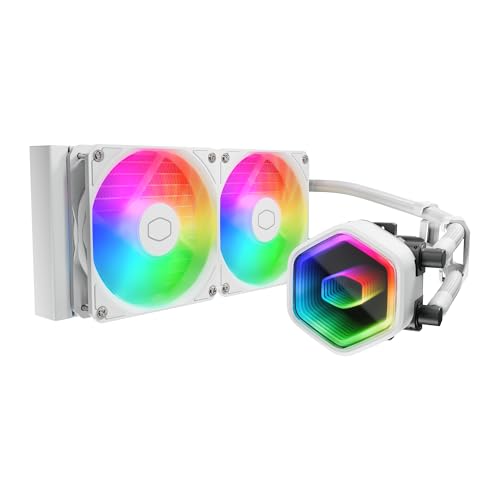
A sealed 240 mm AIO example with AM4/AM5 support in the manufacturer’s current series specifications. It illustrates the radiator-plus-pump layout; the size shown is not a recommendation for every case.

AIO example: NZXT Kraken 280 RGB
A 280 mm AIO with pump display and RGB fans. NZXT lists AM4 support and a 315 × 143 × 30 mm radiator, illustrating why radiator dimensions and internal USB requirements belong in the fit check.
What counts as a closed-loop liquid cooler?
A closed-loop AIO, short for all-in-one, arrives as an assembled CPU cooling system. Its cold plate mounts on the CPU, tubing connects the block to a radiator, and an integrated pump circulates coolant. The radiator mounts to a compatible case position and uses fans to move heat into air. Most consumer AIOs are factory sealed and are not designed to be opened, drained, or topped up by the owner.
That is different from a custom water-cooling loop. In a custom loop, the builder chooses separate blocks, pump, reservoir, radiator, fittings, and tubing, then fills and maintains the system. AIO owners generally do not handle coolant. The loop still contains moving parts and fluid, and a factory seal does not mean that the unit can never fail.
Air cooling is not necessarily “fluid-free” at a microscopic level. Heat pipes in many air coolers contain a sealed working fluid that changes phase inside the pipe to transfer heat. They do not use an electrically driven pump or move coolant through external hoses and a radiator. For a buyer comparing the two desktop cooler types, the meaningful distinction is a fan-and-heatsink assembly versus a pump-driven AIO loop.
How the heat path differs
Air cooling: heat pipes, fins, and fans
An air cooler presses a base against the CPU heat spreader. Heat travels through one or more heat pipes into a dense fin stack. Fans push or pull case air through those fins. The case then needs a sensible airflow path to move warmed air out, typically with case exhaust fans and unobstructed vents.
A tower cooler concentrates the heatsink near the motherboard. This can make the assembly tall and wide, but the heat leaves directly into air already moving through the case. The Peerless Assassin 120 SE, for example, is listed by its manufacturer as a 125 × 110 × 155 mm dual-tower unit with six heat pipes and two 120 mm fans. Its manufacturer explicitly warns builders to check chassis height and tall memory clearance. Those dimensions are the sort of concrete fit details to check for any large air cooler.
AIO liquid cooling: cold plate, pump, tubes, and radiator
An AIO cold plate absorbs heat from the CPU. Coolant carries it through tubes to a radiator, where fans transfer it to air. The pump is part of the block or loop. Moving the radiator to a case front, top, or side can move the largest heat-exchange surface away from the CPU socket, though the pump block and tubes still occupy space around the motherboard.
The radiator must fit the case’s actual mounting rails, not merely the advertised fan size. A 240 mm AIO generally uses two 120 mm fans; a 280 mm model generally uses two 140 mm fans. The radiator may be longer or thicker than the fan class suggests. Account for radiator plus fans, end tanks, fittings, screw rails, and any push-pull fan arrangement. If comparing one specific 280 mm system, our 280 mm AIO guide for AM4 explains radiator dimensions and clearance in more detail.
Cooling performance: match the CPU and workload
Neither cooling method has an inherent performance win in every system. The cooler’s contact plate, heatsink or radiator area, fan design, pump behavior, mounting pressure, paste application, CPU power settings, and room temperature affect the result. Case airflow also matters: a large radiator cannot shed heat well if its intake is blocked by a solid panel or clogged filter.
A high-end air cooler can handle demanding processors when the model, case, and airflow are appropriate. AIOs can offer more radiator area or a different heat distribution, but the word “liquid” does not guarantee lower temperature or higher boost clocks. Compare independent tests using the same processor, power limits, workload, case, ambient temperature, and noise target. Manufacturer TDP ratings are not directly comparable across brands because test methods and assumptions may differ.
Think about the workload. Short gaming bursts, long rendering sessions, compiling, scientific workloads, and sustained all-core processing create different heat patterns. If your CPU runs stock settings and your current cooler keeps it within the processor maker’s operating guidance without excessive noise, changing the cooler may have little practical benefit. If the CPU thermally throttles, the cooler is loud at normal loads, or the case is cramped around the socket, a different design might solve a specific issue.
Make sure the motherboard is suitable for the processor and its power limits. A CPU cooler does not improve motherboard VRM capability. Some AIO pump blocks include a small fan near the socket, and some air coolers create airflow around nearby components, but those features are not substitutes for checking the board’s power delivery, BIOS settings, and case ventilation.
Noise: fans are not the whole story
An air cooler usually has fan noise as its principal active sound. The fan speed rises with temperature, and larger or multiple fans can sometimes move the required air at lower RPM, depending on the model and system. A loose clip, dust buildup, fan bearing wear, vibration against the heatsink, or an aggressive fan curve can still make an air cooler noisy.
An AIO has radiator fan noise plus pump noise. A pump may create a steady hum, a higher-frequency tone, or gurgling if air accumulates in an unfavorable place. AIO fans also react to CPU or coolant temperatures according to their control curve. Some systems have software or a controller; others connect to motherboard headers and are managed in BIOS. AIO noise can be low, but do not assume the pump is silent or that the radiator fans will always run slower than air-cooler fans.
Listen to noise tests for the exact model if sound matters. Reviews should describe measurement distance, noise floor, fan speeds, pump setting, and CPU load. A “quiet” result from a low-power processor cannot be compared fairly with a different cooler tested at a high power limit. Look at idle, gaming, and sustained-load behavior separately.
For the most predictable quiet build, a reliable cooler running at a moderate fan curve is often more useful than choosing by category. AIO pump speed, fan curve, case resonance, and room acoustics can matter more than liquid versus air. A pump can also be audible even when the radiator fans are slow, while an air cooler fan may be easy to replace or tune independently.
Case clearance: where each design needs room
Air cooler clearance
Air coolers need vertical room between the CPU socket and side panel. Check the case’s maximum CPU cooler height and compare it to the fully installed cooler, not just its bare heatsink. A front fan may need to sit higher to clear tall RAM, increasing total height. Check motherboard layout for VRM heatsinks, memory slots, graphics card access, and the top PCIe slot. A two-tower cooler can overhang memory or make installation awkward even if its height technically fits.
A standard tower can also make it harder to reach motherboard connectors, M.2 screws, or memory latches after assembly. Consider whether you need to remove the cooler for future upgrades. A low-profile air cooler solves height issues but may have a smaller heatsink or fan; compare the exact unit’s capacity and test results rather than assuming low-profile means inadequate.
AIO radiator and tube clearance
AIOs trade CPU-tower height for radiator placement requirements. A case may support a 240 mm radiator at the top but not a 280 mm radiator because the fan rails overlap memory or motherboard heatsinks. A front radiator may fit but take space from the graphics card. A side radiator may conflict with cable routing, drive cages, or a power supply shroud.
Check the radiator’s full dimensions and thickness with fans installed. Also check tube length and direction. Tubes should reach without sharp kinks, pressure on fittings, or contact with hot or moving components. A pump block may be smaller than a dual tower, but it still needs clearance around the socket, RAM, VRM cover, and graphics card backplate.
Orientation recommendations vary with case layout and cooler design. Manufacturers and motherboard makers provide guidance for keeping trapped air away from the pump where possible. Follow the specific AIO manual and case manual. Do not rely on a generic diagram that may describe a different radiator position or pump design.
Maintenance and expected service life
Air cooler maintenance
Air cooler maintenance is generally straightforward: shut down the PC, remove dust from the heatsink fins and fan, inspect fan clips and cables, and replace thermal paste if the cooler is removed or temperatures indicate it is needed. Keep the case filters clear so the heatsink does not fill with dust. Follow the fan and motherboard instructions for unplugging and reinstallation.
The heatsink itself has no pump. If a fan fails, the fan can often be replaced with a compatible size and connector while keeping the heatsink in service. Check the cooler maker’s replacement fan options, mounting clips, and warranty. A fan failure is still important: shut down or reduce load if CPU temperatures rise beyond safe operating conditions, and replace or repair the cooling system before sustained use.
AIO maintenance
AIOs are usually sealed and do not need routine coolant refills. CORSAIR explains that its AIO loop is factory sealed and advises keeping the unit and fans clean. Routine care still includes removing dust from radiator fins, fan blades, and filters; checking that pump and fan connectors remain secure; and watching for unusual noise, leaks, or a sudden change in temperature. Use the maker’s guide for filter cleaning and radiator care rather than pushing debris deeper into the fins.
“Sealed” does not mean “never inspect it.” Tubes can age, fans can fail, and pumps can eventually wear. The loop is generally not owner-serviceable. If the pump fails or the loop leaks, the usual resolution is warranty service or replacement of the AIO, not topping it up with generic coolant. Keep purchase details and follow the manufacturer’s warranty process.
Air cooler and AIO lifetimes cannot be reduced to a guaranteed number from their design alone. Quality, operating temperature, dust, bearing type, pump design, transport, and use all matter. Check warranty length and support availability for the exact model. A longer warranty can help with a defect claim, but it does not prove that a cooler will perform better or last longer in every system.
Failure modes and repairability
Air cooler failure points
Air coolers have relatively few active components. The fan motor or bearing can wear, a cable or connector can fail, or dust can restrict airflow. A mounting screw can loosen after transport or installation. The heat pipes and fin stack can also be damaged physically, but in normal desktop use, the fan is usually the component that needs attention first.
Repairability is one practical advantage. A compatible replacement fan may restore cooling without replacing the heatsink. If you use two fans, a single fan issue may allow temporary lower-load operation under close temperature monitoring, but do not assume the remaining fan is sufficient for unrestricted use. Confirm the correct fan dimensions, clip design, PWM connector, and airflow direction.
AIO failure points
An AIO adds a pump and sealed liquid path. Possible symptoms include a pump that is not detected, unusual pump noise, coolant-flow reduction, rising CPU temperatures, or a leak. Small amounts of air can exist in a sealed loop and may make noise depending on orientation. ASRock’s AIO troubleshooting FAQ recommends installing the radiator higher than the pump whenever possible to reduce air accumulation at the pump; always consult the specific cooler’s own mounting guidance.
A failed radiator fan is often replaceable. A failed pump or a blockage inside the sealed loop is different: the owner typically cannot open and service the unit. That can make the AIO less repairable than an air cooler if a major loop component fails after warranty. On the other hand, a leak is not a routine expectation for every AIO; avoid treating the possibility as certainty. Check the warranty and failure-handling terms and install the system carefully.
Do not run the CPU under sustained load if the pump has stopped or coolant temperatures are clearly abnormal. Shut down and use the manufacturer’s support process. If you notice liquid on components, power off at the wall or PSU switch if safe, disconnect power, and do not restart the system until you have inspected and dried it according to qualified service advice.
Cost and total system complexity
Air coolers are often less expensive than AIOs, especially in the midrange, but product pricing changes and premium air models can cost more than entry-level AIOs. Compare the entire setup: CPU cooler, extra case fans, fan controller, internal USB header requirements, lighting controller, replacement fans, and potential case changes. An AIO’s advertised price is not the total cost if the current case cannot fit it.
Software can also change the ownership experience. Some AIO displays, lighting systems, or pump controls need a vendor application and internal USB connection. Other models use motherboard headers and BIOS fan curves. Air coolers typically need only fan headers, though RGB air-cooler models may also need lighting connections. If you prefer fewer applications and cables, compare the control system before choosing.
Consider resale and upgrade plans. An air cooler may carry over to a new build if the manufacturer offers the right mounting kit, but check socket compatibility for the future platform. An AIO can also be reused if its mount, radiator support, tube reach, and condition fit the new case. A cooler used across generations may need updated brackets. Keep the original mounting hardware, manuals, and purchase proof.
Choose an air cooler when…
- You want a simpler system with no pump or external coolant loop.
- Your case has enough CPU cooler height and memory clearance.
- You prefer a fan that can be replaced independently if it fails.
- Your processor and workload are within the cooler’s tested capabilities.
- You want fewer cables, headers, or vendor-control software.
- You do not need the radiator placement or visual layout an AIO offers.
A dual-tower air cooler such as Thermalright’s Peerless Assassin 120 SE illustrates the format: a metal heatsink with heat pipes and two fans, AM4/AM5 mounting support, and a specified 155 mm height. That height is not universal. Measure your chassis side-panel clearance and memory before purchasing. Thermalright’s official product page lists its dimensions and socket support.
Choose a closed-loop AIO when…
- Your case supports the radiator size and thickness you want at a suitable position.
- A tower cooler would interfere with the side panel, memory, or motherboard area.
- You want the radiator located at the front or top and have planned the airflow layout.
- You need a tested cooler configuration for sustained CPU loads or a specific noise target.
- You value an LCD, RGB, or build aesthetic enough to accept extra wiring and software.
- You understand that the loop is sealed and a pump failure may require replacing the unit.
Do not buy an AIO simply because the phrase “water cooling” sounds more powerful. Choose one when the radiator placement, measured performance, or build constraints make sense for your particular system. For radiator-size decisions, compare the local guides to 120 mm AIOs and 280 mm AIOs for AM4. Those guides focus on size-specific fit; this page compares AIO and air-cooler designs.
Product examples, not a universal ranking
The cards below show representative products from each design. They do not imply that one cooler is the right match for every CPU or case. Verify exact model, socket kit, height or radiator dimensions, included fans, warranty, and retailer package before ordering.
Peerless Assassin 120 SE: a large air-cooler example
The Thermalright Peerless Assassin 120 SE is a dual-tower air cooler with two 120 mm fans. The manufacturer lists AM4 and AM5 support and 155 mm overall height. It is an example of a high-capacity air-cooler form factor, but builders still need to check case height, RAM clearance, fan height adjustments, and motherboard access. The model does not require a liquid pump or radiator mount.
MasterLiquid Core II 240: a sealed-loop example
Cooler Master’s Core II series includes a 240 mm model with AMD AM4/AM5 support, a 277 × 119.2 × 27.2 mm radiator, and a pump block. Those dimensions illustrate the fact that a nominal 240 mm radiator is longer and wider than its fan label. The AIO needs a case radiator position, fan connections, pump power, and correct tube routing. See the Cooler Master Core II specification page for current model details.
NZXT Kraken 280 RGB: an AIO with a display
NZXT’s Kraken 280 RGB has a 280 mm radiator, two 140 mm RGB fans, and a 1.54-inch pump display. NZXT lists AM4 support and 315 × 143 × 30 mm radiator dimensions. It also uses an internal USB connection and software control, so the buyer should check motherboard header availability and cable routing. This example shows how an AIO’s extra features can add setup requirements beyond the pump and fans.
Noise and thermal testing: how to compare reviews fairly
When reading product reviews, look for data collected with the same CPU power limit, case, ambient temperature, and workload. A cooler may keep a CPU at a lower temperature because its fans run faster; that does not necessarily mean it is quieter. A review that reports only maximum fan speed may not reflect the curve you would use for daily work. Check both noise-normalized performance and performance at manufacturer-default settings if available.
Consider coolant or pump speed when evaluating an AIO. Some reviewers test the pump at maximum, while an owner might tune it lower. Fan control settings also matter. For an air cooler, note whether tests use one fan or two, and whether the front fan is raised to clear memory. Comparing results from different review benches without controls can give a false sense of precision.
Temperature readings are useful alongside CPU clocks, power draw, and noise. Modern CPUs may boost to a temperature or power target, so a better cooler may allow higher sustained clock speeds rather than dramatically lower temperatures. That behavior depends on the processor and BIOS settings. Read the test methodology before deciding that a cooler is “cooler” based on one number.
Common misconceptions
“Liquid cooling is always cooler.”
Not necessarily. AIO model, radiator, fans, workload, and case airflow determine results. Strong air coolers can perform well, and a poorly fitted AIO can perform badly. Compare exact models under similar test conditions.
“Air coolers contain no liquid.”
Many air coolers use sealed heat pipes with a working fluid inside. They do not have a pump-driven coolant loop, external tubing, or radiator. The practical comparison is the complete cooler design, not whether any sealed fluid exists within a component.
“AIO coolant has to be topped up.”
Normal consumer AIOs are factory sealed and are not designed for routine refill. If a unit loses performance or leaks, consult the maker’s warranty and support rather than opening the loop or adding generic coolant.
“An AIO is maintenance-free.”
It requires no regular coolant service, but the radiator, fans, and filters still collect dust. The pump and tubing should be monitored for unusual noise or behavior. “No coolant refill” is not the same as “no cleaning or inspection.”
“Air cooling is only for low-end CPUs.”
Air cooling spans small stock coolers to large dual-tower heatsinks. Suitability depends on the exact CPU, power limits, case, and workload. Use test data for the cooler and processor combination instead of a general category label.
Frequently asked questions
Which lasts longer, an air cooler or an AIO?
There is no guaranteed lifespan from the category alone. An air cooler has a heatsink and fan or fans; an AIO adds a pump and sealed loop. Fan bearings can wear in either type, and AIO pumps can fail. Check model-specific warranty and service support, and keep the cooler free of dust.
Can an AIO leak and damage a PC?
A leak is a possible failure mode, but it should not be treated as a routine outcome or assumed likelihood without reliable model-specific data. Install the AIO carefully, use the included screws, inspect for damage, and follow the warranty instructions. If you see liquid, shut down and disconnect power safely before attempting troubleshooting.
Can I replace an AIO pump?
Most consumer AIO loops are sealed and not designed for owner pump replacement. A fan may be individually replaceable, but a pump or internal loop issue usually goes through warranty service or replacement of the full cooler. Verify the manufacturer’s service policy for the model.
Does an AIO make more room around RAM?
It can, because the radiator is mounted away from the CPU socket and the pump block is often smaller than a dual-tower heatsink. However, the radiator can conflict with RAM or motherboard components when mounted at the top, and tubing still has to route around the build. Check the case and motherboard layout.
Is an AIO harder to install?
It usually involves more steps: mounting the CPU block, placing the radiator, routing tubes, connecting pump and fans, and sometimes handling USB or RGB wiring. A large air cooler may be physically awkward to install but generally has fewer cables and no radiator. The exact difficulty depends on the case and cooler bracket.
Should I buy a 280 mm AIO or a dual-tower air cooler?
Compare case fit first. A 280 mm AIO needs radiator rails, depth, tube routing, and the required headers. A dual-tower air cooler needs enough vertical clearance and room around RAM. Then compare independent noise and temperature tests for your CPU. For 280 mm dimensions and AM4 support, see our dedicated 280 mm AM4 AIO guide.
Does air cooling need case fans?
A tower cooler uses its own fan or fans, but the case still needs an airflow path to bring in cooler air and exhaust warmed air. The number and placement of case fans depend on the case and other components. Follow case and cooler instructions and monitor temperatures after assembly.
Final decision
Choose an air cooler if you want a simpler, more repairable setup and your case has enough height and memory clearance. Choose a sealed AIO if radiator placement solves a real layout problem, if reliable tests show it meets a performance or noise target, or if you prefer the visual design and accept extra installation and pump considerations.
For either type, confirm CPU socket hardware, motherboard compatibility, case fit, and independent test results for the processor you own. Keep fans, heatsinks, radiators, and filters clean. A matched cooler in a well-ventilated case is more dependable than choosing a category based on reputation alone.
For more PC component guides, browse the Digital Tools section. If you are considering a custom open loop rather than an AIO, our guide to water-cooling pumps covers that separate system type.
Amazon content disclosure: Product images and Amazon listing details in the cards are supplied through Amazon’s Creators API. Availability, package contents, and model variants can change; verify the exact listing before purchase. Other specifications are linked to manufacturer sources.