Affiliate disclosure: As an Amazon Associate, DailyHomeDecorating.com earns from qualifying purchases. If you buy through links on this page, we may receive a commission at no extra cost to you.
In this guide, “automatic vacuum” means a self-moving floor-cleaning robot. We compare navigation, self-emptying docks, floor fit, and upkeep, while keeping manually pushed stick, upright, canister, and handheld vacuums out of the robot category.
Amazon robot vacuum examples to compare

roborock Q7 M5+ Robot Vacuum and Mop, Up to 7-9 Weeks Self-Empty, 10000Pa | Upgraded from Q5 Max+, Dual Anti-Tangle System for Pet Hair & Carpet, PreciSense LiDAR Navigation, App Control, Black
ASIN: B0DWX69JVG
The verified listing describes the Roborock Q7 M5+ as a robot vacuum and mop with up to 7–9 weeks of self-emptying, 10,000 Pa suction, an anti-tangle system, PreciSense LiDAR navigation, and app control. These are listing claims, not independent test results. It fits shoppers who want scheduled floor care and an automatic dust-bin routine; confirm the bundle and dock contents on the current page.

Shark AV2501AE AI Robot Vacuum with XL HEPA Self-Empty Base, Bagless, 60-Day Capacity, LIDAR Navigation, Perfect for Pet Hair, Compatible with Alexa, Wi-Fi Connected, Carpet & Hard Floor, Black
ASIN: B08QZVSC8D
The Shark AV2501AE listing describes an AI robot vacuum, an XL HEPA self-empty base, bagless operation, and LiDAR navigation. This configuration may interest shoppers who want an automatic emptying station without the ongoing purchase of disposable dock bags. Check how the dust cup and filters are maintained and whether the listed bundle matches your floor plan.

Tikom Robot Vacuum and Mop, Robotic Vacuum Cleaner with Self-Emptying Base | 6000Pa, 90 Days Capacity, LiDAR Navigation, Home Mapping, Ideal for Pet Hair, Hard Floors, Carpet (L8000 Plus)
ASIN: B0FKH1RW65
The Tikom L8000 Plus listing describes a self-emptying robot vacuum and mop with LiDAR navigation, home mapping, a 6,000 Pa suction rating, and a stated 90-day dock capacity. Because a capacity claim depends on household dirt and cleaning frequency, treat the duration as a manufacturer estimate. Verify the dock size and maintenance supplies before ordering.
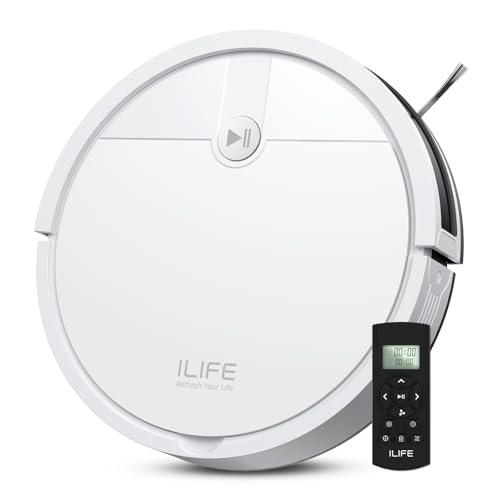
ILIFE V2 Robot Vacuum Cleaner, Tangle-Free Suction, White | 120 Mins Runtime, Remote Control, Schedule, Slim, Self-Charging Robotic Vacuum Cleaner, Ideal for Pet Hair and Hard Floors
ASIN: B0F4DKGRDN
The ILIFE V2 is a robot vacuum rather than a manually pushed stick or upright. Its listing emphasizes a slim profile, scheduled cleaning, remote control, self-charging, and a stated runtime of up to 120 minutes. This is a simpler automation approach than a model with a mapping dock; make sure its navigation style suits your home and that you are comfortable with more frequent bin emptying.

Tikom Robot Vacuum and Mop Combo, 5000Pa Robotic Vacuum Cleaner, 150 Min Max, App & Remote Control, Ideal for Hard Floor, Carpet, Pet Hair, Self-Charge(G8000 Max)
ASIN: B0DV53XDDJ
The Tikom G8000 Max listing describes a 2-in-1 robot vacuum and mop with app and remote control, a stated 5,000 Pa suction rating, up to 150 minutes of runtime, and self-charging. A combined unit can reduce the number of floor-care devices, but mopping performance and water-tank capacity vary. Confirm whether its mop function matches your floors and routine.
Certain content that appears on this site comes from Amazon. This content is provided “as is” and is subject to change or removal at any time. Product examples and images are supplied through Amazon Creators API; confirm specifications and availability on the current listing.
Explore more practical ideas in Home & DIY. For a separate automated-cleaning category, see our guide to robot cleaners for inground pools; pool robots clean water, not household floors. For another home-cleaning task, read our guide to cleaning patio furniture cushions.
What “automatic vacuum” means in this guide
An automatic vacuum is a floor-cleaning robot that moves across a room and collects dry debris with limited hands-on steering. It may return to a charging dock by itself, follow a schedule, use sensors or a map to plan its route, and—on some models—empty its own dust bin into a larger base. The word “automatic” describes how much of the cleaning cycle the machine handles without a person pushing it. It does not mean the home needs no preparation, the robot can clean every surface, or the owner never has to maintain it.
This distinction matters because search results often mix autonomous robots with upright, canister, stick, and handheld vacuums. Those manual appliances can have stronger direct control and larger cleaning heads, but a person guides them throughout the job. This guide is specifically about self-moving floor robots. It focuses on the levels of automation, navigation, docking, maintenance, and floor compatibility that make one robot a better fit than another. For a manually operated model, look for a dedicated upright or cordless vacuum guide instead.
Quick recommendations by automation level
For a balanced robot-and-dock combination, the Roborock Q7 M5+ listing combines LiDAR navigation, app control, and a self-empty base. The Shark AV2501AE is the bagless self-empty option in this shortlist. The Tikom L8000 Plus is a mapping-focused alternative whose listing also describes a self-empty dock. If your budget or preferences point toward a simpler scheduled robot, the ILIFE V2 offers self-charging and remote scheduling but does not list an automatic-empty base. The Tikom G8000 Max adds a vacuum-and-mop combination with app and remote control.
These examples are organized by features shown on their current Amazon listings, not by independent lab testing. Product specifications, prices, bundles, and availability can change. The stated suction, run time, and dock capacity are manufacturer or listing claims; they do not predict the exact result in every home. Use the product cards as a shortlist, then verify the exact version, current seller, dimensions, maintenance supplies, return terms, and app requirements before purchasing.
How an automatic robot differs from a manual vacuum
A robot vacuum drives itself across accessible floor area using motors, wheels, brushes, and a navigation system. The owner may choose a schedule, rooms, or cleaning mode in an app or with a remote, but the robot performs the movement. Most models need the owner to clear cords and small objects, empty or maintain the dust system, clean brushes, and rescue the machine if it gets stuck. A robot is a routine helper, not an unattended replacement for every deep-cleaning task.
A manually operated vacuum—such as a stick, upright, canister, or handheld—requires a person to move the nozzle and decide where to clean. That allows targeted passes on stairs, upholstery, shelves, and edges, but it consumes hands-on time. Many households use both: a robot for frequent maintenance on open floors and a manual vacuum for stairs, corners, furniture, and occasional concentrated jobs. We keep those product categories separate here so a robot’s scheduled operation is not compared unfairly with a person-controlled machine.
Automation is a spectrum, not a yes-or-no label
The simplest robot may have a start button, basic sensors, and a charging dock. It can operate without being pushed, but its route may be less predictable and it may need more supervision. A scheduled robot adds timed starts; remote or app control adds a way to start, stop, or change cleaning without touching the machine. Mapping models add room plans and may allow zone or room selection. Self-empty docks reduce how often the owner handles collected dust. More advanced bases may also manage mop pads or water, but this guide’s products vary in their exact accessories.
Every additional layer has a tradeoff. A schedule helps only if the room is prepared before the robot starts. A map is useful only if navigation is accurate enough in your layout and the app provides clear controls. A self-empty base reduces routine bin handling but takes up floor space and may involve bags, filters, or periodic bin cleaning. A combo dock adds convenience but can introduce more maintenance steps. Decide which repeated chore you most want to reduce before paying for more automation.
A practical definition of “hands-free”
“Hands-free for 60 or 90 days” generally refers to a stated dust storage capacity under assumed cleaning conditions; it does not mean the robot needs zero attention for that period. Actual time between emptying depends on how often it runs, how many people and pets live in the home, how much hair or debris is collected, and the dock design. A full bin, tangled roller, dirty sensor, blocked inlet, or wet spill may require immediate attention regardless of a marketing duration.
Think of the dock as a buffer that reduces one task, not a maintenance-free system. Check how the dock disposes into its larger bin, whether it is bagged or bagless, where replacement bags or filters are sold, and how often the manufacturer recommends cleaning. If you dislike ongoing consumables, a bagless dock may sound appealing, but its dust handling can be messier. Compare real routine and recurring cost rather than focusing on the largest “days hands-free” number.
Navigation: random patterns, sensors, and mapped routes
Basic robots may move in a pattern guided by bump, drop, wall, or obstacle sensors. They can be suitable for an uncomplicated open room, but they may revisit some areas and miss others. More structured navigation uses a camera, gyroscope, laser ranging, or combinations of sensors; product pages often use terms such as LiDAR or smart mapping. A mapped robot can identify rooms and support selected zones, though exact capabilities vary by model and software version.
Before choosing a mapping system, consider your layout. A large open floor, multiple rooms, rugs, and several thresholds create different navigation demands. A map is most helpful when the robot can reliably return to its dock and you can correct room boundaries in the app. Ask whether it supports multiple floors if you plan to carry it between levels; do not assume it remembers every floor automatically. Review the manual and current app description for mapping, no-go zones, and saved maps.
Charging docks and self-empty stations
A standard charging dock replenishes the robot’s battery. A self-empty base adds a larger dust container that receives debris from the robot after a cycle. The base can reduce how frequently you empty the small onboard bin, which is useful for scheduled cleaning or pet hair. It also needs a stable location near power, with clearance around the robot’s approach. Measure the dock itself, not only the robot, and check the listing diagram for recommended clearance on each side.
Self-empty systems differ in capacity, filtration, bags, and noise. Some run a loud suction cycle when the robot returns; others have settings for when to empty. A dock’s bagless design avoids replacing a bag but may expose the user to dust during disposal. Read the product description for how to empty and clean the base. If you have allergies, consider the full path from robot bin to dock, and check filter and seal details rather than assuming a “HEPA” label covers every step.
Floor compatibility and what robots can actually clean
Automatic vacuums work best where their wheels and brush can cross the floor without getting trapped. Hard flooring is often straightforward, but loose rugs, cords, deep thresholds, long fringe, and floor vents can interrupt a run. Low-pile rugs may be manageable for many models, while tall pile and thick edges can challenge others. Read the product’s floor guidance and, if possible, test the robot in the room during the return window.
If your home has mixed flooring, review brush design and carpet settings. Some robots raise suction automatically on carpets, while others require a setting in the app. A robot-mop combo may need the mop module removed or its water controls adjusted before it crosses a rug. Verify whether it can avoid carpet in mop mode. The listing title alone may say “carpet and hard floors,” but the manual provides more useful limits on pile height, wet zones, and transition thresholds.
Pet hair, long hair, and brush maintenance
Pet hair can fill a robot’s small bin quickly and wrap around its brush roll. Anti-tangle features may reduce wrapping, but they do not guarantee that hair never needs to be removed. Check whether the brush is accessible without tools, whether replacement rollers are available, and how often the manual recommends inspection. If you have a shedding pet, a self-empty dock can reduce bin trips, but the brush and filter still need routine attention.
Long human hair creates a similar challenge. A robot that runs every day can collect hair before it forms clumps, but it still needs a clear route and periodic cleaning. Consider whether the robot can reach under beds and sofas where hair gathers. Measure the furniture clearance against the robot’s height, including any sensor turret. If it cannot pass beneath a sofa, it will not maintain that area automatically.
Mopping combinations: useful extra or unnecessary complexity?
Some automatic vacuums also carry a mop pad or water reservoir. A combo can handle light surface wiping in addition to dry pickup, which may be convenient on sealed hard floors. It does not necessarily replace a dedicated mop, remove dried stains, or safely wet every surface. Floor material, cleaning solution rules, water control, and pad maintenance all matter. Do not run a wet mop across a rug unless the robot is designed to detect and avoid it.
A combo machine may require the owner to fill a tank, attach or wash a pad, and keep the mop module clean. Some higher-end stations add more automated pad care, but that is a different system from a basic robot-and-charger. Decide whether your home needs regular dry vacuuming only, or whether a damp maintenance pass would be useful. For the latter, check the exact mopping mechanism and the manufacturer’s approved surfaces before choosing a combo.
Room preparation and obstacle avoidance
Even a capable robot benefits from a quick reset before it starts. Pick up charging cables, socks, toy pieces, and lightweight objects; raise loose curtains if they reach the floor; and ensure the dock route is clear. Use boundary strips, virtual walls, or app no-go areas where available to block pet bowls, fragile objects, or a cable nest. Review whether the robot recognizes small obstacles or simply pushes them aside. Product claims about obstacle avoidance differ considerably.
If your home includes stairs, open landings, or a sunken room, confirm that cliff sensors are present and tested according to the instructions. Never assume a sensor makes an unusual edge safe. Check how the robot handles dark flooring, reflective surfaces, and transitions because sensor performance can vary. Keep children and pets away while it is moving if they may disturb it or place objects in its path.
Battery life, coverage, and recharge behavior
A runtime number is only one piece of coverage. Suction setting, floor type, brush resistance, navigation, and battery age all affect how much area a robot cleans before returning to recharge. Some mapped robots can resume where they stopped after charging; simpler products may restart or require a new cycle. For a multi-room home, look for a clear explanation of recharge-and-resume, battery capacity, and the manufacturer’s recommended maximum area.
For a smaller apartment, a shorter stated runtime may be sufficient if the robot can complete a cycle in one pass. For a large home, prioritize navigation and recharge behavior over a single high runtime figure. Check that the dock can be placed in a location with power and adequate clearance. The robot may need to travel over thresholds between rooms, so test those transitions rather than relying solely on a floor-area estimate.
Noise and scheduling around daily life
Robot vacuums are not silent. Brush contact, suction, wheels, voice prompts, and especially a self-empty cycle can be audible in nearby rooms. If you work from home or have a sleeping infant, schedule cleaning when noise is less disruptive. Some apps let you pause, reduce suction, or delay auto-emptying; verify those controls before buying. A quiet mode may also reduce pickup performance or increase the cleaning time, so compare modes in the manual.
A schedule is useful when the floor is predictably clear. It can become annoying if the robot starts while someone is using the room, or if it repeatedly tangles on a cord. Begin with supervised runs and refine the schedule only after you see how the robot behaves. If the model supports room-specific schedules, use them to clean high-traffic areas more often and quieter rooms less often.
Apps, Wi-Fi, and privacy questions
App features range from basic start/stop to maps, room selection, schedules, history, and maintenance alerts. Check phone compatibility and the required Wi-Fi band before buying. Some devices rely on cloud services for advanced controls; others include a remote or buttons for basic operation. If you prefer not to create an account, look for a non-app control path and make sure it still covers the features you need.
Mapping robots may store a floor plan in the app or service. Read the manufacturer’s privacy information and settings to understand what data is collected, where maps are stored, and whether camera or microphone hardware is present. The verified products in this shortlist are described primarily through their current listing features; the full privacy terms can change. If data practices matter to you, review the current policy before connecting a robot to your home network.
Small apartments and compact homes
In a small home, robot size and dock placement matter as much as battery capacity. Measure the height under beds, cabinets, and sofas, then compare with the robot’s listed dimensions including any sensor turret. A slim design can reach under more furniture, but may have a smaller dust bin or different navigation hardware. A large self-empty base can consume floor space that is scarce in a studio.
Choose a robot whose automation matches your layout. A basic scheduled model can be enough for a mostly open studio, especially if you are comfortable emptying its bin. A mapped robot may be more useful when the space has a bedroom, kitchen, and living zone with different schedules. Think about where the dock can live without becoming a visual obstruction or blocking a closet. A robot you can park conveniently is more likely to run regularly.
Large homes and multiple levels
Large homes benefit from predictable mapping and efficient room selection, but a robot still covers only accessible floor and typically works on one level at a time. If the product supports multiple saved maps, check how many it can retain and whether you must move the dock or robot manually. A second dock may be convenient but adds cost and space. Never assume one robot will clean stairs; carrying it between floors is a separate task.
For a large floor, review recharge-and-resume, dust-bin capacity, and the size of the self-empty base. A robot may need more than one session to cover the whole home. Separate high-traffic rooms into different schedules so the unit can clean when those rooms are empty. If the layout includes closed doors or frequent furniture changes, mapping may need to be updated or adjusted.
A closer look at the five product examples
The Roborock Q7 M5+ listing describes LiDAR navigation, app control, an anti-tangle system, a 10,000 Pa suction rating, and a self-emptying station with a stated 7–9 week interval. That makes it a feature-rich balance for someone who wants planned routes and fewer manual bin dumps. The duration is a listing estimate, not a guarantee for a pet-filled home. Check the package details to confirm which dock, filters, and mop components are included.
The Shark AV2501AE combines a robot with an XL HEPA self-empty base described as bagless and a 60-day capacity. This may appeal to shoppers who prefer a larger dock and do not want to buy collection bags. The dock will still need emptying and cleaning, and you should review the maintenance instructions for dust exposure. The product title references LiDAR and Wi-Fi; check the app’s current compatibility and map features before deciding.
Two mapping options and two simpler approaches
The Tikom L8000 Plus listing describes LiDAR, home mapping, a self-emptying base, and a stated 90-day capacity. A mapped floor plan and room controls can be useful if the household wants to clean only the kitchen after dinner or avoid a play area. Verify the dock’s actual size, what supplies it requires, and how the app handles no-go zones. The long capacity estimate should be treated as a best-case marketing figure until your own use proves otherwise.
The ILIFE V2 is a simpler robot vacuum listing with a slim profile, scheduling, remote control, self-charging, and a stated up-to-120-minute runtime. It may suit shoppers who want autonomous movement without a complex app and self-empty station. The Tikom G8000 Max adds app and remote control plus a vacuum-and-mop function, with a listed 150-minute runtime. The combo can offer more floor-care options, but it also creates water and pad maintenance. Each sits at a different point on the automation spectrum.
Maintenance you should expect
Even automatic vacuums need regular upkeep. Empty the onboard bin or dock when indicated, clean filters as directed, remove hair from the main brush and side brush, wipe sensors, and inspect wheels for wrapped fibers. Washable filters must be fully dry before reinstalling if the manufacturer permits washing. Replace consumables at the recommended interval; a clogged filter can reduce airflow and make the robot work harder.
For mopping models, empty or refill water as directed, wash the pad, and let components dry. Do not leave dirty water in a tank if the manual advises against it. Keep charging contacts clean and check the dock inlet for debris. Set a recurring reminder based on your usage, not just the calendar. Homes with pets or heavy daily traffic may need more frequent checks than a lightly used guest room.
How to compare total ownership cost
The upfront price is only one cost. A self-empty dock may need bags, filters, or replacement parts; a bagless base may require more hands-on dust disposal. Mop combos add pads and cleaning supplies. Check the availability and price of replacement brushes, filters, and batteries before buying. If a product is discounted, confirm that the discounted option is the exact model and bundle you want, not an accessory or earlier version.
Consider how many hours of manual work the robot will actually replace. If it cannot enter the main rooms or struggles with floor transitions, its theoretical automation may not translate into useful time saved. Compare a simpler robot plus occasional manual vacuuming with a more elaborate dock system. The best value is the setup that fits your layout, support needs, maintenance tolerance, and real cleaning habits.
What automatic vacuums do not replace
A robot is poor at stairs, upholstery, curtains, shelves, tight corners behind furniture, and high surfaces. It may not handle wet spills, large debris, or a deep carpet clean as well as a suitable manual machine. It can also miss areas blocked by closed doors or clutter. Keep a manual vacuum or other appropriate tool for those jobs, even if the robot handles daily floor maintenance.
Automatic vacuuming is most effective as a regular low-effort routine. It can collect dust and crumbs between deeper cleaning sessions, but it cannot decide that a room needs special attention or safely identify every object on the floor. If a spill involves liquid, sharp debris, or a substance the manufacturer warns against, stop the robot and clean the area manually.
Setup checklist for the first week
Place the dock on a level floor near power and follow the clearance diagram. Charge the robot as directed, install the correct brush or mop module, and connect the app only if you want the supported controls. Run an initial mapping or supervised cleaning cycle while you watch how it handles rugs, thresholds, cords, and furniture. Correct any map boundaries and establish no-go areas where the robot should not travel.
After a few sessions, check the brush, filter, and bin to learn how quickly your home fills them. Adjust the schedule so the robot runs when rooms are clear. Test the return-to-dock path and verify what happens after a low-battery pause. If the unit repeatedly misses a room, snags on a rug, or cannot find its base, correct the underlying layout issue before relying on a daily schedule.
Common mistakes when buying a robot vacuum
A frequent mistake is treating suction numbers as a direct comparison across brands. Listings may use different methods and pair the motor with different brushes, airflow paths, and cleaning modes. A high number alone does not prove better pickup on your carpet. Review the full feature set and current owner feedback for the exact version. Another mistake is buying a self-empty base without checking how tall and wide it is; it may not fit beside a cabinet or behind a door.
Also avoid assuming that “smart mapping” means perfect obstacle avoidance, or that “mop combo” means an automated floor-washing system. Read the actual feature description and manuals. The robot may need clear floors, supervision during the first runs, and periodic care. Set expectations around the repeated tasks you want to automate, then select the simplest model that reliably handles them.
Frequently asked questions
Is an automatic vacuum the same as a robot vacuum? In most shopping contexts, “automatic vacuum” refers to a robot that moves across the floor without being pushed. Product listings may use several phrases, so verify that the device is self-moving rather than a powered manual vacuum.
Can a robot vacuum replace an upright vacuum? Usually not for every task. Robots can maintain accessible floors on a schedule, while uprights and other manual vacuums are better suited to stairs, upholstery, concentrated messes, and targeted deep cleaning.
Do all automatic vacuums empty themselves? No. Most robot vacuums have a small onboard dust bin that the owner empties. A self-emptying model returns to a larger dock that transfers collected debris, but that dock still needs maintenance.
Are robot vacuums safe for every rug? No. Fringe, deep pile, loose edges, and thick thresholds can cause tangles or block movement. Check the model’s floor guidance and test it under supervision before scheduling unattended runs.
Does LiDAR guarantee better cleaning? LiDAR can support structured navigation and maps, but the sensor alone does not guarantee complete coverage or obstacle handling. Room layout, software, furniture, and map settings also affect results.
How often does a robot vacuum need maintenance? It depends on use and the home. Check the dust bin, brushes, filter, wheels, and sensors regularly. Pet hair and daily operation may require more frequent cleaning than occasional use.
Should I buy a robot vacuum-and-mop combo? Choose a combo if you will use the damp cleaning feature and can maintain its water tank and pads. If you only need dry pickup, a vacuum-only robot may be simpler.
Final decision: match automation to your routine
When choosing among the best automatic vacuums, begin with the task you want to stop doing by hand. If it is repeated bin emptying, prioritize a suitable self-empty base. If it is steering between rooms, look for mapping that supports your layout. If the home is simple and open, a basic scheduled model may be enough. If you want both dry pickup and damp wiping, compare a combo while accounting for water and pad upkeep.
The Roborock Q7 M5+ and Tikom L8000 Plus emphasize mapping and self-emptying; the Shark AV2501AE adds a bagless dock design; the ILIFE V2 keeps automation simpler; and the Tikom G8000 Max combines vacuuming with mopping. None is automatically right for every household. Verify current specifications, seller, consumables, and return rules on the live Amazon listing, then choose the model whose everyday routine feels realistic for your floors and schedule.