Affiliate disclosure: As an Amazon Associate, Daily Home Decorating may earn from qualifying purchases. Product links may earn a commission at no extra cost to you.
intro
The best college window fan is one that fits the dorm window safely, moves air in the direction the room needs, and is allowed by campus housing rules. Dorm windows can have narrow openings, safety stops, fixed screens, unusual frames, or strict limits on appliances; the fan with the most airflow is not useful if it cannot sit securely. A slim single-body fan may suit a taller opening, while a twin fan with adjustable side panels may better fit a conventional double-hung window. This guide compares those formats and explains window measurements, airflow versus noise, intake and exhaust modes, screens, electrical and fall safety, and questions to ask housing staff before installing. Window fans move outside air; they do not refrigerate it, and they cannot cool a room when outdoor air is hotter than the indoor air.
Quick picks for different dorm windows
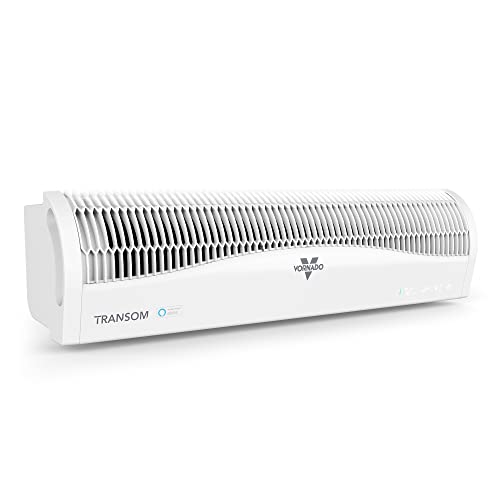
Consider the Vornado TRANSOM AE when you have a single- or double-hung window at least 26 inches wide and 8 inches high at the opening, and you want a low-profile fan with electronic intake/exhaust reversal. It is designed for horizontal installation only. Consider a Comfort Zone twin fan when you have a standard double-hung window and want expandable panels, reversible airflow, a removable insect screen, and straightforward controls. The Bionaire BW2300 is an older twin-fan model with remote, thermostat, and adjustable panel support; verify current listing condition and warranty before buying. These are model examples, not dorm-policy approval or a claim of laboratory testing.
Why dorm rooms need a different fan checklist
A home window may have a deep sill, an accessible exterior, and no housing rules. A dorm window may be high above ground, have a limited-opening safety device, include a screen that must remain installed, or serve as a required emergency exit. Students may also share rooms, have roommates sensitive to noise, or rely on central air that cannot be modified. Before choosing a fan, confirm that the window opens far enough, the fan is permitted, the screen can remain in place, and the installation does not interfere with the room’s safety hardware. If any of those points are unclear, ask the residence-life or facilities office instead of assuming a no-tools design is automatically approved.
Measure the actual window opening
Measure the clear opening after the sash is raised or slid, not the overall window frame. Record width and height at the narrowest point, then compare them with the fan’s minimum opening and expansion range in its manual. Also measure the sill depth, screen position, and any interior trim that may block the housing. A model advertised for a 26- to 40-inch window may require a minimum opening height as well as width. Check whether your dorm window is double-hung, horizontal slider, casement, or a tilt-in style. A fan designed for one style may not be safe in another. Product dimensions alone do not show how the unit rests against the sash or seals gaps.
Window types and dorm compatibility
Double-hung windows open vertically and are a common match for many twin fans. Horizontal sliders may work with some models when installed vertically, but only if the manufacturer permits that orientation and the controls, power cord, and panel support remain in the approved position. Casement windows that crank outward may not provide a flat support surface for a standard fan. Some dorm windows are fixed or open only a few inches because of a restrictor. Never remove a limiter, defeat a lock, or force a fan into an opening. Check the manual’s approved installation diagrams and housing rules. If the model’s orientation is not explicitly covered, use a different fan or another cooling method.
Vornado TRANSOM AE fit considerations
Vornado’s guide says the TRANSOM AE is designed for single- and double-hung windows, accommodates 26- to 40-inch widths, needs at least an 8-inch-high opening, and is for horizontal installation only. Its Soft-Fit foam blocks help close side gaps; the manufacturer recommends keeping the window screen in place. That profile can be useful in a room with a wide vertical opening and limited sill space, but it will not suit every narrow or sliding dorm window. Keep one hand on the fan during installation as the guide directs, and make sure the sash actually secures it. Do not rely on foam alone if the window cannot close firmly on the unit.
Comfort Zone twin fan fit considerations
Comfort Zone’s 9-inch 3-speed reversible twin fan product page lists an expandable width of 23.5 to 37 inches, plus a removable bug screen and cover on the described model. Its manual gives a minimum double-hung window opening of 23.5 inches wide by 11.125 inches high. This type of twin fan is a familiar fit for conventional dorm windows, but the open height and sill shape still matter. The brand offers multiple similar products—some have remote control, some do not, and some include Wi-Fi—so verify the exact model number, width range, speed count, airflow features, and included screen or cover. Do not use specifications for one Comfort Zone variant to assume another model has the same dimensions.
Bionaire BW2300: older model, careful listing checks
The Bionaire BW2300 is an older twin window fan with reversible airflow, a remote, thermostat, and an extender screen in manufacturer documentation. Its manual describes use in double-hung, slider, and casement windows and shows a pull-out extender, but current retail availability can depend on remaining stock or third-party sellers. Check whether the product is new or used, whether the remote and extender panels are included, and whether the listing offers a valid return policy. Because the model is older, avoid assuming that replacement parts or warranty support are as available as for a current fan. It remains a useful fit example, but students should verify the exact included pieces and current support before purchase.
Airflow: intake, exhaust, and exchange
Intake mode brings outside air into the room. Exhaust mode sends room air outdoors, which works best when there is a path for replacement air to enter—such as a slightly open door or another window, if allowed. Some twin fans can move air in opposite directions at the same time; other models reverse both fan motors together. These settings do different jobs. Intake can help when outside air is cooler and cleaner. Exhaust can clear stale or warm air when replacement air comes from a cooler area. Cross-flow can circulate across a room, but performance depends on room layout and openings. Match the mode to outdoor conditions and the ventilation path rather than leaving the fan on one setting by habit.
When intake is the better setting
Use intake when outside air is cooler than the dorm and you want to pull it indoors. This may be useful in the evening or morning if outdoor conditions are comfortable. A clean screen can keep many insects out, while the fan’s filter or grille may offer additional protection only if the manual says it does. Keep the room door open if the fan needs a return-air path, but only when allowed and safe. Avoid drawing air from a corridor with cooking odors, cleaning fumes, or other unwanted contaminants. If the outside air is smoky, dusty, humid, or hotter than the room, intake may make comfort worse. A fan cannot cool air below outdoor temperature.
When exhaust is the better setting
Exhaust can remove warm or stale room air, but it needs replacement air from somewhere else. Without that path, airflow can be weak and the room may feel stagnant. If the dorm has another window, a small opening may allow cross-ventilation if campus rules and weather permit. If the door is the only path, think about privacy and corridor air. Do not exhaust into a shared hallway when it would push odors or disturb neighbors. Exhaust mode can also draw air through gaps or from adjacent rooms. Use the fan when the incoming air is suitable and do not expect exhaust to lower the room temperature below the temperature of the replacement air.
Reversible blades versus reversible motor
A reversible twin-blade design may change direction by reversing the motor or fan blade direction, depending on the model. Some models have each fan set separately; others switch both fans from intake to exhaust. This affects how precisely you can control airflow. A twin fan with one intake and one exhaust can move air through a room if there is a clear path, while a fully reversible unit changes its whole opening from intake to exhaust. Read the product manual for the exact available modes. The marketing phrase “reversible airflow” does not prove that the two fans can run independently, and a model with one shared switch may offer fewer ventilation arrangements than its product title implies.
Airflow versus noise in a shared room
A high-speed setting may move more air but can be more noticeable to a roommate or to someone studying. A low setting may be easier to live with overnight but may not move enough air through a larger room. Manufacturer CFM figures, when provided, are measured under stated conditions and do not account for screens, gaps, furniture, or the fan’s exact mounting. Noise varies with speed, vibration, window contact, and the room’s acoustics. Secure the unit evenly, close unused gaps with manufacturer-supplied panels, and start at a low speed. If the fan rattles, turn it off and check the installation rather than pressing it harder into the frame. Avoid comparing sound by name alone when listings give no standardized dBA measurements.
Screens: keep them in place when required
Dorm screens may be part of the housing’s insect barrier or building maintenance plan. Vornado’s TRANSOM guide recommends leaving the screen in place, and some window fans are designed to fit with a screen behind them. Other models include a removable bug screen that attaches to the fan. A screen can add resistance to airflow, but removing a screen may violate dorm rules or allow insects inside. Do not remove or alter a dorm screen unless the housing office explicitly permits it. Check the fan manual to see whether the model can operate with the window screen in place and where the screen sits relative to the fan. Clean the screen gently as directed by housing staff.
Removable screens and covers
A removable insect screen helps keep bugs out while a fan is operating; a cover can close the fan opening when it is off. Comfort Zone models may include a bug screen and fabric cover, but features depend on the model. Some Vornado fans use foam blocks to fill gaps instead. These accessories have different jobs: the screen filters insects, the foam fills side gaps, and the cover helps block airflow when the fan is not in use. Confirm what is included and whether the screen can be removed for cleaning. Do not attach a blanket, towel, or improvised fabric over an operating fan; it can obstruct airflow or contact moving parts. Use only the accessory described in the manual.
Dorm rules and getting written approval
Campus housing policies vary by school and even by building. Some may allow small fans but restrict window-mounted devices, exterior protrusions, electrical appliances, or removal of screens. A resident assistant may not be the person who approves a safety-related installation, so check the housing handbook or contact facilities/residence-life staff. Ask whether window fans are permitted, whether the screen must remain installed, whether the window restrictor can remain in place, and whether the fan may extend beyond the frame. If the school prohibits it, choose a desk or tower fan that does not attach to the window. Do not assume that “tool-free” means exempt from housing rules.
Fall and egress safety
A window fan must not compromise the window’s ability to serve as an exit if the room’s safety plan uses it. Do not block a required egress opening, remove a sash lock, or install a unit that cannot be removed quickly if staff instruct you to do so. Never lean on a fan installed in a window. Use the manufacturer’s securing method, keep the fan fully supported, and do not add improvised brackets that the manual does not approve. If the window is elevated or the fan would sit above a drop, ask housing staff before installing anything. The product manual and campus safety guidance take priority over a general buying guide.
Electrical and cord safety
Use a fan with the electrical rating required for your room and plug it directly into an appropriate outlet unless the manual explicitly permits an approved power strip. Keep the power cord away from the sash, sharp window edges, water, and places where it can be pinched. Do not run a cord under a rug or across a walkway. Check that the plug and cord are not damaged before use. Window fans often include a fuse or other safety device; never bypass or remove it. If the outlet is loose, warm, sparking, or frequently trips, unplug the fan and report the issue to housing or maintenance rather than trying to repair building wiring.
Rain, condensation, and outdoor exposure
A window fan is not automatically weatherproof because it sits in a window. Check the manual before leaving it installed in rain or using it in a wet opening. Vornado describes the TRANSOM case as weather-resistant, but that does not mean it should be exposed to severe weather or standing water; follow its safety instructions. Close the window and remove or protect the fan during storms if the manufacturer and dorm policy require it. Keep cords and plugs dry. If water enters the housing, turn the fan off, unplug it if safe, and do not use it until it has been inspected according to the manual.
Noise troubleshooting for a dorm
If a window fan buzzes or rattles, turn it off, check that panels are locked, and confirm the sash is contacting the case evenly. A loose screen or blind can vibrate against the fan. Do not wedge hard objects between the motor housing and the frame unless the manufacturer provides them. Try a lower speed and ensure curtains cannot be drawn into the grille. If noise persists, the motor or blade may be damaged. Unplug the fan and contact the seller or manufacturer. Noise complaints are easier to prevent by discussing quiet hours with a roommate and using the lowest speed that provides useful airflow.
Setting up the airflow path in a small room
A window fan moves air most effectively when the room has a clear path through which air can enter or leave. Place furniture and curtains so they do not block the fan grille. If using exhaust, allow make-up air through another permitted opening. If using intake, a door or separate window may let air circulate further into the room. A fan that only stirs air within the window opening may provide less benefit than one with a clean route across the sleeping or study area. Avoid directing airflow into a roommate’s face or toward loose papers. Adjust the direction based on outdoor temperature, humidity, smoke, and noise, and close the window when conditions make outdoor air undesirable.
Window fan versus desk fan or tower fan
A window fan can exchange room air with the outdoors; a desk or tower fan mainly circulates indoor air. If the dorm window is too small, does not open, or cannot accept a fan under campus rules, a portable fan may be the safer choice. A desk fan is easier to move and does not occupy the window, but it will not exhaust warm air outside. A tower fan can fit beside a bed or desk and may offer a wider oscillating pattern. Choose based on the room’s ventilation, available floor space, noise tolerance, and policy. A window fan is not a substitute for air conditioning during hot outdoor conditions.
Window fan versus air conditioner
A window fan uses outdoor air and circulation; an air conditioner actively transfers heat and can cool below outdoor temperature. A fan may help on mild evenings when outside air is comfortable, but it will not provide refrigeration. Some dorms prohibit student-installed air conditioners or regulate window units because of power, installation, or building requirements. Check the campus policy before buying either product. If a room has central air, a fan can sometimes help with circulation, but running a window fan while air conditioning is operating can bring warm air in or push conditioned air out. Coordinate the fan mode with the room’s cooling system and the RA or facilities guidance.
How to choose for a roommate situation
Ask a roommate about sleep, study, and noise preferences before selecting a fan. One person may want exhaust at night while another wants the window closed. A timer or remote can make adjustments easier, but it adds another feature that needs batteries and setup. Agree on quiet hours, speed, and when the window can remain open. If the fan is reversible, decide who will change its direction and whether the window can safely remain open when no one is in the room. Store the remote in a consistent place and use the fan’s manual controls if the remote is lost. A simple, quiet portable fan may be preferable when roommates disagree about outdoor airflow.
How to install after approval
Read the exact manual before installation. Confirm the window style and minimum opening, position the fan as shown, extend side panels evenly, and close the sash only as the manufacturer instructs. Check that the unit is fully supported and cannot tip or slide. Keep the screen in its required position. Route the power cord through a safe, unpinched path. Do not remove window guards or alter trim. Test the unit on low speed while watching for movement or vibration. If it shifts, stop the fan and remove it. Do not leave an unstable unit in place while asleep or away. Follow any campus inspection or approval process.
Seasonal removal and storage
At the end of warm weather, unplug the fan, remove it with both hands, clean it as the manual directs, and store it dry. Do not carry it by the power cord or grille. Reinstall the window screen, sash lock, restrictor, and any housing hardware. Store the fan where it will not be crushed or exposed to moisture. Keep the manual and small accessories—remote, foam blocks, extender panels, and cover—in a labeled bag. Before the next season, inspect the cord, plug, blades, housing, and latch points. A damaged or incomplete fan should not be forced back into a window.
Airflow claims and comparison limits
Some window fan listings publish CFM, speed, or room-size claims, but measurement conditions differ. A dorm room’s real airflow depends on the open area, screen, window geometry, fan direction, hallway or second-window path, and wind. A feature label such as “whole room” does not guarantee that one fan will ventilate every room layout. We have not independently tested these examples, so the product comparisons focus on official fit and operating features. Use performance figures as model-specific claims and compare the same type of measurement. For a dorm, the most useful first test is whether the fan fits securely and moves air where it is needed at a speed the occupants can tolerate.
Product examples to compare
The Vornado TRANSOM AE shows a low-profile single-unit format with electronic intake and exhaust, but it requires a compatible wide horizontal opening. The Comfort Zone twin fan represents the expandable-panel style with reversible operation and a removable screen on specified versions. The Bionaire BW2300 is a legacy example with remote and thermostat features whose availability and support should be confirmed. These product examples are selected from Amazon Creators API catalog records, but listing images and package descriptions can change. Confirm the exact model, width range, orientation, accessories, return policy, and dorm fit before ordering. Do not assume that a fan shown in a marketplace photo is approved by your college.
Final buying checklist
Before buying, write down the window’s clear width and height, identify its opening style, and check whether a safety stop limits it. Read the fan’s manual for supported orientation, expansion range, minimum opening, screen use, and cord routing. Ask housing whether window fans are allowed and whether screens or restrictors must remain in place. Decide whether you need intake, exhaust, or both, and consider where replacement air will come from. Compare noise controls and cleaning access. Finally, choose a size that can be removed safely and stored at the end of the season. If any safety or policy question remains unclear, choose a portable room fan that does not mount in the window.
FAQ: Are window fans allowed in college dorms?
Policies differ by school and building. Check the housing handbook or ask residence-life/facilities staff whether window fans are permitted, whether screens must remain in place, and whether the window has a safety limiter or egress role.
FAQ: What window size does a dorm window fan need?
It depends on the model. Measure the clear opening and compare both the required height and width with the current manual. For example, Vornado lists 26–40 inches wide and at least 8 inches high for TRANSOM AE; Comfort Zone CZ319WT documentation lists a minimum double-hung opening of 23.5 inches wide by 11.125 inches high.
FAQ: Can I install a twin window fan vertically?
Only if the manufacturer explicitly permits it for that model and provides the required installation support. Some twin fans allow vertical placement in slider windows; Vornado TRANSOM AE is specified for horizontal installation only.
FAQ: Should a window fan blow in or out?
Use intake when outside air is cooler and acceptable; use exhaust to remove room air when a suitable replacement-air path exists. Avoid drawing in smoke, fumes, or very hot outdoor air.
FAQ: Can I leave the dorm screen in place?
Many models can operate with the screen retained, and some manufacturers recommend it. Check the fan manual and dorm rules. Do not remove or alter a campus screen without permission.
FAQ: Does a window fan cool a room like AC?
No. A window fan moves air and can exchange indoor and outdoor air, but it does not refrigerate. It works best when outdoor conditions are more comfortable than indoors.
Official product and safety sources
Check current product documents for exact dimensions and installation rules: Vornado TRANSOM AE product details; Vornado TRANSOM AE owner’s guide; Comfort Zone 9-inch 3-speed twin fan; Comfort Zone twin fan product family; Bionaire BW2300 manual; and Sunbeam window-fan FAQ. Dorm rules are campus-specific, so consult your own housing handbook or staff. Amazon product examples and images are supplied through Creators API; verify current listing details.
College window fan examples to compare
ASIN: B09RTQKF7Z

ASIN: B0BDGGRQZZ

ASIN: B000065DKJ
Certain content that appears on this site comes from Amazon. This content is provided “as is” and is subject to change or removal at any time. Product examples and images are supplied through Amazon Creators API; confirm current listing information and included accessories before purchase.