Affiliate disclosure: As an Amazon Associate, this site may earn from qualifying purchases. If you buy through links on this page, we may receive a commission at no extra cost to you.
Finding the best vacuums at Walmart is less about chasing a single model and more about comparing the exact listing, seller, floor head, included tools, and return details. Walmart’s catalog can include current models sold by Walmart, products fulfilled by Walmart for Marketplace sellers, third-party listings, and restored or open-box offers. A search result may group several variants under one product card, so the item you see in a thumbnail is not always the same bundle, condition, or seller shown after you open the listing.
This guide explains how to shop Walmart’s vacuum selection for upright, compact, carpet-cleaning, and multi-surface needs. It does not promise any particular price, stock status, or store availability; those can change by location and date. We also show a few Amazon-listed models as cross-store product examples so you can compare product configuration and listing details across retailers. Those Amazon links are not claims that the item is currently available at Walmart. Confirm the Walmart page itself for the current model, seller, delivery or pickup options, price, and return window before ordering.
Quick answer: how to shop Walmart for a vacuum
Start with your floor plan: carpet-heavy rooms usually call for an upright with a motorized brush roll; mostly hard floors may suit a canister, stick, or upright with brush-roll shutoff; stairs and furniture favour a detachable pod or usable hose; and a spot cleaner is for localized carpet or upholstery treatment rather than routine dry debris. Walmart’s vacuum category includes multiple formats and brands. Narrow your search by type and surface, then compare two or three exact model numbers instead of relying on a broad category label.
Next, inspect the listing identity. Read “Sold by” and “Shipped by,” confirm new versus restored or open-box condition, and verify what tools, filters, batteries, and accessories are included. For a Marketplace item, open the seller information and return details before checkout. For a Walmart-sold item, confirm the current return date in the product and order pages. Walmart’s published return policy currently lists vacuums and floorcare among categories with a 30-day window; most items sold by Marketplace sellers also have a 30-day window, with exceptions and item-specific conditions. See Walmart’s policy pages for the latest terms, rather than assuming a general 90-day rule applies to a vacuum.
Finally, compare total value: the machine price plus any bags, filters, belts, replacement brush rolls, batteries, or specialty tools you will need. A lower listed price is not always a lower cost over several years. Use the current Walmart product page for live availability and policy details, and use independent product research to decide whether the design fits your floors and cleaning routine.
Walmart-listed vacuum examples to compare across stores
The examples below have Amazon Creator API images and direct ASIN links. They are included only as cross-store reference listings: a matching Walmart model, color, condition, bundle, seller, or stock status must be checked separately on Walmart. Treat model numbers as the key for comparing offers, and do not assume that a photo or a shared family name means the package is identical.

ASIN: B00JH98GR4. Cross-store example of an upright with a detachable pod and brush-roll shutoff; verify the current bundle.

ASIN: B09V5NPHP3. A compact upright example to compare when storage space and smaller rooms matter.
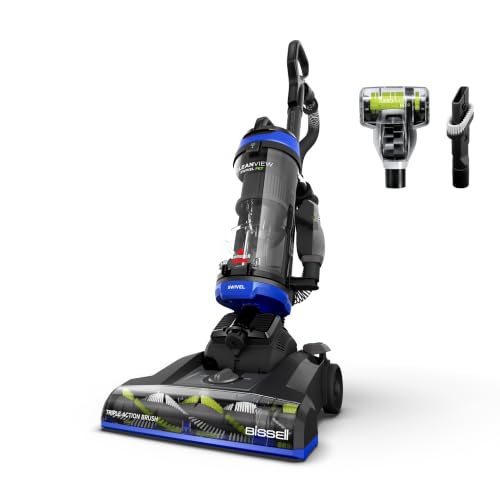
ASIN: B0CWB3TF7X. A full-size upright example for comparing brush-roll, steering, and included tools.
Use Walmart’s live Vacuums & Floor Care category and the relevant brand or model search to see what is currently offered. A product can be in stock online but unavailable for local pickup, or available in one location but not another. Set your delivery address or store before comparing pickup and delivery estimates. If Walmart’s category URL changes, search “vacuum cleaners” from Walmart’s own website and use the current category page.
For a sense of the current catalog, Walmart listings recently included the Shark Navigator NV360, BISSELL CleanView Compact 3508T, and BISSELL CleanView Swivel 3836. These are live listing examples rather than endorsements or a promise of stock. Check the item page for the selected seller, condition, delivery options, price, and return details; those can change after this guide is published.
Understand Walmart’s seller labels before buying
Walmart.com can show products sold directly by Walmart and products sold by third-party Marketplace sellers. The listing identifies the merchant with a “Sold by” or “Sold and shipped by” label. A Marketplace item may be shipped by the seller or fulfilled through Walmart, but the seller remains important for product questions, warranty details, and return processing. Walmart says Marketplace sellers are responsible for processing, shipping, returns, and customer service related to their orders, although Walmart may provide fulfillment or customer-care support in some cases.
Do not treat “fulfilled by Walmart” as the same thing as “sold by Walmart.” Fulfillment describes who stores, packs, or ships the order; seller identity tells you who sold the product. Before checkout, open the seller profile, check the seller’s feedback or Pro Seller badge if shown, and read the listing’s condition and return details. Look for a consistent model number, a complete specification list, and clear warranty information. If a seller’s page has sparse details or the product description mixes several models, pause and compare the manufacturer’s documentation before ordering.
For a higher-priced vacuum, keep the order receipt, packaging, and included accessories until you have inspected the machine and confirmed it works. Compare the carton label and manual with the listing. If an item arrives with the wrong model, missing tools, or a different condition than advertised, use your Walmart account’s order details and support process promptly. Marketplace disputes have a dedicated policy framework; Walmart’s Marketplace Promise describes situations where customer care may step in after a seller has an opportunity to resolve a problem. Review the current seller terms and policy for the exact order.
Return windows: check the vacuum’s actual deadline
Returns are a key part of buying a vacuum online because handling, noise, weight, floor compatibility, and storage fit are difficult to judge from photos. Walmart’s current standard return policy lists “Vacuums & Floorcare” as a 30-day category. The general standard policy otherwise says most items are returnable within 90 days, but that general statement does not replace the vacuum-specific exception. The return eligibility and deadline shown in your account or on the item page should be checked for the order you place.
Marketplace purchases need an extra check. Walmart states that most items sold and shipped by Marketplace sellers may be returned within 30 days, but return restrictions, seller-specific details, and exceptions can apply. Some products may not be eligible for store returns, such as freight, heavy, hazardous, odd-sized, or oversized items. Marketplace listing pages can also specify restocking fees in certain circumstances. Read the item’s return details, especially for restored, open-box, multi-box, or large carpet-cleaning machines.
Before removing packaging or using the vacuum, inspect the return instructions. Keep the receipt or digital order details, all accessories, and original packing materials while deciding whether the machine fits. Check the brush head on the floor type permitted by the manufacturer and avoid using the machine in a way that could affect eligibility. If you are buying during a holiday period, confirm whether an extended window applies to the specific item and seller; do not assume a seasonal extension automatically covers every Marketplace offer.
Walmart policy pages change over time. The official references are Official Walmart return policy, Marketplace Return Policy, and Marketplace seller information. Check them again at purchase, and follow the specific return instructions shown in your order.
Start with the type of vacuum, not the sale label
Walmart search results often mix uprights, stick vacuums, handhelds, canisters, robot vacuums, carpet washers, spot cleaners, and wet/dry shop vacuums. These machines solve different jobs. A carpet washer is a liquid-cleaning machine for carpet and upholstery, not a replacement for routine dry vacuuming. A shop vacuum is designed for workshop debris and certain spills, not daily carpet care. A robot can maintain accessible floor areas but still needs the user to clear obstacles, empty it, and handle stairs and corners.
For broad carpeted rooms, compare upright models by powered brush roll, height adjustment, brush shutoff, bin or bag capacity, and push effort. For homes with stairs, a detachable pod, handheld mode, or long hose can improve practical reach. For apartments and quick crumbs, a lightweight stick or compact upright may be easier to store. For mostly hard floors, look for a nozzle that avoids scattering debris and a brush setting suitable for delicate surfaces. A canister often offers a flexible floor head and hose, but takes a different storage footprint.
For pet hair, look beyond the word “pet” in a listing title. Compare brush-roll design, hair-removal tools, bin capacity, sealed filtration, and how easy the floor head is to clean. For fine dust or household sensitivities, check the complete filtration path and what the manufacturer’s claim covers. A HEPA-labelled filter in a product title does not by itself prove that the whole machine is sealed to a particular standard. Our separate guides cover mixed hard-floor and carpet homes and pet-hair cleanup in more detail.
Compare the full model number and package
Many vacuum families have several model numbers that look nearly identical. A suffix can indicate a different color, retailer bundle, accessory set, filter, brush roll, or revision. Product cards may use variant selectors that change the price and item when clicked. Before you compare retailer prices, write down the exact model number shown on the selected option and verify it on the manufacturer’s site or manual.
Build a short checklist from the listing: vacuum type, model number, floor head, brush-roll shutoff, height adjustment, included tools, cord or battery, filter type, capacity, weight, and warranty. If two pages use the same marketing name but different model numbers, do not assume their features match. Check the “About this item” section and package contents. If a battery is required, verify whether it is included. If the model is bagged, confirm the bag type and whether a starter bag comes in the box.
Also check whether the product is new, restored, refurbished, or open-box. A restored machine may have a lower price, but the condition, seller, warranty, accessories, and return process can differ. Read the condition definition and seller terms rather than relying on the product family name. A new product with a modest feature set may be a better fit than a restored high-end unit if you need predictable warranty support or an exact accessory bundle.
Evaluate carpet pickup and hard-floor controls
Carpet pickup depends on the interaction between brush roll, suction, nozzle geometry, floor height, and debris. A powered brush helps lift embedded soil and hair from carpet fibers, but a head set too low may be hard to push. A head set too high can reduce agitation. If you have high-pile carpet, verify that the vacuum has an adjustment range suitable for it. Read the manufacturer’s instructions and check whether the seller listing names the exact model that supports those settings.
Hard floors call for different behavior. A brush roll may scatter larger crumbs or contact delicate finishes, so look for a brush shutoff or a separate hard-floor mode. When shopping in store, if the display is powered and available to handle, check the location of controls and the head’s maneuverability without switching on a display model unless permitted. Online, use the manual and product specifications to verify rather than trusting a generic “all floors” phrase.
For rugs, observe the rug manufacturer’s care guidance. A powerful brush may pull fringe or snag a loose weave. If you plan to move between wall-to-wall carpet, hardwood, tile, and area rugs, choose a vacuum with clear floor controls and predictable transitions. A floor head that is easy to clean can be more valuable over time than a flashy display feature, especially if long hair or fibers regularly wrap around the brush.
Compare total ownership cost
A vacuum’s advertised sale price is only one part of cost. Bagged models need compatible bags; bagless models need filter cleaning and eventual filter replacement. Brush rolls and belts may need service. Cordless models depend on battery life and may require a replacement pack. A carpet washer needs cleaning solution and maintenance after use. Compare the consumables and replacement parts before choosing a machine, especially if you vacuum frequently.
Use a simple three-year estimate: machine price plus likely bags, filters, belts, batteries, and specialty tools. You do not need an exact prediction; the exercise is meant to reveal a model that is cheap upfront but expensive to keep running. Check whether the manufacturer sells parts directly or provides a compatible parts diagram. If an accessory is essential, confirm that it is included or available separately and that it fits the selected model.
Price comparisons should be made at the same time and for the same package. Walmart prices can vary by seller, location, condition, and promotion; other retailers can have different bundles. Compare final checkout totals, including shipping or pickup convenience, and avoid comparing a discounted restored item with a new model as though they were equivalent. A “was” price or promotion does not establish the vacuum’s cleaning performance. Use product fit and ownership cost to decide whether a discount matters.
Online versus in-store shopping
Online shopping offers a wide range of listings, detailed specifications, reviews, and convenient delivery. It can also be harder to judge push effort, noise, handle height, and the real size of a vacuum. Use the manual and product dimensions to check storage fit, and verify the selected model number before checkout. Check delivery estimate and whether the item is shipped in one box. A large carpet cleaner may have different delivery or return logistics than a small stick vacuum.
In-store shopping can help you assess handle comfort, weight, balance, and accessory storage. A floor model may not match the exact configuration sold online, so compare the model number and box contents. Some products available online may not be displayed locally, and store stock can change. If a nearby store shows no inventory, that does not necessarily mean the model is unavailable for shipping; if it shows available inventory, confirm before making a special trip.
Pickup and delivery options depend on the item and selected location. Set your store or address before assuming that a listing can be picked up today. For large or heavy items, check whether the return can be handled in a store or must go through a seller or carrier. Walmart’s app and site provide order history and return workflows, but the item’s specific policy still applies. Save a screenshot or note of the model and return deadline with your order confirmation.
How to use ratings and reviews
Star averages can help you identify recurring problems, but they do not replace model research. Look at the number of reviews and when they were posted. Product pages sometimes combine ratings across colors or variants, and a shared listing can merge experiences from different model numbers. Check that the reviews mention the same model and accessory configuration you are considering.
Read reviews for patterns rather than one dramatic account. Repeated comments about a short hose, hard-to-empty bin, hair wrap, weak performance on thick carpet, missing accessory, or difficult returns may help you understand tradeoffs. Sort by recent reviews when possible because a product revision or seller change can alter the experience. Keep in mind that reviews are individual reports and may reflect a different floor type, household, or maintenance routine.
Pay attention to verified-purchase labels, but understand that they do not mean the reviewer performed a controlled test. Retailer reviews can offer useful clues about delivery, packaging, and support in addition to cleaning. For performance claims, check independent testing methods and manufacturer documentation. Do not rely on a “best seller” badge as proof that a vacuum matches your home.
Check warranty and support before checkout
Warranty coverage is usually tied to the manufacturer’s terms, the purchase date, and the seller or authorized channel. Check the manufacturer’s warranty page for the exact model and note whether residential use differs from commercial use. For a Marketplace listing, ask who handles warranty support and keep the seller name and receipt. A retailer return window and a manufacturer warranty are separate protections with different requirements.
Review whether the machine can be repaired and whether basic parts are available. A replaceable filter or brush roll is helpful only if you can buy the right part later. Look for official manuals, service contacts, and parts diagrams. If the listing claims a special filtration system or floor technology, confirm its care instructions and replacement part numbers from manufacturer sources. This is especially useful when two listings have similar names but different suffixes.
For restored or pre-owned products, check the condition description, warranty period, and return rules separately. A restored item may be a reasonable choice for a secondary vacuum or budget purchase, but it is not automatically equivalent to new. Verify that the return window gives you enough time to inspect the machine and that the seller clearly states what accessories are included. If the item arrives with a missing filter or damaged head, document it and contact the seller through your order page promptly.
A practical Walmart vacuum comparison checklist
- Floor plan: write down carpet, hard-floor, rug, stairs, and upholstery needs.
- Exact model: confirm the full model number and any suffix on the selected variant.
- Seller: check “Sold by” and “Shipped by,” seller identity, and condition.
- Floor head: verify brush-roll control, height adjustment, edge reach, and suitability for your flooring.
- Reach and handling: compare weight, cord, hose, battery, lift-away features, and storage dimensions.
- Filtration: check the complete system and replacement filter requirements.
- Consumables: price compatible bags, filters, belts, batteries, and cleaning solution.
- Return deadline: check the specific item’s current window, including Marketplace exceptions and return method.
- Warranty: confirm the manufacturer’s terms and who provides support.
- Total checkout cost: compare the same condition and bundle, including shipping or pickup.
Common mistakes when shopping Walmart vacuum listings
Assuming the search result is the whole offer. Product cards may hide variant selectors, Marketplace sellers, restored condition, or different bundles. Open the item page and read the final selected product details.
Using the general return window for a vacuum. Walmart’s current standard policy lists vacuums and floorcare in a 30-day category. Marketplace items can have their own exceptions and restrictions. Confirm the deadline for the exact order instead of assuming the broadest stated policy applies.
Comparing model families instead of model numbers. Similar names can hide different brush rolls, tools, filters, or packages. Find the exact model on the manufacturer’s support page before deciding that two prices are comparable.
Confusing Walmart fulfillment with Walmart as seller. A Marketplace seller may use Walmart fulfillment. Check the seller line because warranty questions, return details, and customer service can depend on who sold the vacuum.
Reading a star rating as a performance test. Ratings can combine variants and reflect many different floors and routines. Use them to spot common issues, then verify specifications and fit for your home.
Forgetting consumables. Bags, filters, belts, and batteries affect the cost of ownership. Check availability and price of compatible parts before you buy, not after the first replacement is due.
Frequently asked questions
What is the return window for a vacuum bought at Walmart?
Walmart’s current standard return policy lists vacuums and floorcare in a 30-day category. Marketplace items are generally subject to a 30-day minimum window, but restrictions and item-specific conditions can apply. Check the item page and your order’s return deadline, as policies can change.
Does Walmart sell third-party vacuum listings?
Yes. Walmart Marketplace sellers can offer products on Walmart.com. The product page identifies the seller, and an item may be fulfilled by Walmart while still being sold by a Marketplace seller. Review the seller, condition, warranty information, and return details before checkout.
Are Walmart vacuum prices the same online and in store?
Prices and availability can vary by location, seller, condition, and promotion. Compare the same model number and bundle at the same time, and review the final checkout total. This guide does not treat any price or stock status as fixed.
Is a vacuum with more reviews always the better buy?
No. Review count and star averages are signals, not controlled tests. Check whether reviews correspond to your exact model, read recent comments for recurring tradeoffs, and compare manufacturer specifications with your own floor plan.
Can I return a Marketplace vacuum to a Walmart store?
Many Marketplace returns can be brought to a Walmart store within the applicable window, but some items are excluded because of size, freight, hazardous-material rules, or seller-specific restrictions. Check the listing’s return details and Walmart’s current Marketplace policy before buying.
Should I buy the cheapest vacuum on the page?
Only if its type, floor head, filtration, service parts, and warranty meet your needs. A lower price may refer to a different condition or seller, and consumables can increase long-term cost. Compare total ownership cost and the exact package rather than the lowest card price.
Final recommendation
The best vacuum at Walmart for your home is the exact model that fits your floor types, storage space, maintenance preferences, and support expectations at the time you purchase. Compare models by full number, inspect the seller and condition, check the current return deadline, and calculate the cost of bags, filters, and replacement parts. Use Walmart’s location-aware listing to confirm live pickup, shipping, and stock, and verify product claims against manufacturer documents. Amazon listings in this guide are cross-store examples only; they do not guarantee matching Walmart stock or bundles.
For more help matching a machine to a specific floor plan, see our guides to vacuum types and home cleaning needs, hardwood and carpet combinations, and affordable vacuum options.
Certain content that appears on this site comes from Amazon. This content is provided “as is” and may change or be removed at any time. Product examples and images are supplied through Amazon Creators API; check current Amazon listings for the latest prices, availability, product details, and specifications. Amazon examples are cross-store comparisons and are not claims of current Walmart inventory.