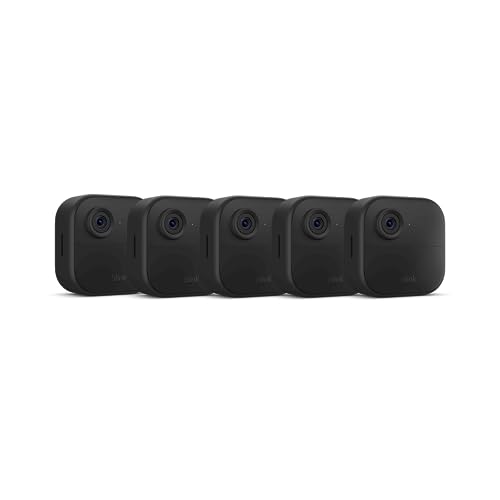
Where to buy
Shopping for the best security camera for beginners under $400? Check the latest price, availability and delivery options on Amazon for each system below. Prices and stock change often, so confirm the current listing before you buy — and remember that under $400 is a ceiling for a whole system here, not a price any single camera should approach. Orders are placed on Amazon.
- Easiest full system to start with: Blink Outdoor 4 Wireless Security Camera — 5-Camera System with Sync Module 2 — Check on Amazon
- Simplest app and setup: Google Nest Cam (Outdoor or Indoor, Battery) — 2-Pack — Check on Amazon
- Best grow-into-it hub system: eufy Security eufyCam S330 (eufyCam 3) 2-Cam Kit with HomeBase 3 — Check on Amazon
- Easiest no-subscription single camera: REOLINK Argus 4 Pro 4K Dual-Lens Solar Security Camera — Check on Amazon
- Step-up detail, more to manage: Arlo Pro 5S 2K Spotlight Security Camera — Check on Amazon
- Only with existing wiring and help: Ring Floodlight Cam Wired Pro — Check on Amazon
Read the full guide ↓
Disclosure: As an Amazon Associate, dailyhomedecorating.com earns from qualifying purchases. Links to Amazon on this page are affiliate links; they cost you nothing extra. Listing details such as price and availability change often, so check the current Amazon listing before you buy.
If this is your first camera system, here is the reassurance this whole guide is built on: the best security camera for beginners under $400 is not the most powerful one, and you should not spend anywhere near the ceiling. Four hundred is headroom — room to start with a simple kit, learn what you actually look at, and add a camera later without replacing anything. Every pick below was chosen for a beginner’s real first month: unboxing without dread, an app that explains itself, alerts that do not train you to ignore them, and a storage story you understand before the trial ends, not after.
Beginner-friendly also means honest about the two traps that catch almost every first-time buyer. Trap one is the subscription surprise: several famous cameras record nothing playable once a free trial lapses unless a plan is active, which feels like the camera broke. We state, in plain words inside every review, exactly what stops working without a plan on that pick. Trap two is specification theatre — 4K, radar, stitched panoramas — when what a first system must do is far simpler: notice the door, show you a clear clip, and keep that clip somewhere you can find it. The picks are ordered by how gently they treat a newcomer, which is why the simplest whole-home kit leads and the hardwired floodlight, a genuinely advanced install, comes last with its conditions spelled out.
One expectation to set kindly and early: your first cameras will teach you placement by getting it slightly wrong. Everyone’s do. Battery and magnetic-mount systems forgive that — you move the camera in minutes — which is another reason beginners should start wire-free, keep the boxes, and treat month one as rehearsal. And a camera, however friendly, is still just a witness: it will show you the door, it will not lock it. Learn the viewing habit first; the hardware is the easy part.
In this guide
Quick Picks
Short on time? This table matches each system to the job it does best in this guide’s lens. Every pick is reviewed in full below, including exactly what its subscription does and does not lock away.
| Pick | Best for | Zone | Key spec | Link |
|---|---|---|---|---|
| Blink Outdoor 4 5-Camera System | Easiest full system to start with | Outdoor (also usable indoors) | 1080p HD, maker-claimed battery life up to two years on AA lithium cells, 143-degree diagonal field of view, Sync Module 2 hub | Check on Amazon |
| Google Nest Cam (Battery) 2-Pack | Simplest app and setup | Indoor and outdoor (either, per camera) | 1080p HDR, battery or optional wired power, magnetic mount, on-device person/animal/vehicle detection, IP54 maker rating | Check on Amazon |
| eufyCam S330 2-Cam Kit | Best grow-into-it hub system | Outdoor (cameras) + indoor hub | 4K cameras, integrated solar panel, HomeBase 3 local storage expandable to 16TB (drive sold separately), face-recognition AI on the hub, IP67 maker rating | Check on Amazon |
| Reolink Argus 4 Pro | Easiest no-subscription single camera | Outdoor (single wide-view camera) | 4K 8MP dual-lens 180-degree stitched view, ColorX colour night vision, battery plus included solar panel, microSD local recording, IP66 maker rating | Check on Amazon |
| Arlo Pro 5S 2K | Step-up detail, more to manage | Outdoor (also rated for indoor use) | 2K HDR video, dual-band Wi-Fi, integrated spotlight and siren, colour night vision, removable rechargeable battery | Check on Amazon |
| Ring Floodlight Cam Wired Pro | Only with existing wiring and help | Outdoor only (hardwired) | 2K HDR video (maker ‘Retinal 2K’), 2000-lumen LED floodlights per maker spec, 3D Motion Detection with radar, hardwired power | Check on Amazon |
How we chose
For beginners we ranked by the first-month experience above all. Setup had to be app-guided with no tools beyond a screwdriver, and the default settings had to be sane — a camera that alerts forty times a day teaches its owner to mute it, which is a failed system. We required each pick’s no-plan behaviour to be describable in one sentence, and we say that sentence in every review. Battery and solar systems scored ahead of wired ones for forgiveness of placement mistakes, maker battery claims are flagged as claims, and the single hardwired pick is included — clearly labelled as a get-help install — because beginners often inherit a home where its fitting already exists.
Across all six picks we also applied three standing rules for this series. Every specification quoted — resolution, field of view, weather rating, battery endurance — is a manufacturer claim from the maker’s own listing or documentation, and is described as such; we do not present lab results we did not produce. Every dollar figure in this article is the keyword’s own under-$400 framing: linked picks say check price on Amazon because live prices move, and no static product price appears anywhere in the guide. And every pick had to be a real, currently listed product with a verifiable Amazon listing, checked for this guide — no placeholder products, no invented models.
Detailed reviews
Blink Outdoor 4 Wireless Security Camera — 5-Camera System with Sync Module 2
Zone: Outdoor (also usable indoors). Key spec: 1080p HD, maker-claimed battery life up to two years on AA lithium cells, 143-degree diagonal field of view, Sync Module 2 hub.
Five cameras in one box is the entire argument here, and it is a strong one: front, back, both sides and the garage approach can all be covered in a single afternoon without running a single cable. Each camera is a compact weather-resistant unit powered by two AA lithium batteries, which Blink rates for up to two years of life under its stated typical-use assumptions — a maker claim that shrinks fast on busy driveways and in cold snaps, but even a fraction of it beats quarterly ladder trips. Video is 1080p with infrared night vision and two-way talk. The kit’s Sync Module 2 matters more than the cameras do: plugged in indoors with a USB drive you supply, it records clips locally with no plan at all. Person detection and extended cloud history, however, sit behind the Blink Subscription Plan, and live view length and clip storage in the cloud are plan features too. The cameras are outdoor units by design, though nothing stops one watching a garage interior or a hallway from a shelf.
Subscription and storage, plainly: local recording through the included Sync Module 2 plus your own USB drive works without any subscription. Cloud clip storage, person detection and photo capture require the Blink Subscription Plan after the trial. Budget the USB drive as part of the system, because the module alone stores nothing.
This is the starter system we hand to nervous first-timers: cameras that pair by scanning a code, a hub that plugs in and mostly disappears, and a five-view safety net that means one badly-aimed camera is a lesson, not a blind spot. Start with three mounted and keep two in the drawer until you know where you actually want them.
Ownership notes: feed the Sync Module 2 a decent-sized USB drive from day one, name cameras by viewpoint rather than number, and keep a spare set of AA lithium cells in the drawer the hub lives in. Battery swaps on five cameras are a rota, not an emergency, if you stagger them — swap the busiest camera’s cells first and let the app’s battery indicators, treated as rough guides, set the order.
Honest limitation: The honest limitation is resolution and responsiveness: 1080p at this price-per-camera cannot read a number plate across a wide driveway, and battery cameras wake and start recording a beat slower than wired ones, so the first moment of an event can be missed.
Choose it if its zone, storage story and power source match the viewpoint you are filling. Skip it if any of those three fights your plan — the other five picks cover the remaining combinations. Check on Amazon
Google Nest Cam (Outdoor or Indoor, Battery) — 2-Pack
Zone: Indoor and outdoor (either, per camera). Key spec: 1080p HDR, battery or optional wired power, magnetic mount, on-device person/animal/vehicle detection, IP54 maker rating.
This is the only pick in the guide that is genuinely both an indoor and an outdoor camera at once: the same sealed, battery-powered unit sits on a magnetic base on a living-room shelf one month and screws to a wall plate over the porch the next, which makes the two-pack a flexible starter system rather than two fixed decisions. Video is 1080p with HDR and night vision, and Google builds person, animal and vehicle detection into the camera itself, so basic intelligent alerts work without paying anything. What is free is deliberately short, though: the camera keeps a rolling few hours of event history at no cost, and anything longer — extended event video history and familiar-face recognition — requires a Nest Aware subscription. There is no local storage option at all; no card slot, no hub, no USB path. The battery is rechargeable and built in, with maker battery-life estimates that vary by activity level, and an optional weatherproof cable can power a camera continuously where an outlet is reachable. The maker weather rating is IP54, splash-resistant rather than sealed against driving rain, so placement under eaves matters.
Subscription and storage, plainly: cloud-only storage. Short rolling event history is included free; longer history and familiar faces are locked behind Nest Aware. If a no-subscription system is a hard requirement, this is the wrong pick no matter how elegant the hardware feels.
If one app must run your first system, Google’s is the gentlest teacher: plain-language alerts, a timeline a child could read, and cameras that move from shelf to wall plate as your confidence grows. The one lesson to learn on day one is its short free history — decide about the plan while the trial clock is a choice, not a surprise.
Ownership notes: decide the charging rhythm early — a camera that comes down monthly wants its charge cable kept somewhere findable, and the magnetic base makes the down-and-up a two-minute job. Review the free history window behaviour in your first week so the plan decision is informed by your actual checking habits, and download any clip you care about before it ages out of the window you have.
Honest limitation: The honest limitation is the storage model: when the free history window is only hours long, an event you sleep through on a trip can age out before you ever see it unless you pay for the plan — the subscription is effectively part of this product’s price.
Choose it if its zone, storage story and power source match the viewpoint you are filling. Skip it if any of those three fights your plan — the other five picks cover the remaining combinations. Check on Amazon
eufy Security eufyCam S330 (eufyCam 3) 2-Cam Kit with HomeBase 3
Zone: Outdoor (cameras) + indoor hub. Key spec: 4K cameras, integrated solar panel, HomeBase 3 local storage expandable to 16TB (drive sold separately), face-recognition AI on the hub, IP67 maker rating.
The two cameras are outdoor battery cameras with an integrated solar panel that eufy describes as needing about two hours of daily sunlight to sustain charge in typical use — treat that as a maker claim that depends heavily on sun exposure, mounting angle and how busy the view is. Video is 4K, night vision is in colour with a spotlight, and all recording lands on the HomeBase 3 hub indoors rather than in a cloud account. The hub ships with a modest amount of built-in storage and accepts an added hard drive for expansion up to the maker’s stated 16TB ceiling. Person, pet and vehicle detection plus face recognition run on the hub itself, which is why eufy can sell this kit with no monthly fee for its core recording and detection features. The cameras carry an IP67 weather rating as a manufacturer specification. Two-way talk, a siren and Alexa and Google Assistant streaming round out the kit. What the kit does not do is Apple HomeKit, and the cameras only talk to the HomeBase, so hub placement indoors — near the router, roughly central to the cameras — decides real-world reliability more than any headline specification.
Subscription and storage, plainly: no plan is required to record, play back or use the hub-based detection. Storage is local only, on the HomeBase 3; there is no eufy cloud recording fallback in this kit, so if the hub is stolen or fails, the footage goes with it unless you have expanded storage and your own backup habits.
Choose the hub system when you already know you will grow: the first evening is slightly more involved (the hub wants a wired network connection), and in return you never meet a paywall for your own recordings. Beginners who hate subscriptions emotionally, not just financially, belong here.
Ownership notes: keep the HomeBase 3 on a wired network connection in a central indoor spot, label each camera’s position in the app the day you mount it, and check solar exposure after the first week — a camera whose battery trends down despite sun wants a slightly different angle, not a bigger complaint. Add storage before you need it; moving to a larger drive later means planning a quiet afternoon with the hub.
Honest limitation: The honest limitation is the two-camera ceiling of the box itself: a third viewpoint means buying an add-on camera, and shaded north-facing walls can starve the solar panel in winter, turning a fit-and-forget camera into one you occasionally bring indoors to charge.
Choose it if its zone, storage story and power source match the viewpoint you are filling. Skip it if any of those three fights your plan — the other five picks cover the remaining combinations. Check on Amazon
REOLINK Argus 4 Pro 4K Dual-Lens Solar Security Camera
Zone: Outdoor (single wide-view camera). Key spec: 4K 8MP dual-lens 180-degree stitched view, ColorX colour night vision, battery plus included solar panel, microSD local recording, IP66 maker rating.
One camera doing the work of two is the pitch: twin lenses stitch a single 180-degree panoramic frame, so a corner mount watches both walls of an L-shaped yard, or one driveway camera covers the street approach and the garage door together. Resolution is 4K from an 8MP sensor pair, and Reolink’s ColorX night mode uses a very fast lens and a large sensor to hold colour after dark without leaning on a spotlight — maker claims that hold up best where some ambient light exists and should be read as best-case. Power is a built-in rechargeable battery topped up by the included solar panel, so mounting is two screws and no cables. Recording is local to a microSD card you supply (the maker supports large-capacity cards), person, vehicle and animal detection runs on the camera, and no subscription is required for recording or smart alerts; Reolink’s optional cloud exists but nothing core is locked behind it. The maker weather rating is IP66. Dual-band Wi-Fi is on board, and the camera can also pair with Reolink’s Home Hub if you later want centralised storage.
Subscription and storage, plainly: no plan needed. Local microSD recording and on-camera detection are included; the card is sold separately, and footage lives on that card in the camera itself, so a stolen camera takes its evidence with it unless you add the optional hub or cloud.
As a first single camera it is disarmingly simple: charge it, card in, two screws, done — and its wide view forgives the aim errors every beginner makes. It teaches the core habit (check the clip, adjust the view) with no account gymnastics and no plan decision hanging over the trial period.
Ownership notes: use a high-endurance microSD card — continuous event writing wears ordinary cards — and format it in the camera. Check the stitched image at the seam after mounting by walking the boundary yourself, angle the solar panel for the worst month rather than the best week, and download important clips promptly: the card in the camera is a working buffer, not an archive.
Honest limitation: The honest limitation is the stitched image: objects crossing the seam between lenses can distort briefly, the extreme wide view spreads pixels thin at long range, and like every solar camera it depends on the panel actually seeing sun.
Choose it if its zone, storage story and power source match the viewpoint you are filling. Skip it if any of those three fights your plan — the other five picks cover the remaining combinations. Check on Amazon
Arlo Pro 5S 2K Spotlight Security Camera
Zone: Outdoor (also rated for indoor use). Key spec: 2K HDR video, dual-band Wi-Fi, integrated spotlight and siren, colour night vision, removable rechargeable battery.
A single flagship camera earns its place in an under-$400 system guide because two or three of them still fit the ceiling, and because it does the one job value kits do badly: identifying detail. The 2K HDR sensor, wide field of view and integrated spotlight produce colour night footage with noticeably more facial and clothing detail than 1080p battery cameras, and dual-band Wi-Fi lets it hold the stronger of your 2.4 or 5 GHz networks — a real advantage at the far end of a house. The battery is removable and rechargeable, the housing is weather-sealed for outdoor mounting, and a built-in siren and two-way talk are standard. The catch defines the brand: without an Arlo Secure subscription, this camera is essentially a live-view device. Recorded playback, person/package/vehicle recognition and activity zones all sit behind the plan once the trial ends, and there is no memory-card slot in the camera. Local recording exists only through a separate Arlo SmartHub with USB storage, an extra purchase that still does not unlock the recognition features. Treat the plan as a running cost of owning this camera, not an optional extra.
Subscription and storage, plainly: Arlo Secure is effectively required — recording and smart recognition are subscription features. Local storage needs a separate SmartHub and USB drive and still leaves smart alerts plan-dependent. No plan, no recordings: that sentence should decide this pick for you.
Pick this when a friend who knows cameras will help you set up, or when identifying faces at the door is the whole point. It is a superb camera wrapped in the most plan-dependent ecosystem here, and beginners should walk in knowing the subscription is part of the product, not an upsell to resent later.
Ownership notes: the removable battery is the maintenance story — a second charged battery turns a ladder trip into a swap, and the camera’s downtime drops to minutes. Keep the plan renewal on autopay if this camera guards a viewpoint you rely on, audit your activity zones after the first fortnight, and expect firmware and app changes to occasionally move settings; a quarterly five-minute check keeps the detail you paid for actually switched on.
Honest limitation: The honest limitation is total cost of ownership: one camera plus years of plan fees can overtake a no-fee kit’s price, and buyers who cancel the plan are left with far less camera than the box art suggests.
Choose it if its zone, storage story and power source match the viewpoint you are filling. Skip it if any of those three fights your plan — the other five picks cover the remaining combinations. Check on Amazon
Ring Floodlight Cam Wired Pro
Zone: Outdoor only (hardwired). Key spec: 2K HDR video (maker ‘Retinal 2K’), 2000-lumen LED floodlights per maker spec, 3D Motion Detection with radar, hardwired power.
Every other pick in this guide runs on batteries; this one replaces an existing outdoor light fitting and never needs charging, recharging or solar luck again. In exchange for an electrician-grade install — it hardwires to a standard junction box — you get two bright LED floodlight heads, a 2K HDR camera, colour night vision, a siren, and Ring’s radar-based 3D Motion Detection, which the maker says tracks movement through the yard more precisely than pixel-watching alone and enables its Bird’s Eye View map of an event’s path. Continuous power also means the camera is always awake: no wake-up delay, no missed first seconds, and pre-event buffering features that battery cameras cannot match. The trade is Ring’s storage model in its purest form. The camera has no local storage of any kind. Without a Ring subscription, you can watch live and receive motion alerts, but you cannot review, save or share a single recorded event; video history, person alerts and rich notifications are all plan features after the trial. It is also resolutely outdoor-only and fixed: where it is wired is where it watches, forever, so placement mistakes are expensive ones.
Subscription and storage, plainly: cloud-only, and the Ring subscription is required for any recorded video playback at all. There is no card, hub or USB alternative for this model. If subscription-free recording matters to you, skip this pick entirely and look at the local-storage systems above it.
Beginners: this is the one to admire and postpone, unless the wired fitting already exists over your driveway and someone competent is doing the install. Always-on floodlight coverage is a wonderful second chapter and a miserable first one — everything above it on this list can be running before dinner.
Ownership notes: there is almost nothing to maintain, which is the point — no batteries, no cards, no hub. Your ownership tasks are account tasks instead: keep the subscription active if you rely on recordings, review the radar motion settings after the first week of real traffic, and clean the lens and floodlight heads each season, because hardwired permanence quietly accumulates grime that battery cameras get wiped during every recharge.
Honest limitation: The honest limitation is lock-in plus installation: it needs existing wiring (or an electrician to add it), it cannot move rooms or houses cheaply, and its entire recording history lives behind a paid plan on Ring’s servers.
Choose it if its zone, storage story and power source match the viewpoint you are filling. Skip it if any of those three fights your plan — the other five picks cover the remaining combinations. Check on Amazon
Comparison table
| System | Zone | Recording without a plan | Storage | Power |
|---|---|---|---|---|
| Blink Outdoor 4 5-Camera System | Outdoor (also usable indoors) | Yes — via Sync Module 2 local storage | Local USB via hub, or cloud with plan | AA lithium batteries (maker claim: up to two years) |
| Google Nest Cam (Battery) 2-Pack | Indoor and outdoor (either, per camera) | Short free event window only | Cloud only | Rechargeable battery, optional wired cable |
| eufyCam S330 2-Cam Kit | Outdoor (cameras) + indoor hub | Yes — hub detection and recording included | Local, HomeBase 3 (expandable) | Battery + integrated solar (maker claim) |
| Reolink Argus 4 Pro | Outdoor (single wide-view camera) | Yes — on-camera detection and recording | Local microSD (card sold separately) | Battery + included solar panel |
| Arlo Pro 5S 2K | Outdoor (also rated for indoor use) | No — recording requires Arlo Secure | Cloud; local only via separate SmartHub | Removable rechargeable battery |
| Ring Floodlight Cam Wired Pro | Outdoor only (hardwired) | No — playback requires Ring subscription | Cloud only | Hardwired mains |
Read that middle column before anything else in this guide. It is the difference between a system whose cost ends at checkout and one whose cost is a standing order — and it is the column most product pages work hardest to blur. If you only follow one link from this section, make it the headline pick for this lens: Check on Amazon.
How to choose the best security camera for beginners under $400
Start smaller than the ceiling invites. Two or three cameras covering the doors teach you your own habits — which alerts you open, which views you never check — and every system here expands. Beginners who start with the biggest kit usually end up maintaining cameras they ignore, which is worse than fewer cameras they trust.
Choose your storage story in words of one syllable. Local (hub or memory card): recordings live at home, no monthly fee, and if the camera is stolen the footage may go with it. Cloud: recordings live on the company’s servers, searchable from anywhere, and stop when the plan stops. Neither is wrong; not knowing which one you bought is the only wrong answer, and each review in this guide states it outright.
Prefer forgiving hardware for your first mounts. Battery cameras and magnetic bases let you fix the aim mistakes everyone makes in week one without new holes. Solar assistance is a bonus, not a promise — panel placement decides whether the maker’s battery claims come true. Leave hardwired anything for your second system or for a professional install.
Tame the alerts on day one, not day thirty. Turn on person detection where it is offered, draw activity zones over pavements and roads, and lower sensitivity until the camera is mostly quiet. A beginner’s system succeeds when an alert still makes you look at your phone in month three — that is a settings achievement, not a hardware one, and every pick here can do it.
Write down three dates before you enjoy the first clip: when each trial subscription ends, when each battery will plausibly want attention (the maker’s claim is the optimistic bound), and where you put the chargers, cards and spare screws. First systems fail on admin, not technology; a note on the fridge beats a dead camera in month four.
Common mistakes
- Buying the maximum kit on day one. Unopened cameras in a drawer are the classic beginner purchase; start with the doors and expand into the system you now understand.
- Letting the trial lapse by accident. On the cloud and plan-locked picks, the day the trial ends is the day recording stops — decide about the plan deliberately, in the first week.
- Mounting high and wide for a ‘security look’. Beginners film rooftops and streets; the useful beginner view is face-height at a door or gate, narrow enough to recognise someone.
- Leaving default sensitivity on. Forty alerts a day trains you to ignore the forty-first, which was the real one. Ten minutes of zone-drawing on day one prevents the entire failure mode.
- Throwing away boxes, mounts and chargers. Your second placement attempt — and there is always one — needs exactly the parts that look like packaging.
- Expecting the camera to prevent anything. A first system shows you your home; locks, lights and habits protect it. Beginners who expect prevention feel betrayed by a tool that only ever promised witness.
Final recommendation
Beginners, buy the learning curve, not the ceiling. The Blink five-camera system is the most forgiving start — cheap per view, locally recording, and expandable in every direction — with the Nest two-pack as the pick if the simplest possible app matters more than avoiding a plan. Grow into the eufy hub system when subscriptions annoy you, and leave the floodlight and the flagship Arlo for the confident second phase. Whichever you choose, you will finish month one well under budget with a system you understand — which is the real beginner feature no box can print.
Three starter blueprints that stay beginner-friendly
Blueprint one — the gentle start. One Blink system, three cameras mounted (front door, back door, living space), two kept in the box for month two. Local recording means no plan decision at all, and the whole first month is about learning alerts and angles with training wheels on. This is the default recommendation for a true first-timer.
Blueprint two — the two-camera classroom. The Nest pair, one in and one out, inside the simplest app in the guide. Your homework is deliberately tiny: watch the free history window behave for a week, then decide about the plan with evidence. Everything about this blueprint is reversible, which is what makes it educational rather than expensive.
Blueprint three — the grow-into-it hub. The eufy kit for beginners who already know subscriptions irritate them: a slightly more deliberate first evening with the hub, then a system that never asks for money again and accepts more cameras whenever confidence arrives. Add the Reolink later for the corner the kit cannot see.
Placement, power and privacy in practice
Wherever the lens, three practical truths govern every pick in this guide. Placement beats specification: a modest camera at face height on a choke point outperforms a flagship filming a panorama from the eaves, so mount, walk the view yourself at night, and judge the actual recorded clip rather than the live preview. Power is a schedule, not a feature: every battery and solar figure quoted by these makers assumes their version of typical use, so your real maintenance interval is set by your busiest camera in your worst month — discover it in the first season and write it on the calendar. And privacy is part of the installation, not an afterthought: aim away from neighbours’ windows and gardens, use activity and privacy zones where the app offers them, tell household members and regular visitors the cameras exist, and remember that indoor cameras watch your own life most of all — the picks with physical shutters, covers or lens-away privacy modes exist because that matters. A system installed with those three habits will still be trusted in year three; one installed for the spec sheet alone usually is not.
Understanding the numbers on the box
One more translation applies to every figure in this guide, including the ones in its own comparison table: a specification is a promise about a component, not about your installation. The same camera produces different real-world results at two metres and at twelve, in a lit street and in a dark lane, on a strong router signal and on the far side of three walls from a weak one. That is why this guide keeps returning to the unglamorous verbs — mount, walk, check, adjust — because they are where specifications become performance. It is also why we describe endurance, sealing and detection figures as maker claims throughout: not as a legal reflex, but because the maker’s test bench and your February are genuinely different places, and an honest guide prices that difference in from the start rather than apologising for it afterwards.
Four numbers do most of the persuading in this category, and all four deserve translation before they are allowed to influence you. Resolution — 1080p, 2K, 4K — counts pixels, not clarity: a 4K camera behind a small lens, compressing hard to save battery and bandwidth, can resolve less real detail than a well-lit 2K camera, and distance divides whatever detail exists. Judge resolution as potential, then ask the placement question: at the distance your camera will actually work, does the pick’s tier give a face enough pixels to be a face? Field of view works the opposite way to intuition — wider is not better, merely broader: every extra degree spreads the same pixels thinner, which is why this guide pairs wide detection views with narrower identification views instead of crowning one number. Battery figures are the softest numbers in the category: each maker tests under its own stated typical use, with its own assumptions about events per day and temperature, so treat every endurance claim in this guide as an optimistic bound set by the manufacturer and plan your charging rhythm around your busiest camera, not the brochure’s average one. Weather ratings, finally, are laboratory specifications: an IP code describes how a sealed sample resisted water and dust under test conditions, and it says nothing about years of gasket ageing, driven coastal rain or a mount that pools water against the housing. Read IP66 as ‘properly rain-resistant when mounted sensibly’, IP54 as ‘sheltered positions’, and you will never be surprised by weather. None of this makes the numbers useless — it makes them comparable, which is the only job they were ever fit for.
Beginners often ask when they will stop feeling like beginners, and the honest answer is: after the first incident you review successfully. The first time an alert leads you to a clear clip — a delivery, a fox, a neighbour’s cat with ambitions — the system clicks from gadget to habit. Everything in this guide’s ordering serves that moment: simple apps shorten the path to it, local recording removes the paywall standing in front of it, and forgiving mounts mean your first placement mistake does not delay it by a weekend of re-drilling.
It is also worth saying what you are not missing by starting here rather than with professional installation. A professionally fitted system buys design expertise, wired reliability and often a monitoring contract — real things, priced accordingly. What it does not buy is a different category of camera magic; the sensors and apps overlap heavily with this guide’s. Starting consumer-grade, learning your own home’s patterns, and upgrading only the viewpoints that prove themselves is not the cheap imitation of the professional route. For most homes it is simply the sensible order.
Our headline pick for this lens is the Blink Outdoor 4 Wireless Security Camera — 5-Camera System with Sync Module 2 — Check on Amazon — because it fits the lens’s priorities with the fewest compromises on storage honesty and day-to-day ownership.
Frequently asked questions
I have never installed a camera. Where do I actually start?
With the Blink system or the Nest pair in this guide: charge or load the batteries, follow the app, mount one camera watching your main door from inside or above it, and live with it for a week before adding more. That week teaches you more than any specification.
What stops working if I do not pay for a subscription?
On the eufy, Blink-with-local-storage and Reolink picks: essentially nothing core — they record locally. On Nest, recorded history shrinks to a short free window. On Ring and Arlo, recorded playback effectively stops. Each review states its pick’s position in plain language.
How hard is the wiring on the floodlight camera?
It is a mains-wiring install on an existing junction box — a job for an electrician or a confident, permitted DIYer, not a first project. It is the only pick here we describe that way, deliberately.
How long do the batteries really last?
Manufacturers publish best-typical figures — up to two years for Blink’s AA cells, months-scale claims for the rechargeable picks — and real life with busy views and cold weather lands well under them. Treat every figure in this guide as a maker claim and keep chargers findable.
Can I add cameras later, or must I buy the final system now?
Every ecosystem here expands: add-on cameras join the eufy hub, the Blink module and the Nest and Arlo apps. Starting small costs you nothing but a second order, which is exactly why beginners should.
Do I need fast home internet for these?
A normal home broadband connection handles several cameras; what matters more is Wi-Fi strength where the cameras sit. If a far camera struggles, moving the router or hub usually helps more than upgrading the camera.


