Where to buy
New to home cameras? Every pick below is a single camera or one-camera starter system within the under $150 budget, chosen because a first-time owner can install and understand it in one sitting. Check the current price and box contents on Amazon, since kits and included modules differ by listing.
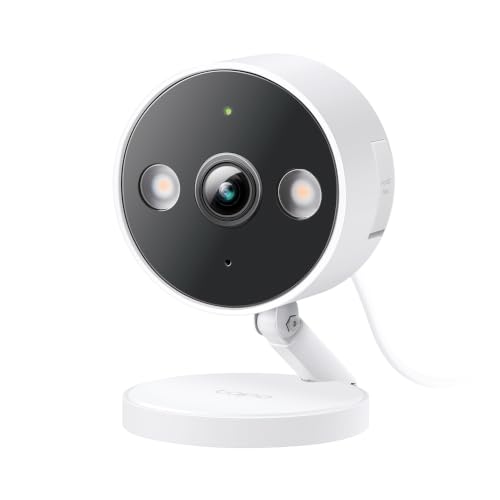
- Best first camera overall: Tapo C120 — 2K QHD, IP66, wired, free AI detection, microSD local storage
- Easiest outdoor start: Blink Outdoor 4 (1-Camera System) — 1080p HD, wire-free, maker-claimed up to two-year battery, sync module system
- Easiest indoor start: Blink Mini 2 — 1080p HD, 143-degree view, plug-in, built-in spotlight
- Best grow-with-you indoor pick: eufy Indoor Cam E220 — 2K, pan 360 and tilt 96 degrees, motion tracking, microSD local storage
- Best for sharpest video simply: Wyze Cam v4 — 2.5K QHD, IP65, wired, microSD local storage
- Best set-and-forget outdoor pick: eufy SoloCam S220 — 2K, integrated solar panel, built-in 8GB local storage, no monthly fee
Read the full guide ↓
Disclosure: As an Amazon Associate, dailyhomedecorating.com earns from qualifying purchases. Links to Amazon on this page are affiliate links; they cost you nothing extra. Listing details such as price and availability change often, so check the current Amazon listing before you buy.
Choosing the best security camera for beginners under $150 is less about specifications than about what happens on your first Saturday with the thing. A beginner-friendly camera is one you can unbox, connect and position without a ladder, a drill sergeant or a networking qualification, whose app explains itself in plain words, and whose costs, all of its costs, were visible before you bought it. The cameras in this guide were picked to that standard. Each is labelled honestly as an indoor camera, an outdoor camera or a wired model that can do either, because the most common beginner mistake is buying a good camera for a job it was never built to do, and the second most common is discovering the subscription only after the free trial ends.
The beginner’s other advantage is a clean slate, and this guide spends it wisely by thinking in small systems from day one. Most first-time owners need exactly two views to feel their home is covered: the main entrance and the main living space. Every ecosystem in this pool offers that pair, one camera for the door area and one for the room, in a single app, for under $150 a camera. The wired pair, Tapo inside or out with a second Tapo or the sharper Wyze at the key door, suits beginners with an outlet near the entrance. The Blink pair, a wire-free Outdoor 4 and a plug-in Mini 2, suits beginners who fear cables and commitment in equal measure. The eufy pair, a pan-and-tilt indoor camera and a solar outdoor camera, suits beginners who want to set the system up and then genuinely forget it exists. If your budget stretches further, the companion guide Best Security Camera For Beginners Under $200 applies the same system thinking at the next tier.
Three facts are stated up front so nothing in the reviews surprises you later. First, subscriptions: Blink’s recorded clips and person detection need its paid plan, Wyze and Tapo record locally for free and sell optional cloud extras, and eufy needs no plan for normal use, and each review repeats its own brand’s position where it matters. Second, battery and solar numbers are maker claims under ideal test conditions, and your mileage will vary with traffic, weather and Wi-Fi strength. Third, no camera here needs professional installation, a hub you have not budgeted for, or tools beyond a screwdriver, and where a pick does want a memory card or a module, the review says so in the open. Beginner-friendly is a property of the whole ownership experience, and that is the standard applied throughout.
In this guide
Quick Picks
Short on time? This table matches each camera to the job it does best in this guide. Every pick is then reviewed in full below, with its storage and subscription position stated plainly.
| Best for | Pick | Key spec | Link |
|---|---|---|---|
| Best first camera overall | Tapo C120 | 2K QHD, IP66, wired, free AI detection, microSD local storage | Check on Amazon |
| Easiest outdoor start | Blink Outdoor 4 (1-Camera System) | 1080p HD, wire-free, maker-claimed up to two-year battery, sync module system | Check on Amazon |
| Easiest indoor start | Blink Mini 2 | 1080p HD, 143-degree view, plug-in, built-in spotlight | Check on Amazon |
| Best grow-with-you indoor pick | eufy Indoor Cam E220 | 2K, pan 360 and tilt 96 degrees, motion tracking, microSD local storage | Check on Amazon |
| Best for sharpest video simply | Wyze Cam v4 | 2.5K QHD, IP65, wired, microSD local storage | Check on Amazon |
| Best set-and-forget outdoor pick | eufy SoloCam S220 | 2K, integrated solar panel, built-in 8GB local storage, no monthly fee | Check on Amazon |
How we chose
Setup effort was scored first, in the order a beginner meets it: account creation, Wi-Fi pairing, mounting, aiming and the first evening of alerts. Picks earned their places by keeping each step short and forgiving. QR-code pairing, stands that work without screws, magnetic bases and apps that explain motion zones with pictures rather than jargon all counted heavily. Anything that demanded port forwarding, manual network surgery or a separate hub purchase before the first picture appeared was excluded from this beginner pool entirely, however capable it might be for enthusiasts.
The second filter was the honesty of the ongoing relationship. We mapped, for each brand, what works with no payment beyond the camera: live view everywhere, local recording on the Tapo, Wyze and eufy models, subscription-gated recording and person detection on Blink, and optional cloud upgrades on Wyze and Tapo that add intelligence without removing the basics. Beginners are the buyers least equipped to decode that split at the shelf, so it is spelled out in every review and summarised in the comparison table. Memory cards, where needed, are named as part of the purchase rather than discovered at midnight during setup.
Coverage logic for a first system closed the assessment. Beginners do best with cameras that forgive imperfect placement, which favoured the wide view of the Mini 2, the moving lens of the eufy E220 and the fit-anywhere wire-free mounting of the Blink Outdoor 4 and solar eufy S220, alongside wired cameras whose continuous recording forgives a beginner’s uncalibrated motion zones. Maker specifications were used for resolution, weather-resistance figures and battery or solar claims, and those claims are labelled as claims wherever they appear, because teaching a first-time owner which numbers are promises and which are advertising is part of the guide’s job.
We also scored what happens when something goes wrong, because for a beginner the recovery experience is the product. Every pick here can be factory-reset with a button press and re-added to its app in minutes, every brand publishes plain-language help and status pages, and none of the systems punishes a mistake, a wrong password, a router change, a camera moved to a new room, with anything worse than a short re-pairing session. That forgiveness is worth real money to a first-time owner and it is unevenly distributed across the wider market, where some systems treat a changed Wi-Fi password as a weekend project. If you take one selection principle from this guide, take that one: buy the system that forgives you.
Detailed reviews
Each review states where the camera belongs, indoors, outdoors or either, what it records without payment, and the one limitation we would want to know before buying. Battery, solar and weather figures are maker claims from the manufacturer’s own specifications.
Tapo C120 — Best first camera overall
Where it belongs: Indoor or outdoor (wired). Recording position: Local microSD recording and AI detection free; optional Tapo Care adds cloud storage.
The Tapo C120 is TP-Link’s wired indoor/outdoor camera, and its headline is what it refuses to charge extra for: person, pet and vehicle detection are handled on the camera and included without a subscription, which is rare in this pool. Video is 2K QHD with colour night vision helped by dual spotlights, the housing carries an IP66 weather-resistance rating from the maker, and a magnetic base with a metal plate in the box makes indoor placement unusually flexible for a camera that can also live outside on a wall or under an eave. Like the Wyze it is plug-in powered, so it watches continuously rather than napping between motion events.
On storage, the C120 records to a microSD card locally with no plan required, and TP-Link’s optional Tapo Care subscription adds cloud storage and richer notification content on top. That ordering matters: the free tier here is genuinely functional, because the AI detection that decides whether an alert is a person or a passing cat is not paywalled. The subscription is therefore a convenience for off-site backup, not the toll gate it is on some rivals. If your house rule is one app and no monthly fees, a matched pair of C120s inside and out is the most straightforward way to honour it at this budget.
The compromises are physical rather than digital. The camera is wired, so placement follows your outlets, and the body is a fixed-view design: no pan or tilt, so one camera covers one composed view and wide rooms may need two. The Tapo app is capable but separate from the Kasa ecosystem some households already run, so check which app your other TP-Link gear uses before building a whole system around it. Within those limits, the C120 is the pool’s best answer to subscription fatigue: sharp video, weather sealing a step above the Wyze on paper, and detection intelligence that stays free after purchase.
This is the first camera we hand a beginner: plug it in, scan, mount it with the magnetic base, and it is already detecting people for free and recording to its card with nothing to subscribe to and nothing to decode. If the whole experiment ended with this one camera by the door, it would still have been a success.
Honest limitation: fixed view with no pan or tilt, and wired power only, so it cannot follow action across a room or sit somewhere an extension lead cannot reasonably reach.
Blink Outdoor 4 (1-Camera System) — Easiest outdoor start
Where it belongs: Outdoor (wire-free battery). Recording position: Cloud recording and person detection need Blink Subscription Plan; local via sync module USB.
The Blink Outdoor 4 is the wire-free outdoor anchor of this pool: a battery camera that mounts with screws in minutes, needs no outlet and no cable run, and talks back to a sync module inside the house. Video is 1080p HD with infrared night vision and two-way talk. The maker’s headline claim is battery life of up to two years from the included AA lithium batteries under default settings and typical use, and that figure must be read as a maker claim, not a promise: heavy motion traffic, long live-view sessions, cold weather and weak Wi-Fi all shorten real intervals between battery swaps, sometimes dramatically.
Blink is also the pool’s clearest example of subscription gravity, so here is the honest split. Without a Blink Subscription Plan you get live view and motion notifications, and that is close to the whole story: saving and reviewing recorded clips in the cloud, extended history and person detection are subscription features. Local storage exists as an escape hatch through a sync module with a USB drive attached, which keeps clips in the house instead of the cloud, but it is a more manual arrangement than a microSD card inside the camera and the exact module in the box varies by kit, so check the listing for the system you are buying. Many owners happily pay the plan for the polish; just price it into the system before comparing sticker prices.
Choose the Outdoor 4 for the places wiring cannot go: a gate, a side fence, a detached garage corner, a tree line at the end of the drive. Its enhanced motion detection and adjustable zones help it ignore the street while watching the path, and because cameras are added one sync module at a time, a single outdoor camera today can become the perimeter of a larger Blink system later. What it will not do is match the wired cameras here for sheer detail: 1080p across a wide yard view identifies that someone is there more readily than exactly who, so pair it with a sharper wired camera at the door itself if identification matters most.
For a first outdoor camera, nothing else here is this painless to place: two screws, no cable, and the app walks you through zones and sensitivity with unusual clarity. Just go in with your eyes open about the plan, because the camera’s memory is the part that lives behind it.
Honest limitation: the features most people picture when they buy a camera, recorded cloud clips and person detection, require the paid Blink plan or a local-storage workaround, and the two-year battery figure is a best-case maker claim that busy locations will not see.
Blink Mini 2 — Easiest indoor start
Where it belongs: Indoor (plug-in; outdoor only with separate weather-resistant adapter). Recording position: Cloud recording and person detection need Blink Subscription Plan; no on-camera card slot.
The Blink Mini 2 is the indoor half of a Blink household: a compact plug-in camera with 1080p HD video, a wide 143-degree diagonal field of view from the maker’s specification, colour night view from a built-in spotlight, two-way audio and a stand that doubles as a wall mount. One Mini 2 composed from a corner shelf covers a typical living room wall to wall, which is why it pairs so naturally with the Outdoor 4 in a mixed system: same app, same alert style, same subscription decision, one camera language inside and out. It is also the natural second or third camera in this pool, the one you add for the nursery, the home office or the hallway once the entrances are covered.
The subscription story is the same Blink story, and it applies indoors exactly as it does outside. Person detection and saved video history in the cloud are Blink Subscription Plan features; without the plan the Mini 2 is a live-view and motion-alert camera, with local clip storage possible only through a compatible sync module setup elsewhere in the system. That is a reasonable trade at this size and price class, but it must be a conscious one: if you want an indoor camera that records locally to its own card with no plan at all, the eufy E220 and the wired Tapo and Wyze picks in this guide do that and the Mini 2 does not.
One placement warning matters more than any spec: the Mini 2 is an indoor camera. Blink offers outdoor use only with a separate weather-resistant power adapter, and even then it belongs under cover, not screwed to a fence in the rain. Used as intended, on a shelf or screwed high in a corner with its cable tidied to the skirting, it is discreet, silent and quick to install, and its spotlight makes night checks of a sleeping child or a restless pet a colour picture instead of a grey infrared guess. For renters it has a further quiet virtue: the stand needs no screws at all, so it can watch a room for a year and leave no trace when the lease ends.
The Mini 2 is the gentlest possible indoor start, a shelf, an outlet and five minutes, and it teaches you the Blink app that its outdoor sibling also uses. Buy the pair together and your first system, door and room, shares one learning curve instead of two.
Honest limitation: no on-camera local storage of its own and person detection locked behind the Blink subscription, plus it is indoor-first, so it cannot substitute for a true outdoor camera at an exposed mounting point.
eufy Indoor Cam E220 — Best grow-with-you indoor pick
Where it belongs: Indoor (plug-in, pan and tilt). Recording position: Local microSD recording, no subscription required; optional cloud available.
The eufy Indoor Cam E220 solves the fixed-camera problem by moving: it pans a full 360 degrees and tilts 96 degrees on the maker’s specification, tracks motion across a room automatically, and records 2K video while doing it. One E220 in the middle of an open-plan space does the coverage work of two fixed cameras, following a toddler, a dog or an unexpected visitor from the door to the kitchen without you touching the app. On-device AI distinguishes people and pets for alerts, and it works with Alexa, Google Assistant and HomeKit ecosystems, which makes it the most platform-flexible indoor pick in this pool.
eufy’s storage position is the mirror image of Blink’s. The E220 records to a microSD card in the camera, card sold separately, with no subscription required for recording, playback or its core detection features, and it can also pair with a HomeBase 3 for centralised local storage if you grow into the wider eufy system. An optional cloud plan exists for buyers who want off-site copies, but nothing about normal daily use is locked behind it. For a mixed indoor and outdoor system built on local storage, the E220 inside and its solar sibling the SoloCam S220 outside are the only pair in this guide that share one app and one no-fee philosophy.
The limits are about physics and placement. It is indoor-only and plug-in powered, so it needs an outlet and a surface or bracket with a commanding view; pan and tilt cannot see through a badly chosen corner, and the tracking motor, while quiet, is not silent in a bedroom at night. It also cannot watch the yard: the moment a camera must survive rain, this is the wrong tool and the outdoor picks take over. Judged as an indoor camera, though, it offers the most coverage per camera in the pool, and for pet owners its tracking clips are the ones people actually end up watching.
Beginners underestimate how much placement matters until a fixed camera stares at the wrong half of a room. The E220 forgives that completely by looking around for you, and its no-plan local recording means the second month costs the same as the first: nothing.
Honest limitation: strictly indoor and outlet-dependent, and its moving lens covers one room brilliantly but cannot be in two places at once, so multi-room homes still need a camera per key room.
Wyze Cam v4 — Best for sharpest video simply
Where it belongs: Indoor or outdoor (wired). Recording position: Local microSD recording free; optional Cam Plus adds cloud events and smart labels.
The Wyze Cam v4 is the wired all-rounder in this pool: a small plug-in camera the maker rates for indoor or outdoor use, with an IP65 weather-resistance rating on the housing, 2.5K QHD video, enhanced colour night vision, a motion-activated spotlight and a built-in siren. Because it runs on continuous USB power rather than a battery, it never sleeps through the start of an event to save charge, and it can record around the clock to a microSD card instead of only waking for motion clips. Wyze lists local recording support for cards up to 512GB, sold separately, which is the largest local capacity in this group and the reason this camera suits buyers who want long on-camera history without paying for cloud space.
Storage and subscriptions need stating plainly, because Wyze splits them clearly. Local microSD recording works without any plan: motion events and continuous recording stay on the card, and you review them in the app. The optional Cam Plus subscription is what adds cloud-stored event video and the smarter person, pet, package and vehicle classifications, along with longer cloud history. Without the plan you still get motion alerts and local playback, but the camera is less clever about telling a person from a swaying branch, and there is no cloud copy if the camera itself is stolen or damaged. Treat the subscription as an intelligence upgrade, not a requirement, and budget the microSD card as part of the real purchase.
Power is the honest trade-off. The v4 needs an outlet within cable reach of the mounting point, and outdoor runs need the maker’s outdoor-rated power arrangement rather than a random indoor adapter left in the rain. In exchange you get the sharpest video in this pool, a spotlight that makes night footage usable for identifying faces and clothing, and two-way talk for speaking to a delivery driver or telling a dog to get off the sofa. It works with Alexa and Google Assistant for voice viewing on smart displays, which makes it an easy single-ecosystem anchor: buy one for the front door, and its indoor twin is the same camera, same app, same settings.
Choose the v4 when your beginner priority is simply seeing clearly: faces at the door, number plates on the drive, a parcel’s label read from the step. The setup is nearly as easy as the Tapo’s, and the only extra lesson is the optional plan, which you can safely ignore while the card does the remembering.
Honest limitation: it is wired only, so a mounting point with no outlet nearby is a non-starter, and the smartest detection labels sit behind the optional Cam Plus plan even though local recording does not.
eufy SoloCam S220 — Best set-and-forget outdoor pick
Where it belongs: Outdoor (wire-free, solar-assisted). Recording position: Built-in 8GB local storage, no subscription required; optional cloud available.
The eufy SoloCam S220 is the outdoor camera for people who dislike both cables and battery chores: wire-free like the Blink, but with an integrated solar panel on its top surface that the maker says keeps the internal battery topped up with a few hours of direct sunlight a day under typical conditions. That sunlight figure is a maker claim with an obvious condition attached: a camera mounted under a deep porch roof or on a shaded north wall may harvest too little light and still need occasional USB recharging, so mounting position is part of the product. Video is 2K, a clear step above the Blink’s 1080p, with on-device person detection and two-way talk.
Storage is where the S220 makes its stand. It carries built-in 8GB local storage inside the camera, no card to buy and no hub required for basic use, and eufy sells it explicitly as a no-monthly-fee camera: recording, detection and playback work without a subscription, with an optional cloud plan and HomeBase 3 compatibility available for buyers who want more. Eight gigabytes is finite, so the camera overwrites its oldest clips as it fills, and busy driveways cycle history faster than quiet side gates; that is the honest cost of built-in storage, and it is still a fundamentally different deal from a camera whose recordings stop entirely when a plan lapses.
As the outdoor half of an eufy mixed system it mirrors the E220’s philosophy in weather-sealed form, and as a standalone it is the pool’s lowest-maintenance perimeter camera: no ladder trips with a battery pack every season, no cable through the wall, no plan renewal. What it asks in return is sun and a sensible view: mount it where the panel sees sky, aim it so the detection zone covers the approach rather than the street, and accept that a wire-free camera records events rather than continuous footage. For a front path, a garden gate or a driveway corner, that trade is usually the right one.
The S220 is the outdoor camera for beginners who know themselves: if a battery that needs charging twice a year will, in your house, mean a dead camera by spring, solar assistance is not a luxury but the feature that keeps the system alive. Mount it in real sunlight and it asks almost nothing of you ever again.
Honest limitation: the solar claim depends entirely on mounting sunlight, and the fixed built-in 8GB storage cannot be expanded in the camera itself, so high-traffic spots keep a shorter rolling history than card-based rivals.
Comparison table
| Pick | Where it belongs | Key spec | Recording and subscription position |
|---|---|---|---|
| Tapo C120 | Indoor or outdoor (wired) | 2K QHD, IP66, wired, free AI detection, microSD local storage | Local microSD recording and AI detection free; optional Tapo Care adds cloud storage |
| Blink Outdoor 4 (1-Camera System) | Outdoor (wire-free battery) | 1080p HD, wire-free, maker-claimed up to two-year battery, sync module system | Cloud recording and person detection need Blink Subscription Plan; local via sync module USB |
| Blink Mini 2 | Indoor (plug-in; outdoor only with separate weather-resistant adapter) | 1080p HD, 143-degree view, plug-in, built-in spotlight | Cloud recording and person detection need Blink Subscription Plan; no on-camera card slot |
| eufy Indoor Cam E220 | Indoor (plug-in, pan and tilt) | 2K, pan 360 and tilt 96 degrees, motion tracking, microSD local storage | Local microSD recording, no subscription required; optional cloud available |
| Wyze Cam v4 | Indoor or outdoor (wired) | 2.5K QHD, IP65, wired, microSD local storage | Local microSD recording free; optional Cam Plus adds cloud events and smart labels |
| eufy SoloCam S220 | Outdoor (wire-free, solar-assisted) | 2K, integrated solar panel, built-in 8GB local storage, no monthly fee | Built-in 8GB local storage, no subscription required; optional cloud available |
If the comparison table feels like a lot of columns, reduce it to the three questions a beginner actually has to answer. First: is there an outlet where the camera must live? If yes, the wired rows open up, with their continuous recording and freedom from battery thoughts; if no, the wire-free rows are your shortlist and the question is settled by geography, not preference. Second: do you want the camera to remember things without paying monthly? If that matters, the local-recording rows, Tapo, Wyze and eufy, are your territory; if polished cloud history matters more, Blink’s row is waiting with its condition printed in the open. Third: does the camera need to look around by itself? Only one row pans and tilts, and for a single-camera room it can be worth more than any resolution figure. Answer those three in order and the table collapses to one or two candidates, which is exactly what a first purchase should feel like: not a research project, just a short corridor of sensible doors, each labelled with what it costs to walk through and what it asks of you afterwards.
How to choose the best security camera for beginners under $150
Buy in this order: entrance first, living space second, everything else later. Your first camera belongs where people legitimately arrive, aimed from inside or just outside the main door so it captures faces at conversational distance. Live with it for a week before buying anything else. That week teaches you your home’s rhythms, when the sun blinds the lens, which alerts matter, how your Wi-Fi behaves at that spot, and those lessons make the second purchase dramatically better informed. Every ecosystem in this guide lets you add the matching second camera later at the same under $150 scale, so patience costs nothing.
During that first week, tune before you judge. Every beginner’s camera cries wolf at first, alerting for shadows, headlights and the cat, and the fix is a ten-minute session in the app: draw the activity zone tightly around the approach you care about, set sensitivity a notch below the default, and turn on person detection where your brand includes it. Check the view at night as well as noon, because a porch light or street lamp can white out exactly the face you bought the camera to see. If the picture disappoints, move the camera before blaming it; two feet of height or a slight angle change fixes more beginner footage than any setting.
Then make three small decisions that future-you will appreciate. Name cameras by place, not by model, so alerts read like sentences. Turn on the strongest sign-in security the app offers, since a camera account is a window into your home. And write down, somewhere you will find it, what your system costs per year in plans and cards, so the subscription question stays a decision rather than becoming a surprise. If a plan is part of your setup, set a calendar note before any trial converts to paid, and judge the camera during the trial as if you were already paying, because soon you will be.
Your phone is half the system, so give it ten minutes of the setup budget. Put the camera app on the home screen, allow its notifications properly rather than halfway, and learn the two gestures you will use weekly: opening live view and finding a recorded clip by time. Beginners often judge a camera by its first live picture and never learn the playback path until the day they need a clip urgently, at which point an unfamiliar timeline becomes an emergency tutorial. Practise once, on a quiet evening, by finding the clip of yourself arriving home that day. After that the system is genuinely yours, and every later camera you add inherits the skill for free.
Expect your opinion of features to change, and buy accordingly. First-time owners reliably overvalue exotic features in week one, detection of packages, vehicles, familiar faces, and reliably undervalue the boring ones by month three: fast app opening, reliable night pictures, an alert tone they have not muted. The picks in this guide were weighted toward the month-three virtues, which is why simple, quick, locally-recording cameras lead it. If a feature you skipped turns out to matter, the optional plans on the Wyze and Tapo and the wider ecosystems around every pick let you add it later. The reverse journey, unsubscribing from complexity you bought on day one, is the one beginners actually regret.
One beginner fear deserves direct reassurance: you cannot really break anything. Camera setup is reversible at every step, mounts can move, zones can be redrawn, sensitivity can be re-tuned, and a factory reset returns any of these cameras to its first morning in about a minute. The only genuinely costly beginner errors are financial and physical, drilling into a wall you rent without permission, or sleepwalking into a subscription you never chose, and both are avoided by the checks in this guide rather than by technical skill. Treat the first camera as a lesson you are allowed to re-sit, and the learning curve flattens to almost nothing.
Common mistakes
Starting with the hardest position. The far garden fence with no power and weak Wi-Fi is where beginner projects go to die. Start at the door, where success is easy, and let the difficult positions be later additions once you understand your network and your app.
Ignoring the trial end date. A generous free trial that silently becomes a paid plan is the commonest beginner complaint in this category. Note the conversion date the day you activate, and decide before it arrives whether the paid features earned their keep.
Leaving every default switched on. Default sensitivity, full-frame zones and all alert types guarantee notification fatigue, and fatigued owners mute the app, which quietly uninstalls the whole system. Ten minutes of tuning in week one is the difference between a tool and a toy.
Buying the card, cable or module afterwards. Cameras that record to microSD need the card in hand on setup day, and module-based systems need their parts in the same box. Read the where-to-buy notes here, check the listing’s contents, and order the small things with the camera, not after it.
Judging night footage by the daytime view. A perfect noon picture can become a white blur at midnight beside a bright porch light. Always review one night clip before finalising a position, and angle the camera so lights sit at the frame’s edge rather than beside the lens.
It also helps to know what good looks like after a month. A settled beginner system sends a handful of alerts a day, each worth opening; its owner can find a specific clip from last Tuesday in under a minute; and its cameras have quietly answered a dozen small household questions, whether the bins went out, whether the teenager came home on time, whether the noise at 3 a.m. was the cat. If your system is not there yet, the gap is almost always tuning and placement rather than hardware, which is the most encouraging fact in this entire category: the camera you already own is probably one quiet evening of adjustment away from being the camera you meant to buy.
Final recommendation
A beginner should buy the Tapo C120 first: it is the only pick here that combines plug-in simplicity, free person detection and free local recording, so the first month teaches you cameras rather than billing. Add the matching wired coverage or step to the Wyze Cam v4 where the sharpest door footage matters. If cables are the obstacle, the Blink pair, Outdoor 4 outside and Mini 2 inside, is the friendliest wire-free start, bought with the subscription understood rather than discovered. And if you want to install once and forget, the eufy pair, E220 indoors and solar S220 outdoors, asks the least of you over time. Every route is under $150 a camera, every route can be running before dinner, and that, for a first system, is the whole game.
One last piece of advice for your first month: keep a tiny note, on paper or in the app, of the three settings you changed from their defaults and why. Beginners forget their own tuning within weeks, and when an alert pattern changes they cannot tell whether the camera, the season or their own earlier adjustment is responsible. That thirty-second habit turns future troubleshooting into reading rather than guessing, and it is the moment a first-time owner quietly becomes the household’s camera expert, which is where every confident system in this guide actually begins.
Our shortlist to check first:
- Tapo C120 — best first camera overall
- Blink Outdoor 4 (1-Camera System) — easiest outdoor start
- Blink Mini 2 — easiest indoor start
Frequently asked questions
I have never owned a camera. Which single one should I buy first?
The Tapo C120, placed at your main entrance. It plugs in, pairs by QR code, detects people without a subscription and records to its own memory card, so nothing about month two differs from day one. Live with it for a week, then add the matching indoor or outdoor camera your home actually needs.
Do I need a subscription for a security camera?
Not with the Tapo, Wyze or eufy picks here, which record locally with their core features free; Wyze and Tapo merely offer paid cloud extras. Blink is the exception in this pool: saving recorded clips and person detection are its paid plan’s job, so a Blink system should be budgeted as camera plus plan from the start.
How long does setup really take?
For the plug-in indoor cameras, about ten minutes from box to live view if your Wi-Fi password is handy. Wired outdoor positions take longer only because of ladders and cable tidying, and wire-free outdoor cameras sit in between: minutes to mount, then a short session drawing activity zones and checking the night view.
What is a microSD card and do I need one?
It is the small memory card that slots into the Tapo, Wyze and eufy indoor cameras and stores your recordings inside the camera itself, with no monthly fee. Buy the card with the camera, in the size the maker supports, and prefer cards sold for endurance in cameras, since they are written to constantly.
Will a camera work if my Wi-Fi is weak at the door?
Poorly, and wire-free models suffer most, buffering live view and draining batteries as they strain to connect. Test your phone’s signal at the mounting spot first. If it is weak, move the router, add a mesh node, or choose a wired camera position closer to the house’s network heart before spending on cameras.
Can I add more cameras later without starting again?
Yes, and you should plan to. Every pick here belongs to an ecosystem that accepts additional cameras in the same app, which is why this guide is organised in indoor and outdoor pairs. Starting with one or two positions and growing is the normal, sensible path, not a compromise.


